2 cards - Not SLI - huge performance hit

dbee

Forum Fiend
Joined
Jul 10, 2009
Messages
638
I had mentioned this in another thread, Something strange here... i had hooked up my 8800 GTS in my rig for folding and it actually slows the 260 down. I've done everything from swapping slots to using different drivers and adjusting any setting i could. Pulled the 8800 out and all is well. To give you an idea, in TF2 i keep a constant sync of 60fps without the 8800 installed. With it, i was seeing drops to 45fps. MW2 would also drop my frames from 100+/- to as low as 20. Whats going on there ? Never encountered this before. NO THE CARDS ARE NOT SLI. Just popped the extra one in for Physx/folding fun.

Help me out here, cant find anything on this matter.
 
Looking at your Mobo, it appears you dont support SLI....... I know you arent trying to SLI, but you cant have an Phys-X (or another working Nvida card for that matter) card without a chipset that supports SLI (well, there are work arounds out there.........)
 
Got cha, yeah i see it now under v 1.6 and up. I dont know much about Nvida/physx but it looks like the only you didnt state above (though it may fit under 'other tweaks') is to set the 8800 to Physx in the Nvidia control panel.......

Edit: do you have XP or windows 7 (the install is different depending on OS).
 
I recommend taking it out, and leaving it out. My reasoning? Ageia PhysX (Before Nvidia bought them out) is a simple Physics plug-in for computer games and uses, not the already stressed GPU or the CPU, but a secondary card, thus removing a load of algorithims and putting them onto another device. Smart idea. When Nvidia bough them out, they moved this runtime on the Nvidia Baseline GPU, under the CUDA process.

The point of telling you that is I see no point in adding in a second card, much less an uber-powerful one to run the 'PhysX', as not many games a) Support such a runtime, and b) It does not stress the modern GPU's of today anyway, so letting it run on your GTX260 alongside your graphics is no problem. Adding in that extra card will only cost you more, power-wise, there is a chance your PSU is not large enough, your system will run hotter, and it is a pain in the arse to get 2 Nvidia-based GPU's working alongside each other out of SLI.

Therefore, it can be clearly seen that it is not nessacary and you should stick with your GTX260 alone if you want the Physics :)
 
I recommend taking it out, and leaving it out. My reasoning? Ageia PhysX (Before Nvidia bought them out) is a simple Physics plug-in for computer games and uses, not the already stressed GPU or the CPU, but a secondary card, thus removing a load of algorithims and putting them onto another device. Smart idea. When Nvidia bough them out, they moved this runtime on the Nvidia Baseline GPU, under the CUDA process.

The point of telling you that is I see no point in adding in a second card, much less an uber-powerful one to run the 'PhysX', as not many games a) Support such a runtime, and b) It does not stress the modern GPU's of today anyway, so letting it run on your GTX260 alongside your graphics is no problem. Adding in that extra card will only cost you more, power-wise, there is a chance your PSU is not large enough, your system will run hotter, and it is a pain in the arse to get 2 Nvidia-based GPU's working alongside each other out of SLI.

Therefore, it can be clearly seen that it is not nessacary and you should stick with your GTX260 alone if you want the Physics :)

It's not just for Physx.

He's doing folding too, so if both cards worked 100%, the performance will sky rocket.
 
I know i am not the first person to do this... And RobbyRob, i've set and reset any setting i could think of that may help the situation. My PSU is a Corsair 750 which will provide plenty of power to both cards.

I know adding a dedicated physx card dont help much and was not planning on using it for that particular, i am mainly looking to fold with it.

I have already taken the card out the same night and its sitting there staring at me laughing.
 
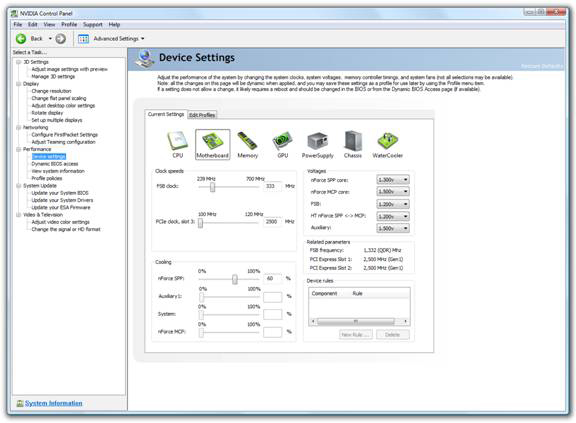
check and make sure both PCI-e slots are running at 5000mhz.... alot of times, 1 of the slots will run at 2500mhz as default.

just as a reference.. my 780i mobo, sli ready, runs the 3rd slot at 2500mhz and must be manually adjusted to 5000mhz. If I run the 3rd slot at 2500mhz, I run an average fps in BC2 of 45-65fps. With the 3rd slot set to 5000mhz, my average jumps to 75-100fps. If you have an OC capable mobo, try adjusting the slot speed.

note: I am running 2 9800GTX cards Non-SLI.
 
Last edited:
I do not see this option in my bios and my mobo is very OC capable. Basic board, not the best but sure does the job.
 
that ability is under the "performance" tab of the nVidia software -- open the "Nvidia control panel
 
Last edited:
Sorry, not seeing this option. Maybe having both cards installed would enable the option... If you dont mind, could you please post a screen shot of what i should be seeing?

Thanks a mill SP
 
I added you in Steam friends.. accept the invite and we can get this sorted out for you.

this screen shot shows a portion of the performance software.. it will allow the user to change pretty much any setting in real time. Take notice of the PCI_e clock , default value is 2500mhz... useing the software, we can clock that to 5000mhz and get you performance where it should be.

perf_group_control_panel.jpg


though there should be an option in your BIOS aswell... we'll get you fixed up right.
 
Last edited:
Thanks Silent Predator, you cured my sick machine. shes feeling much much better now. VERY WELL APPRECIATED .
 

Latest posts

Back
Top