


FIXING YOUR RATES
Alright, since I'm new to this server I might as well start off with a tutorial.
Are you have a problem with Lag spikes or ping? Are you getting the the "warping" effect where you walk a couple steps and "warp" back a couple steps? Fear not, TekBubs is here! (keep in mind I'm not a professional, I'm only doing this to help people who have no idea about rate)
Console Commands:
Here are some of the basic console commands to improving your rates.
cl_updaterate 101
cl_cmdrate 101
rate 20000
If you are still experiencing choke issues lower your updaterate by 30.
NOTE: The above commands are to fix choke rates and ping rates.
How to find your rates:
(I know, this should be first but I'm lazy). This is for people who want to find their rates.
Alright, start off by going to the console, and typing net_graph 3, some text and numbers should appear at the bottom right hand corner of your screen, it should look like this
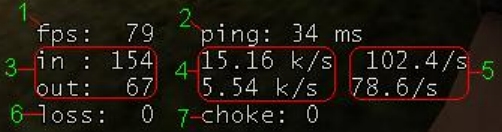
A decent choke rate should be about 0-2, up to 5 isn't that bad but once you start getting high you will experience a type of spike lag that gets really annoying.
A decent FPS rate is about 50, however if you average 25+ you're ok, all source needs is 25. (I'll be posting a tutorial on how to improve your FPS.)
A decent ping rate is anything between 15-70, anything lower than 10 usually means you have messed up rates and anything higher means 1. you're either far away from the server or 2. you have a bad internet connection.
Ill update this topic soon, it's not finished.



