



- Joined
- May 9, 2010
- Messages
- 1,281
Cleaning PC PSU, anyone else ever done this? Step by Step included.
For the past few weeks I have noticed that my PSU has been blowing out hotter air than I was comfortable with. I run a 750w PSU, so I know its going to produce some heat during its operation, but this was well above and beyond. I decided to take the PSU apart and clean it. When I opened the case, the first thing I noticed was DUST and lots of it. Now, I regularly blow my case out with compressed air, however, it seems this does NOT get the PSU even remotely clean. I decided to use a fast drying electrical cleaner to bust this DUST. It has worked perfectly. The PSU outgoing air temp has dropped by atleast 10-15 degrees C.
Please note - do NOT power the PSU until it is completely dry!!! I cant stress that enough. It only takes about 8-10 minutes for the cleaner to completely dry.
Note: any Electrical cleaner will work, as long as it is Fast Drying. Here is the product I use(found at automotive parts stores):

step by step: note, this will work with most stock and all aftermarket PSU's
This entire process only takes about 15-20 minutes.
0.5) turn off PC, let PSU cool for a few minutes
1) turn off PSU at switch and unplug/push and hold power button for 15-30 seconds to vent any residual charge
2) unplug /disconnect all cables, marking them prior to removal if need be to aid in re-assembly.
3) unscrew PSU retaining screws and remove PSU.
4) cut slit in pesky "do not tamper, blah, blah, blah" sticker(this sticker has about as much use as a Matress tag)
5) unscrew PSU case screws and carefully(!!) remove cover
6) lay flat on cardboard or whatever and spray liberaly ALL surfaces.. give it a bath
7) let sit a few minutes, flip PSU onto its side, repeat liberal spraying until all dirt/dust is flushed away
8) let sit 5 minutes to allow cleaner to dry
9) reassemble PSU case
10) wipe case of any remaining liquid, turn PSU over and make sure no liquid is still present, blow into the case if need be to speed up drying.
11) re-install in PC case/re-attach all cables/ plug in PSU power cord/ turn on switch and boot your PC
12) have a drink and enjoy lower PSU aswell as PC case temps.
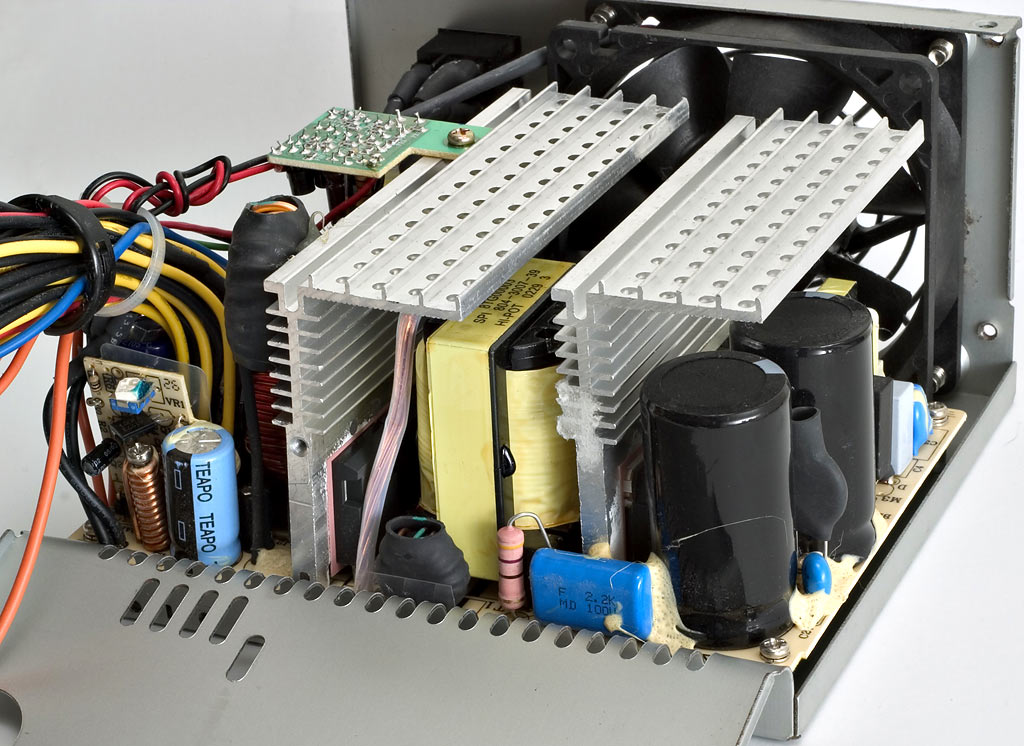
this is what is inside your PSU - note, this is not my PSU, just a graphical representation so you know whats inside.
For the past few weeks I have noticed that my PSU has been blowing out hotter air than I was comfortable with. I run a 750w PSU, so I know its going to produce some heat during its operation, but this was well above and beyond. I decided to take the PSU apart and clean it. When I opened the case, the first thing I noticed was DUST and lots of it. Now, I regularly blow my case out with compressed air, however, it seems this does NOT get the PSU even remotely clean. I decided to use a fast drying electrical cleaner to bust this DUST. It has worked perfectly. The PSU outgoing air temp has dropped by atleast 10-15 degrees C.
Please note - do NOT power the PSU until it is completely dry!!! I cant stress that enough. It only takes about 8-10 minutes for the cleaner to completely dry.
Note: any Electrical cleaner will work, as long as it is Fast Drying. Here is the product I use(found at automotive parts stores):
step by step: note, this will work with most stock and all aftermarket PSU's
This entire process only takes about 15-20 minutes.
0.5) turn off PC, let PSU cool for a few minutes
1) turn off PSU at switch and unplug/push and hold power button for 15-30 seconds to vent any residual charge
2) unplug /disconnect all cables, marking them prior to removal if need be to aid in re-assembly.
3) unscrew PSU retaining screws and remove PSU.
4) cut slit in pesky "do not tamper, blah, blah, blah" sticker(this sticker has about as much use as a Matress tag)
5) unscrew PSU case screws and carefully(!!) remove cover
6) lay flat on cardboard or whatever and spray liberaly ALL surfaces.. give it a bath
7) let sit a few minutes, flip PSU onto its side, repeat liberal spraying until all dirt/dust is flushed away
8) let sit 5 minutes to allow cleaner to dry
9) reassemble PSU case
10) wipe case of any remaining liquid, turn PSU over and make sure no liquid is still present, blow into the case if need be to speed up drying.
11) re-install in PC case/re-attach all cables/ plug in PSU power cord/ turn on switch and boot your PC
12) have a drink and enjoy lower PSU aswell as PC case temps.
this is what is inside your PSU - note, this is not my PSU, just a graphical representation so you know whats inside.
Last edited:






