overclocking question?!?

shotgun king

Rookie
Joined
Apr 11, 2009
Messages
86
ok i have a AMD Athlon II X3 435 processor with an ECS A785GM-A black series motherboard.not sure if it matters or not but i also have a GS8500 Graphics card. i was wondering if i should even worry about overclocking since its all new.y second question is what is the process in overclocking?when it comes to overclocking i guess you could say im a noob.haha
 
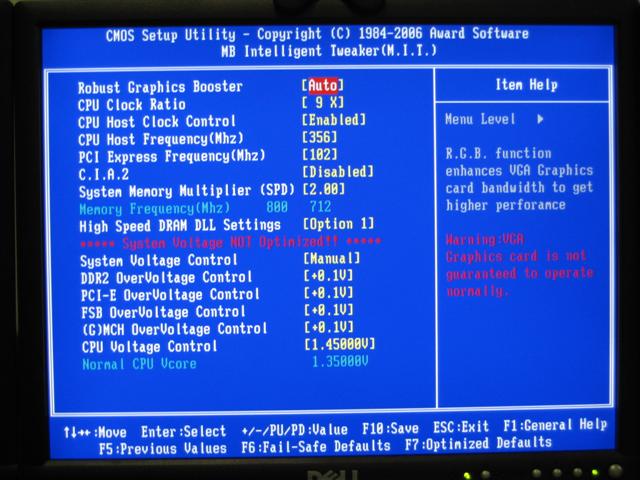
Well you should overclock your CPU by going into your BIOS, you get here by pressing Del or F8 while starting up your computer. Onces your are in your BIOS you need to find something like this:
AMDXP%20E6600%20to%203.2%20ghz%20Overclock%20Bios%20Settings.JPG

You need to change the Mhz, the total amound of GHz is Mhz X Multiplier. For example my CPU is not @ 2.5 Ghz, and i have a multiplier of 11. So the Mhz is 227. (227 x 11 = 2500)

When you found this, overclock in little steps, add 10, see if your CPU keeps working fine, add 10 again the next day. Untill you're happy with the ammound of GHz.

And I where you.... i wouldnt over clock. You can beter get a beter videocard, your CPU is fine, overclocking it won't help much. You will prob won't even notice the difference.

Hope this helped you:)
 
that helps me a great deal.i read some stuff about increasing you voltage and increasing you mhz on your ram it just seamed like a big mess.i think ill hold off a good while before i overclock for the sake of my motherboard and processor.but now that i know how it wont be hard to do.thanks for the help!
 
that helps me a great deal.i read some stuff about increasing you voltage and increasing you mhz on your ram it just seamed like a big mess.i think ill hold off a good while before i overclock for the sake of my motherboard and processor.but now that i know how it wont be hard to do.thanks for the help!

Np, you dont need an overclock exually. You won't see any diffence becaus anyway becaus you'll need a beter videocard first.
 
Actually, overclocking is a little harder than that. Every CPU is different, you do have to mess with voltages a lot and run stress tests to make sure it wont crash/overheat. Also, you have to deal with ram multipliers and other things.

I wouldn't say he wouldn't notice a difference, going from 2.4 to 3.0 on my q6600 netted about a 20 fps difference in source games because of how heavily CPU based they are. But he should only overclock once he's read a true guide and understands what he's doing before he goes and just starts messing around in the bios.

Although it might not be worth it if your using a stock cooler, unless your using certain cpus. Not sure so sure about the stock 435.
 
Actually, overclocking is a little harder than that. Every CPU is different, you do have to mess with voltages a lot and run stress tests to make sure it wont crash/overheat. Also, you have to deal with ram multipliers and other things.

I wouldn't say he wouldn't notice a difference, going from 2.4 to 3.0 on my q6600 netted about a 20 fps difference in source games because of how heavily CPU based they are. But he should only overclock once he's read a true guide and understands what he's doing before he goes and just starts messing around in the bios.

Although it might not be worth it if your using a stock cooler, unless your using certain cpus. Not sure so sure about the stock 435.

I did nothing with voltages, and if he doesnt want to overclock his ram. Its pretty simple.
And I think he won't notice any difference becaus his GPU isnt that good. A new GPU would help way more increasing his FPS.
 
tbh, you shouldn't need to worry about overclocking just yet. I, oddly enough, have a 435 and I have a a780gm-a ultra black series mobo, which is somewhat like the 785. I don't have as much ram as you, but I still get decent performance. Like BlackBird said, if you're looking for performance, a new GPU would help way more in increasing your FPS.
 
1.raise system multi to about 250 if you can

2.Keep raising it (in increments of 10MHz) from there until system is unstable.

3.once it is unstable, leave it there, increase voltage by the smallest amount, do this until it is stable.

4. repeat step 2

5. repeat step 3

6. run a stress test overnight. (like prime95)
 
1.raise system multi to about 250 if you can

2.Keep raising it (in increments of 10MHz) from there until system is unstable.

3.once it is unstable, leave it there, increase voltage by the smallest amount, do this until it is stable.

4. repeat step 2

5. repeat step 3

6. run a stress test overnight. (like prime95)


Add this to step one,

http://www.alcpu.com/CoreTemp/

Always keep an eye on your temperatures.
 
1.raise system multi to about 250 if you can

2.Keep raising it (in increments of 10MHz) from there until system is unstable.

3.once it is unstable, leave it there, increase voltage by the smallest amount, do this until it is stable.

4. repeat step 2

5. repeat step 3

6. run a stress test overnight. (like prime95)

Add this to step one,

http://www.alcpu.com/CoreTemp/

Always keep an eye on your temperatures.

Oh yea forgot something, make sure your ram stays below 1066MHz. Raising the system multi will raise the ram speed, knock down the ram multi untill it is at or under 1066MHz
 
Actually get LinX. It's better than Prime95. But the only real way to test stability is to play a game for 6+ hours straight. An overclock could be bench stable, but not actually stable.
 
Yeah, but if you pass LinX, then you can definitely pass P95.
 
Idk if someone posted this already, but if you have an ATI GPU you can just get the Catalyst Control Center and overclock from there, it's extremely easy, and it can take care of the fan and keep the temp. at a good rate.
 

Latest posts

Back
Top