cl_interp .1

Rufio

Active Member
Joined
Mar 23, 2013
Messages
263
Not sure what's up but my hitreg on the new servers has regressed. I enjoyed about a week of solid hitreg and now it's back to the same old show. It's probably a conspiracy XD

This is probably more annoying to me than anyone else, but for those of you who are in the same boat, try cl_interp .1 when using the rifles. I've noticed slightly better registration with cl_interp .1 vs my traditional cl_interp .033.

Hope this helps, if not :P.
 
Yes, since I spoke with bear, I have been using 0.1 and it has been working out for me. Cheers!
 
Servers have been all over the place, on my end.

GameME has my position as being from Bristol (Wales)! And not Dundee, Scotland!

That, and the servers themselves, showing on the "world map" are no-where near Dallas! And I know my US Geography! :thumbup1:

Either way, give it a while, should be alright.... I hope. :huh:
 
Ideally you wouldn't interpolate anything as data should transfer uninterrupted from your PC to the server - but that simply isn't the case. With interpolation you sacrifice 'hit box to player model alignment' (what you see isn't really what you should be aiming at) but this interpolation delay allows you to attain more hit registration server side when you actually hit the hit box. Previously I would use zero interp (or the minimum on the server) but I cannot tell you how many times I'd hit a player model (blood splatter and all) and there would be no registration.

Bottom line, with the current state of the servers, cl_interp .1 seems to be the best interp to use for hit registration if you are using a rifle. Especially with the Garand as it seems my second shot never registers.
 
Last edited:
try messing with "cl_interp_ratio" and i use interp 0.01

interp_ratio does not necessarily determine interpolation period length

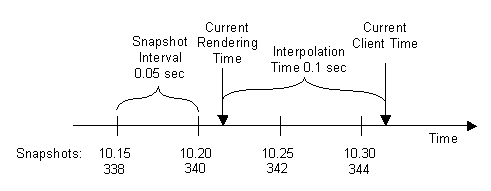
Interpolation.gif


The relation between snapshot rate and view interpolation delay is the following:

interpolation period = max( cl_interp, cl_interp_ratio / cl_updaterate )
"Max(x,y)" means "whichever of these is higher". In other words, your interpolation ratio will be the higher of these two values:
1. cl_interp #
2. cl_interp_ratio # / cl_updaterate #

Therefore, interp ratio may or may not affect the interpolation period. For example, if your interp value is set to cl_interp .033 and your updaterate is set to the server's tickrate (cl_updaterate 66), and you set cl_inter_ratio 1 then your interpolation period would be:

= max (.033, 1/66) or =max (.033, .01515), therefore your interpolation period would still be .033 or 33 ms, regardless of your interp_ratio value. This also holds if you set interp_ratio 2.

Its best to set cl_interp_ratio 0 that way you can control your interpolation period directly with the cl_interp command (unless you want to needlessly do division and then compare that value to your interp value).

Sources:
https://developer.valvesoftware.com/wiki/Source_Multiplayer_Networking#Entity_interpolation
https://developer.valvesoftware.com/wiki/Interpolation
 
Last edited:
I will try this, because that is me. I end a life with 1 kill and 10 80's because the second shot never regs.

Lol same! I was thinking about hosting a DAMAGE competition where people sent me console log files and I would post the players that do the most damage to the enemy team - considering DOD:S doesn't track assists.

It was perfect for like three days when the servers switched but now its back to the same old shenanigans. I have better reg on almost every other server but I don't want to play with a high friciton setting (the ranger battalion servers) or listen to a bunch of politics in the chat (every other active server). Our servers have the best players; just wish I could get my garand working!
 
Last edited:
interp_ratio does not necessarily determine interpolation period length

Interpolation.gif


The relation between snapshot rate and view interpolation delay is the following:

interpolation period = max( cl_interp, cl_interp_ratio / cl_updaterate )
"Max(x,y)" means "whichever of these is higher". In other words, your interpolation ratio will be the higher of these two values:
1. cl_interp #
2. cl_interp_ratio # / cl_updaterate #

Therefore, interp ratio may or may not affect the interpolation period. For example, if your interp value is set to cl_interp .033 and your updaterate is set to the server's tickrate (cl_updaterate 66), and you set cl_inter_ratio 1 then your interpolation period would be:

= max (.033, 1/66) or =max (.033, .01515), therefore your interpolation period would still be .033 or 33 ms, regardless of your interp_ratio value. This also holds if you set interp_ratio 2.

Its best to set cl_interp_ratio 0 that way you can control your interpolation period directly with the cl_interp command (unless you want to needlessly do division and then compare that value to your interp value).

Sources:
https://developer.valvesoftware.com/wiki/Source_Multiplayer_Networking#Entity_interpolation
https://developer.valvesoftware.com/wiki/Interpolation
Thank you Rufio sir. I will look into it more :}
 
Its best to set cl_interp_ratio 0 that way you can control your interpolation period directly with the cl_interp command (unless you want to needlessly do division and then compare that value to your interp value).


cl_interp_ratio 1 is the best it can be. A ratio of 1 is unity. Thus your interp will be based on one tick on the server. A 1:1 ratio. A cl_interp_ratio 0 is the default setting of cl_interp_ratio 1.

These are the optimal settings for connections with no packet loss:

cl_interp 0

cl_interp_ratio 1

cl_interpolate 1

These are the optimal settings for connections with very little packet loss:

cl_interp 0

cl_interp_ratio 2 (uses two ticks in case one is lost)

cl_interpolate 1
 
Last edited:
How do you know if you are a low or no packet loss connection?

If you see jerkiness in game and the play is not smooth you know you are losing packets.

The sure way to always know though is to include:

net_graph 1

in your autoexec.bat

As long as no packets are being lost there is not reason to have your cl_interp_ratio set to anything but 1. Increase to 2 and you will get two packets for each tick in exchange for some latency lost but game will run smooth.
 
cl_interp_ratio 1 is the best it can be.

Again, this is not necessarily true. Did you read the source articles that I included at the bottom of my post that explains the determinants of interpolation period? I briefly summarized this in my post. Interpolation period is determined by the max value of cl_interp OR cl_interp_ratio divided by the server tick rate.

These are the optimal settings for connections with no packet loss:

cl_interp 0

cl_interp_ratio 1

cl_interpolate 1

In this example the interpolation period would simply be 15.15ms (1 / 66 tick). The command 'cl_interp 0' would not be relevant because 15.15 is greater than 0. Again, you simply need to set cl_interp_ratio 0, therefore you can directly control the amount of interpolation you want with the cl_interp command. Additionally, our server does not allow interp values lower than 10 ms (sadly :*( ). Ideally we would force all players to have the same interp to prevent players with high interpolation values and high pings from having an advantage while moving.

The following commands are used to reduce 'client input to server' lag that might help reduce the "jitter" effect while running a low interpolation setting:
cl_predict "1"
cl_smooth "1"
cl_smoothtime "0.1"
 
Last edited:
I have been noticing more players being jittery from my field of view and my view somewhat slug up at moments. Gonna have to mess with this some more.
 
. Again, you simply need to set cl_interp_ratio 0, ]

There is no cl_interp_ratio 0. If you set it to 0 it will default to:

cl_interp_ratio 1

The cl_interp_ratio set at 1 simply means you will use one server tick per one client tick hence a 1:1 ratio. That is the best one can achieve.
 
From what I have seen the rates are automatic to a point that you can't change the commands. I guess it is serverside? Because changing interp to '0.01' to anything doesnt change it.
 
If it is bad enough that it effects your gameplay try adding to your autoexec.bat:

cl_interp_ratio 2
 
Last edited:

Latest posts

Back
Top