Ventrilo Trouble

MontyPilon

Active Member
=(eGO)=
Joined
Oct 25, 2009
Messages
339
This has been happening for a fair while now. I used to use Ventrilo all the time back in my Call of Duty days for mixes/scrims etc. I updated to windows 7 and it still worked fine without any trouble But for some reason When i bind my hot key to talk It does not detect that button being pressed. I tried Setting my Key to a different key i even tried them all But still it would not work. So i thought id reinstall the program and try again But it hasent changed a thing. I would be very Grateful if you could help me.

Thx, MontyPilon:facewall:
 
Sometimes windows will not detect an input device. Go to your recording devices. Set your default to the mic that you will be using. Then go back and set it in ventrilo.

I've had it happen to me before. It is always a sound in but and not a keyboard issue. WIndows 7's audio stuff was rewritten so its a little different.
 
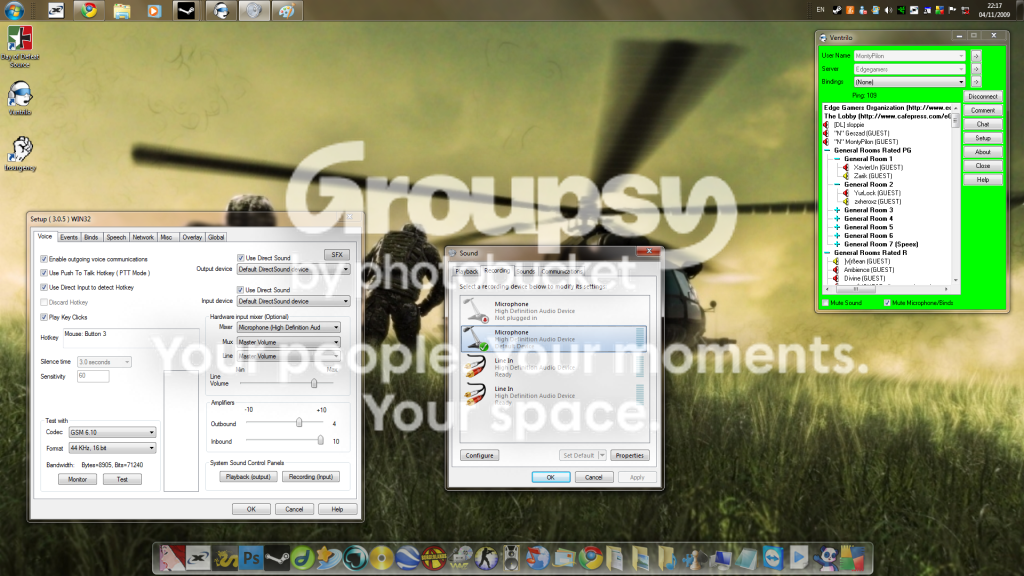
I Do not use a driver for my keyboard, But i do for my mouse. I tried to do what you said i dont know if ive done it right but here is a screenshot of it.
SS1.png


I am sorry for the size of the image.
 
In the output device box is there anything you can change it to besides Default DirectSound device?
 
Monty, everyone says that ventrilo wont work on windows 7 and that pisses me off. I keep finding thread in other websites saying that ventrilo in windows 7 have so much issues. Monty, your not the only ones that have issues in windows 7.
 
From looking at the image, it looks like your ventrilo is bound to "Mouse: Button 3" - your mouse. Have you tried only your keyboard? Or have you tried your mouse as well?
 
I've tried on Mouse and keyboard no change, and yes there is more options in the default box in ventrilo. Windows 7 did work with ventrilo when i first updated for about a month but then it suddenly messed up. Yes there maybe bugs with windows 7, but im sure there is a way to fix it.
 
Yeah vent works on windows 7 when you have the vent window actively up, but when playing other games it doesn't work.
 
When my ventrilo did work, It worked fine in games but Now it wont work all together
 
I would read through anything relevant here.

Once you figure it out, post your solution here to help the other people with issues!
 
I had the same issue & to get it to work I had to run it in compatability mode for XP sp3 & run as admin.

Compatability mode: Right click the icon & go to properties. In the window that pops up there will be a "Compatibility" tab, click it. At the top is a check box called "Run this program in compatability mode for:" check that & then in the dropdown bow under that select XP.

Run as Admin: On the same page above theres a checkbox at the bottom called "Run this program as an administrator" check it & hit apply.

Hope that helps.
 
Can you talk while there is no game running or if Vent is the active window? If so then when you start up Vent try running as administrator. I used to have to do this to play WoW and Warhammer when I reinstalled Vista.
 
It does not let me talk even when im not playing a game. And i tried running as an administrator but it still did not change. I've tried everything to messing with the settings to reinstalling the program, But still no change. Any help would be very much appreciated.
 
Back
Top