




- Joined
- Feb 13, 2010
- Messages
- 1,223
Ok no offense I'm tired of being killed by people with low rates and murder me because there jump 80 feet across that map and me going like whaaa? so I put this together may be another thread/post about it but this I will go into detail about fixing rates.
The easiest way is to download and read the instructions on Casey's Configs.
To download: http://www.pureoverclock.com/download-3.html (Verified link)
Another way if you do not want to download anything do these few steps and you will be playing better in no time.
What are Rates?
Rates in CounterStrike Source and all other Valve games such as CounterStrike 1.6 and Day of Defeat use client side CVAR's which adjust internet connection settings. By default, the game gives you low rates and leaves out many important CVARs that will help your shots hit the target much better. The rates I will give you work best on 100tick servers.
People refer to your bullets hitting the target as registration. Lots of servers have a low tick rate which leads to bad shot registration.
What is a tick rate?
A tick rate is a server side setting that is very important for good gameplay. The optimal tickrate for a server is 100tick. 100tick servers are usually more expensive to rent and are more strenuous on the server itself. Other common tickrates are 33 and 66.
What are some common client side rate CVARs?
cl_updaterate - Default setting from valve is 20. This value is the number of packets per second of updates that you are requesting from the server. The best setting for this is 101.
cl_cmdrate - Default setting from valve is 30. This value is the number of command packets sent to the server every second. The best setting for this is 101.
rate - Default setting from valve is 10000. This value is the maximum bytes per second that the host can receive data. The best setting for this is 25000.
What are some shot registration CVARs?
cl_interpolate - This setting interpolates models on the screen. This is used for smooth gameplay.
cl_interp - This setting interpolates objects positions starting seconds in the past (the value given).
What should I do about this?
If you commonly play on 100tick servers, add these CVARs to your config.cfg file located here:
C:\Program Files\Steam\SteamApps\steamusernamehere\counter-strike source\cstrike\cfg\config.cfg
Shot registration:
cl_cmdrate 101
cl_updaterate 101
rate 25000
cl_cmdbackup 2
cl_interp 0.01
cl_interp_all 0
cl_interpolate 1
cl_lagcompensation 1
cl_lagcomp_errorcheck 1
cl_smooth 1
cl_smoothtime 0.01
cl_predictweapons "1"
cl_pred_optimize "2"
sv_unlag "1"
net_maxfragments "1280"
Violence (See the blood from hits easier)
violence_ablood 1
violence_agibs 1
violence_hblood 1
violence_hgibs 1
Another CVAR I like is ( cl_downloadfilter "nosounds" ) which allows you to never download sounds from servers.
If you have trouble with CSS FPS then try:
mat_picmip 2 (Can go up to 4 which decreases image quality as you go up. 0 is best, 4 is worst)
mat_dxlevel 70 (Uses directx7 and will greatly increase FPS with minor image quality loss/bugs. Illegal in CAL)
mat_dxlevel 80 (Directx8.0)
mat_dxlevel 81 (Directx8.1)
Readin Netgraph 3 In-Game
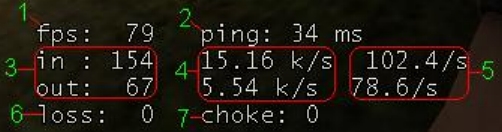
1. FPS- How many frames per second your graphics card is doing
2. Ping- Round trip time from your computer to the server and back
3. Data - How many TCP/IP packets youre sending (you dont need to know this)
4. kilobits per second- how much actual data youre sending in and out (not needed)
5.How many times per second your computer updates your players position on the server (out -- the bottom one)
How many times per second the server sends your computer players positions (in -- the top one)
6. Loss
7. Choke
The easiest way is to download and read the instructions on Casey's Configs.
To download: http://www.pureoverclock.com/download-3.html (Verified link)
Another way if you do not want to download anything do these few steps and you will be playing better in no time.
What are Rates?
Rates in CounterStrike Source and all other Valve games such as CounterStrike 1.6 and Day of Defeat use client side CVAR's which adjust internet connection settings. By default, the game gives you low rates and leaves out many important CVARs that will help your shots hit the target much better. The rates I will give you work best on 100tick servers.
People refer to your bullets hitting the target as registration. Lots of servers have a low tick rate which leads to bad shot registration.
What is a tick rate?
A tick rate is a server side setting that is very important for good gameplay. The optimal tickrate for a server is 100tick. 100tick servers are usually more expensive to rent and are more strenuous on the server itself. Other common tickrates are 33 and 66.
What are some common client side rate CVARs?
cl_updaterate - Default setting from valve is 20. This value is the number of packets per second of updates that you are requesting from the server. The best setting for this is 101.
cl_cmdrate - Default setting from valve is 30. This value is the number of command packets sent to the server every second. The best setting for this is 101.
rate - Default setting from valve is 10000. This value is the maximum bytes per second that the host can receive data. The best setting for this is 25000.
What are some shot registration CVARs?
cl_interpolate - This setting interpolates models on the screen. This is used for smooth gameplay.
cl_interp - This setting interpolates objects positions starting seconds in the past (the value given).
What should I do about this?
If you commonly play on 100tick servers, add these CVARs to your config.cfg file located here:
C:\Program Files\Steam\SteamApps\steamusernamehere\counter-strike source\cstrike\cfg\config.cfg
Shot registration:
cl_cmdrate 101
cl_updaterate 101
rate 25000
cl_cmdbackup 2
cl_interp 0.01
cl_interp_all 0
cl_interpolate 1
cl_lagcompensation 1
cl_lagcomp_errorcheck 1
cl_smooth 1
cl_smoothtime 0.01
cl_predictweapons "1"
cl_pred_optimize "2"
sv_unlag "1"
net_maxfragments "1280"
Violence (See the blood from hits easier)
violence_ablood 1
violence_agibs 1
violence_hblood 1
violence_hgibs 1
Another CVAR I like is ( cl_downloadfilter "nosounds" ) which allows you to never download sounds from servers.
If you have trouble with CSS FPS then try:
mat_picmip 2 (Can go up to 4 which decreases image quality as you go up. 0 is best, 4 is worst)
mat_dxlevel 70 (Uses directx7 and will greatly increase FPS with minor image quality loss/bugs. Illegal in CAL)
mat_dxlevel 80 (Directx8.0)
mat_dxlevel 81 (Directx8.1)
Readin Netgraph 3 In-Game
1. FPS- How many frames per second your graphics card is doing
2. Ping- Round trip time from your computer to the server and back
3. Data - How many TCP/IP packets youre sending (you dont need to know this)
4. kilobits per second- how much actual data youre sending in and out (not needed)
5.How many times per second your computer updates your players position on the server (out -- the bottom one)
How many times per second the server sends your computer players positions (in -- the top one)
6. Loss
7. Choke
Last edited:








