Bad Company 2 Performance Guide

How do you play it in a windowed mode though? I have yet to figure it out and it would be very helpful
 
i need some help with my BF2, i just got the game, and i've tried playing around with the setting's to fit my computer, but i dont know, i can't play it cause at the start im extremly laggy and i can barely see anything :( please help?

And also, i connected the BF2 to my computer, but i dont know how to connect it to my steam :(
 
as to the people wanting to play in windowed mode, it's a pain to drive/use any vehicle/mounted gun due to the fact there's no mouselock on the windowed mode. The graphics will alter themselves based on varying things throughout the system, i suggest a forced setting through catalyst or nvidia's control panel to "fix" this problem (the lighthouse in valpariso will ALWAYS be dark in windowed mode).

it does significantly improve performance though at lower settings and you can alt-tab (OMG!)...
 
Can you get in trouble for editing some of these settings? For example, FOV would give you an advantage over others in MP.
 
No, you do not get into trouble, the game has a limiting value on FOV actually to prevent 180+ viewing settings. As for the rest of the things, the only other questionable ones are in the game options menus, so i'd imagine it's not too terribly bad to adjust them :)

Renderaheadlimit could be abused, but I've tested in empty servers to see how much different things get with that at various settings and the difference isn't very notable.

I suppose there are a few things to be tweaked to give optimal performance in regards to your specific playstyle; but that's hardly an advantage over others and more or less just a comfortable setting for you to play in. Changing the FOV does cause you to load more on your screen at once however, and sometimes it's harder to aim when in close-quarters; but these are VERY VERY minor problems and you get used to them almost instantly.
 
This is some good work! I always wanted to change my FOV but never knew how. Thanks :)
 
Thanks a lot for the guide, the first thing I did when I got the game was mess with the settings.ini it's like a habit, I always do this with every game regardless of whether or not I lag.
 
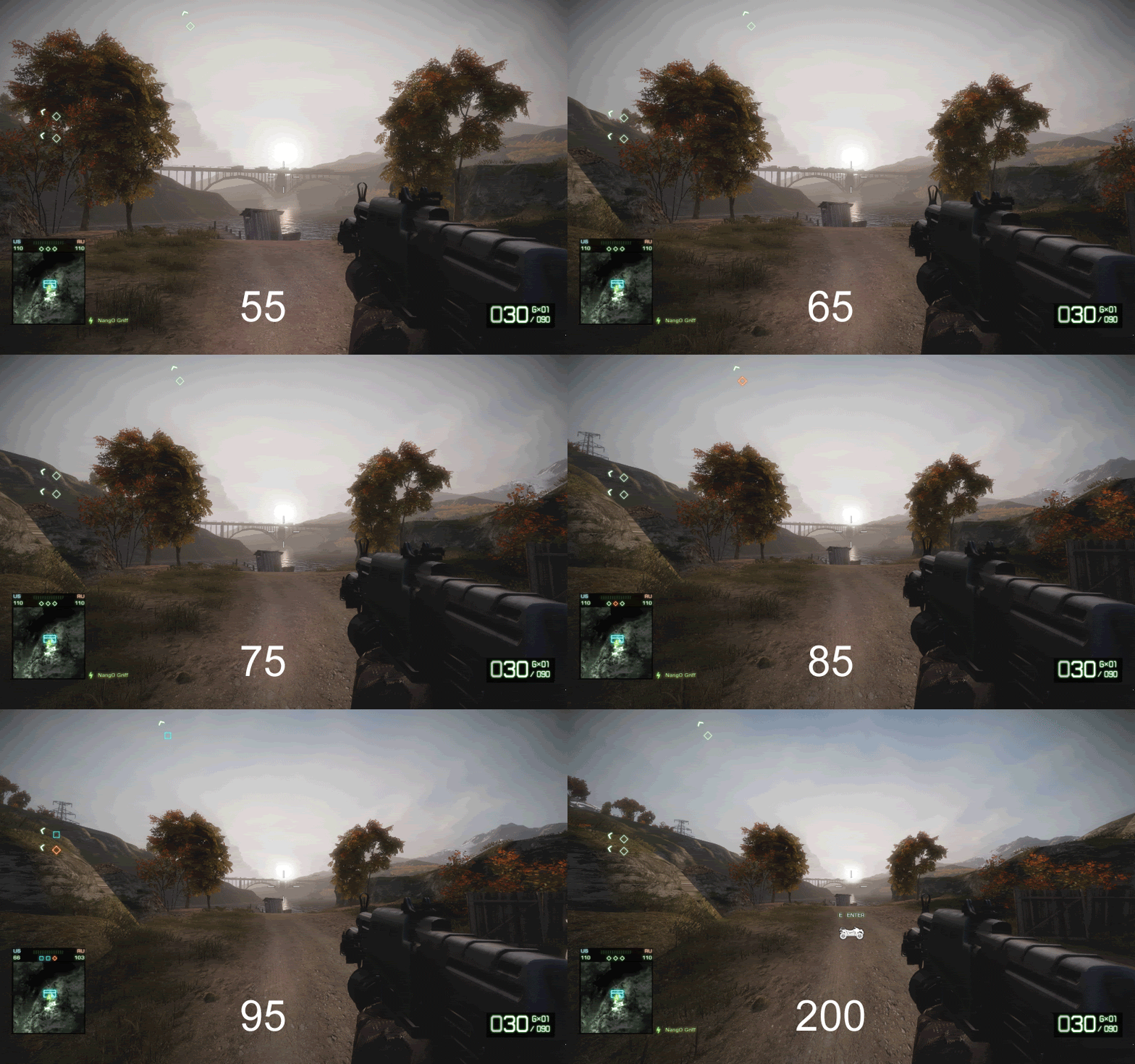
This picture like above shows the fov settings but it goes all the way to 200

15312cc7.gif
 
Good stuff, but something important to note is that this game drains a lot of CPU resources for sound. You can get a significant performance increase by changing your sound setting from "Default(HIFI)" to "Headphones."

For an even greater performance boost change the setting to"War Tapes." This is basically just a much lower sound quality which gives a big boost to performance. It does sort of make the game sound a bit old (probably the reason for the name) but it's still pretty good. I don't really even notice it anymore.

 
For an even greater performance boost change the setting to"War Tapes." This is basically just a much lower sound quality which gives a big boost to performance. It does sort of make the game sound a bit old (probably the reason for the name) but it's still pretty good. I don't really even notice it anymore.

Actually thats entirely incorrect. War Tapes is a much higher quality sound, it uses the raw recordings of weapons fire, footsteps ect that they used for the game. The files are much larger and play at a higher bitrate than the HiFi setting so it uses much more CPU processing power than other settings and its designed for 5.1 audio, so if you dont have it dont use it.
 
That's interesting, I get a significant increase in frame rate when I switch to War Tapes. And the sound quality seems to go down for me....at lease I think it sounds worse; kind of scratchy and distorted sounding, almost like having a heavy bass line on blown out speakers.....maybe it's just me.

At the very least, switching to Headphones should help somewhat.
 
Last edited:
Back
Top