Screen goes blue

Mr.Smiley

Forum Fanatic
Joined
Jul 4, 2007
Messages
973
Hi, I have a 17" e-machines flat screen CRT Tube monitor. I have a 256mb graphics carb with a ATI 9250(i think) chipset. Recently my screen will start to turn shades of blue. If I slam my fist on my desk, it will correct itself. It will go back and forth between the normal color and the blue shades. It varies. Sometimes it happens almost constantly and sometimes it will go for awhile and not do it. The tower is not overheating. I have a thermostat in my room and keep it around 60 degrees. I like to sleep under lots of blankets at night! I am starting to get annoyed with it. I really don't want to spend lots of money, especially right now(think Christmas presents). Any and all help will be appreciated.

=(eGO)= Mr.Smiley -TR-
 
Make sure your moniter is plugged all the way into the back of your computer.. sometimes when mine gets unplugged a little bit it wil do this
 
Only three things I can suggest. (and a half)

1: Check the video cable both to the CRT and especially to the video card. If the cable is loose and only half the pins make contact then you might be dropping out the colors pins Except for blue. Hitting the desk may wiggle the cable back into place. Play with is and watch the screen, it could be loose but the card itself may have a loose connector.

2: does the problem go away when you degause your monitor? Often times the static charge in the tube may result in funny colors - although in my case its always pink but i guess it could be blue too.

3: Buy a new monitor because its going dead. If 1 and 2 dont work it is almost cirtianly the tube getting old and that just happens sometimes. Replacement is the option.

(1/2): The video card is soo old that i would seriosuely strongly consider replacing it fi you play DOD:S. That card is, wow let me count,.. 5 generation old. Yikes.
 
I had this problem not too long ago. Now the screen does not turn blue anymore but I lag terribly at times. My video card is way out of date and thats my problem.
 
Is there a good 256mb card for around $100? Right now, I need a sound card to support my 5.1 surround sound and possibly a new monitor and graphics card. That is quite a bit of outlay and I'm not sure that I can afford that.

One question I did have, is there anything bad about using an old case and changing the interior hardware. I probably need to start updating some of my hardware, but am not a techy guy. I can remove/install hardware without a problem. Just not familiar with doing some of the setup stuff.

Also, what should I expect to put out for a new monitor. I don't like wide screens for some reason, so I would like to go with the traditional square. Also, I am happy with my 17". Yeah, a 19"+ would be cool, but not really necessary right now. Is 8ms time bad? I mean, it isn't the best, but it is probably better than what I have. Sorry if this is kinda jumbled. I'm tired and not really thinking clearly right now.
 
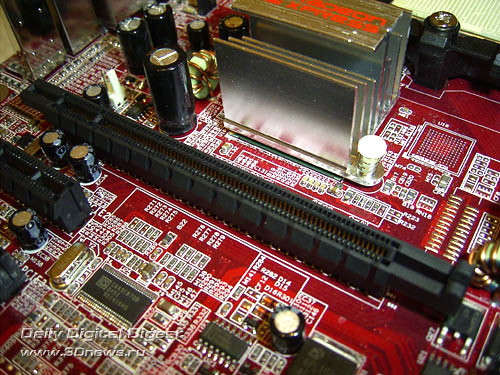
I think its pci/e. I know it has the extra little connector tab thingy. Hope this answers the question!!
 
No, its doesnt really answer the question, but you tried so thats good. Um,... lets see. It really cna be hard to tell but tis MIGHT help: DONT PAY ATTENTION TO COLOR

pcix16.jpg

The above is PCIx 16

The Below is AGP
agp.jpg


As far as reccomending a card for you, I make no reccomendations without seeing system specs first - and you shouldnt listen to anyone who does otherwise. It's always nice to hold off as long as possible and then throw a ton at your comp than to do it slow <-- my opinion here's why---> Because is done slowly you have a hunk of junk just keeping good enough from being soo crappy that you need a new one but never 'good' otherwise if you do it all at once you start off with a nice computer, own a nice one for a while and by the time its not 'good' your no worse off then where you started had you done it slow. So just save up if you can.

You can use your old case to save money when upgrading a PC as long as you keep track of its size and dont keep a miniPC and put a fullsize MB in it because it wont fit :p. A few other things but nothing to mention, if you liek it keep it - although you may or may not have to upgrade the power supply with a new build so keeping a case itself only saves $50 (which can be alot).

Square is fine, some people are all about being square - heh but anyways, I would reccomend a 19" over 17 even if only because its really going to be like the difference between $5-$20 to get the 19 and its more cost effective. Once you have it (19) you realise how much you always wanted it (just like dual screens).

Is 8ms bad? um,... I dont know how fast can you see? Everyone is different, have different tastes and abilities. 8ms means how fast the screen will be able to update itself, which incase you dont know translates to Hz / frames per second (in a manor of speaking) by taking 1 / 8ms = 1 / .008 = 125Hz - meaning that the monitor has the ability to refresh as fast as 125 times per second.
 
Ok, after opening up my pc, I found that the slot for the graphics card is AGP. My processor is a AMD Sempron 3000+ 1.99 GHz I have 1GB DDR2 RAM with the capability of 2GB RAM. My OS is Windows XP Home SP2. I have a 80GB HDD, partitioned, and a 300W Power Supply.

I know, my pc is a piece of junk, but it works, so far. I don't have a mini tower, so I should be ok. Now by new pc, what do you mean? Buy a new "crate" pc or build one myself? What all is involved with building my own? What would I need to replace? Everything? Now I'm getting bummed out about my pc!! Oh well, my priorities just are different(think $600/month car payment and insurance alone).
 
The video card you get will be limited by your power supply. You cannot get the highest AGP card available as you dont have enough power. If you wanted a nice card then you would need to upgrade the PSU as well. Weird thing is, if you get a nice card your processor wont be able to keep up. Then once you upgrade that - you wont have enough RAM. heheh.

This is because your computer is fairly well balances right now. By upgrading one part then you are instantly creating a bottleneck. This doesnt happen to most people who buy dells because dell usually sell's $300 computers with a $300 video card sell it for $600 and let people wonder why their $600 PC runs like a $300 one whne they have such a nice video card.

Anyways, that doesnt seem to be you. If all you want is to get normal video back then you can get just any old geforce 6200 in AGP but if you save up you can spend about
$40 for PSU
$130 for better dual core processor
$150 for Vcard
$30 for some RAM

and it will be as if you have a whole new computer for $350. to you anyways.
 
Hey, thanks for the info!! I will check into it! Thanks for all the help and info, everybody!!

I know this sounds stupid, but what is the difference between processors that are labeled Brisbane and Windsor?
 
The difference is which architecture core they use. As time progresses, processor companies will rerun simulations of their designs and make slight alterations of them which give small performance increases. It is usually best to get the newest one - which you dont always know which is newer. if you go to www.tomehardware.com and look at their cpu benchmarks they should compare all the latest processors including the many different cores and you should be able to see which is best. But again it often only makes a small difference. It is rare that it makes a large differencee but it happens.
 

Latest posts

Back
Top