
You are using an out of date browser. It may not display this or other websites correctly.
You should upgrade or use an alternative browser.
You should upgrade or use an alternative browser.
Prisoner416 reviews freeware for you! (A series)
- Thread starter Prisoner416
- Start date





- Joined
- Dec 18, 2008
- Messages
- 4,044
It would be mucho win if you reviewed this:
http://www.tunngle.net/en/
maybe a comparison to hamachi
http://www.tunngle.net/en/
maybe a comparison to hamachi


- Joined
- Apr 17, 2009
- Messages
- 1,699
Normal, for us XP users.
For all you XP users who already have the AquaSnap tool I reviewed:
Still kinda bummed out over not having the fancy looking Windows 7 OS?
Wish you could have sexy start-up screens, icons, and more?
Well... now you can! It's the next best thing to upgrading your OS!
It's called the Seven Remix Project!
Here's a teaser (Yes, the photos are from an XP machine):

I used this for a long time until I finally upgraded. It patches everything from system icons to backgrounds to sounds and more.
Download it here: http://niwradsoft.blogspot.com/2010/07/seven-remix-xp-241.html
It also comes in Black and Human (Ubuntu) styles.
http://niwradsoft.blogspot.com/2010/07/seven-remix-xp-241-black-edition.html
http://niwradsoft.blogspot.com/2010/04/human-theme-mod-for-seven-remix-xp.html
Does it make your PC function any better? No, but it'll look a lot nicer, and you can finally chuck that stupid Luna theme to the curb!


- Joined
- Jun 6, 2009
- Messages
- 805
Booo I have Windows 7 :'(
- Joined
- Apr 17, 2009
- Messages
- 1,699
Quick lazy review time, yeah!
Speccy is a program designed to tell you what's in your PC.
Anyone looking for tech support should use this program so we can understand what's in your rig.
http://www.piriform.com/speccy
"Speccy will give you detailed statistics on every piece of hardware in your computer. Including CPU, Motherboard, RAM, Graphics Cards, Hard Disks, Optical Drives, Audio support. Additionally Speccy adds the temperatures of your different components, so you can easily see if there's a problem!"
There are more advanced tools, which I will review next, but this one is enough for a simple help request or finding most of what you need to know.
Speccy is a program designed to tell you what's in your PC.
Anyone looking for tech support should use this program so we can understand what's in your rig.
http://www.piriform.com/speccy
"Speccy will give you detailed statistics on every piece of hardware in your computer. Including CPU, Motherboard, RAM, Graphics Cards, Hard Disks, Optical Drives, Audio support. Additionally Speccy adds the temperatures of your different components, so you can easily see if there's a problem!"
There are more advanced tools, which I will review next, but this one is enough for a simple help request or finding most of what you need to know.
- Joined
- Apr 17, 2009
- Messages
- 1,699
Guest review by the bitter old man who lives in your neighborhood.
Everyone loves music, right? RIGHT?! I remember back in the day we'd crank up the old Victrola and you'd put it on there and you'd hear the HUMSKILLY HUMSKILLY HUM DE LAY. Back when music made sense, mind you.
Most people these days have these new-fangled mp3 player thingdejiggers. I don't know why, the dang things are too small and they have all these buttons and knobs and the menus with the things and the browsing the art... why does it have to be complicated, I just want to put a record on and listen to the soothing sound of "Pretty Kitty Kelly".
But I digress. I was told by Prisoner416 to review these modern contraptions. First, I whacked him over the head with my cane a few times for sassing me.
Now, on the interwebs is this stuff you can put on your mp3 thingy to make it better. Support more types of music and add more features, or something. I don't know.
They call it Rockbox so it must be evil, like the devil's rock and roll.
Prisoner told me he tested it on his Sansa Clip+ and was very very happy. It's a replacement firmware, whatever that is. Adds more capability to the device, like support for custom UI themes, games, calculators, and other FANCY things you modern hooligans seem to need these days. He said it supports most major players, not just the Sansa.
You can get it from http://www.rockbox.org/ but be sure to read all the documentation and such. It's a simple auto-installer and well worth liberating your player with.
NOW GET OFF MY LAWN!
Everyone loves music, right? RIGHT?! I remember back in the day we'd crank up the old Victrola and you'd put it on there and you'd hear the HUMSKILLY HUMSKILLY HUM DE LAY. Back when music made sense, mind you.
Most people these days have these new-fangled mp3 player thingdejiggers. I don't know why, the dang things are too small and they have all these buttons and knobs and the menus with the things and the browsing the art... why does it have to be complicated, I just want to put a record on and listen to the soothing sound of "Pretty Kitty Kelly".
But I digress. I was told by Prisoner416 to review these modern contraptions. First, I whacked him over the head with my cane a few times for sassing me.
Now, on the interwebs is this stuff you can put on your mp3 thingy to make it better. Support more types of music and add more features, or something. I don't know.
They call it Rockbox so it must be evil, like the devil's rock and roll.
Prisoner told me he tested it on his Sansa Clip+ and was very very happy. It's a replacement firmware, whatever that is. Adds more capability to the device, like support for custom UI themes, games, calculators, and other FANCY things you modern hooligans seem to need these days. He said it supports most major players, not just the Sansa.
You can get it from http://www.rockbox.org/ but be sure to read all the documentation and such. It's a simple auto-installer and well worth liberating your player with.
NOW GET OFF MY LAWN!
- Joined
- Apr 17, 2009
- Messages
- 1,699
lol Rockbox bricked my iPod nano -_-
This might please the old man, but know that Rockbox has gone through many major updates so it may be worth another shot.


- Joined
- Jul 2, 2009
- Messages
- 4,155
Quick lazy review time, yeah!
Speccy is a program designed to tell you what's in your PC.
Anyone looking for tech support should use this program so we can understand what's in your rig.
http://www.piriform.com/speccy
"Speccy will give you detailed statistics on every piece of hardware in your computer. Including CPU, Motherboard, RAM, Graphics Cards, Hard Disks, Optical Drives, Audio support. Additionally Speccy adds the temperatures of your different components, so you can easily see if there's a problem!"
There are more advanced tools, which I will review next, but this one is enough for a simple help request or finding most of what you need to know.
Let's see if this gets my stamp of approval. >.>
OMFG. YES. This would help SO much. THANK YOU!!
Last edited:
- Joined
- Dec 18, 2008
- Messages
- 4,044
This might please the old man, but know that Rockbox has gone through many major updates so it may be worth another shot.
This was ~1 week ago.
Has it changed that much in 1 week?
- Joined
- Apr 17, 2009
- Messages
- 1,699
This was ~1 week ago.
Has it changed that much in 1 week?
Well, builds are daily...
- Joined
- Apr 17, 2009
- Messages
- 1,699
Vote for next review.
1. Audio player.
2. Advanced system spec tool, like Speccy but more robust.
3. Hosts file tool (block ads and spyware)
4. Random video game thingy. (It's a secret)
1. Audio player.
2. Advanced system spec tool, like Speccy but more robust.
3. Hosts file tool (block ads and spyware)
4. Random video game thingy. (It's a secret)
- Joined
- Jun 6, 2009
- Messages
- 805
All of them... But do 4 first. 

- Joined
- Sep 26, 2010
- Messages
- 214
You had me at 4...
- Joined
- Apr 17, 2009
- Messages
- 1,699
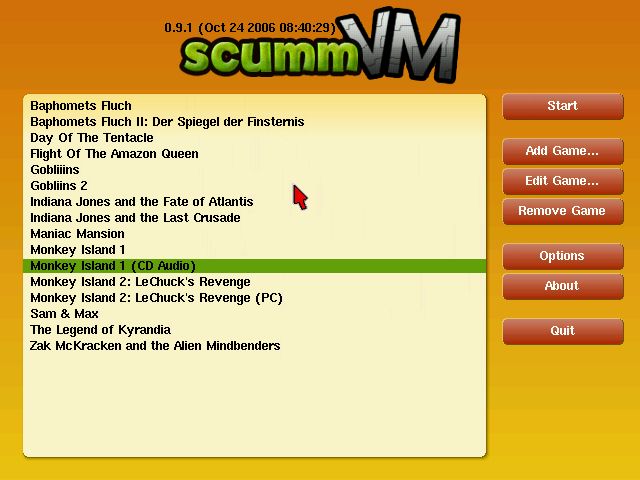
ScummVM is a program which allows you to run certain classic graphical point-and-click adventure games, provided you already have their data files. The clever part about this: ScummVM just replaces the executables shipped with the games, allowing you to play them on systems for which they were never designed!

ScummVM supports many adventure games, including LucasArts SCUMM games (such as Monkey Island 1-3, Day of the Tentacle, Sam & Max...), Sierra's AGI games (such as King's Quest 1-3, Space Quest 1-2, ...), Discworld 1 and 2, Simon the Sorcerer 1 and 2, Beneath A Steel Sky, Lure of the Temptress, Broken Sword 1 and 2, Flight of the Amazon Queen, Gobliiins 1-3, The Legend of Kyrandia 1-3, many of Humongous Entertainment's children's SCUMM games (including Freddi Fish and Putt Putt games) and many more.

Not only can you get a lot of good games for it for free, but almost all the old classics are available as well, if you already own them... or know where to look for them. *coughPleasuredomecough*.
You can get the latest build and free games from http://www.scummvm.org/downloads/
- Joined
- Apr 17, 2009
- Messages
- 1,699
Advanced Users Only!
Most people can do this without a problem, but be careful which lists you use with Hostsman! I use MVPS hosts, hpHosts (Adtracking), and Peter Lowe's Adsevers lists. The full hpHosts lists adds MANY false positives, namely torrent sites. So only use the adtracking one.
Everyone hates ads when surfing the internet, which is why ad-blockers exist. However, they don't actually STOP the connections. They just remove the visible images. Also, there are many sites that exist to hijack data or install malware on your PC. Not very fun.
However, with the Windows Hosts file, you can block the sites themselves from ever connecting to your computer!
Technical information below:
The Hosts file contains the mappings of IP addresses to host names. This file is loaded into memory (cache) at startup, then Windows checks the Hosts file before it queries any DNS servers, which enables it to override addresses in the DNS. This prevents access to the listed sites by redirecting any connection attempts back to the local (your) machine. Another feature of the HOSTS file is its ability to block other applications from connecting to the Internet, providing the entry exists.
You can use a HOSTS file to block ads, banners, 3rd party Cookies, 3rd party page counters, web bugs, and even most hijackers. This is accomplished by blocking the connection(s) that supplies these little gems.
In many cases using a well designed HOSTS file can speed the loading of web pages by not having to wait for these ads, annoying banners, hit counters, etc. to load. This also helps to protect your Privacy and Security by blocking sites that may track your viewing habits, also known as "click-thru tracking" or Data Miners. Simply using a HOSTS file is not a cure-all against all the dangers on the Internet, but it does provide another very effective "Layer of Protection".
Today I will give you two tools to make using the HOSTS file easier and pain-free.
First is http://www.mvps.org/winhelp2002/hosts.htm which explains more about the HOSTS file and comes with a zip file to download.
http://www.mvps.org/winhelp2002/hosts.zip
Run the tool included in this archive as an administrator, and it will auto-patch the hosts file.
However, we can do better then that.
Download Hostsman from http://www.abelhadigital.com/hostsman and install it. From manage update sources, use the ones I mentioned, MVPS hosts, hpHosts (Adtracking), and Peter Lowe's Adsevers lists. The full hpHosts lists adds MANY false positives, namely torrent sites. So only use the adtracking one. DO NOT SELECT OPTIMIZE HOSTS. This turns the file into a rubbish mish-mash which makes it impossible to select single entries to delete, add, or search.
From here on, you can simply click the button to update the hosts file. If you notice one of your sites is no longer working, search for it with Hostsman's searchable editor, which makes tweaking the HOSTS file easy.
I currently have 23,540 sites blocked with mine.
Most people can do this without a problem, but be careful which lists you use with Hostsman! I use MVPS hosts, hpHosts (Adtracking), and Peter Lowe's Adsevers lists. The full hpHosts lists adds MANY false positives, namely torrent sites. So only use the adtracking one.
Everyone hates ads when surfing the internet, which is why ad-blockers exist. However, they don't actually STOP the connections. They just remove the visible images. Also, there are many sites that exist to hijack data or install malware on your PC. Not very fun.
However, with the Windows Hosts file, you can block the sites themselves from ever connecting to your computer!
Technical information below:
The Hosts file contains the mappings of IP addresses to host names. This file is loaded into memory (cache) at startup, then Windows checks the Hosts file before it queries any DNS servers, which enables it to override addresses in the DNS. This prevents access to the listed sites by redirecting any connection attempts back to the local (your) machine. Another feature of the HOSTS file is its ability to block other applications from connecting to the Internet, providing the entry exists.
You can use a HOSTS file to block ads, banners, 3rd party Cookies, 3rd party page counters, web bugs, and even most hijackers. This is accomplished by blocking the connection(s) that supplies these little gems.
In many cases using a well designed HOSTS file can speed the loading of web pages by not having to wait for these ads, annoying banners, hit counters, etc. to load. This also helps to protect your Privacy and Security by blocking sites that may track your viewing habits, also known as "click-thru tracking" or Data Miners. Simply using a HOSTS file is not a cure-all against all the dangers on the Internet, but it does provide another very effective "Layer of Protection".
Today I will give you two tools to make using the HOSTS file easier and pain-free.
First is http://www.mvps.org/winhelp2002/hosts.htm which explains more about the HOSTS file and comes with a zip file to download.
http://www.mvps.org/winhelp2002/hosts.zip
Run the tool included in this archive as an administrator, and it will auto-patch the hosts file.
However, we can do better then that.
Download Hostsman from http://www.abelhadigital.com/hostsman and install it. From manage update sources, use the ones I mentioned, MVPS hosts, hpHosts (Adtracking), and Peter Lowe's Adsevers lists. The full hpHosts lists adds MANY false positives, namely torrent sites. So only use the adtracking one. DO NOT SELECT OPTIMIZE HOSTS. This turns the file into a rubbish mish-mash which makes it impossible to select single entries to delete, add, or search.
From here on, you can simply click the button to update the hosts file. If you notice one of your sites is no longer working, search for it with Hostsman's searchable editor, which makes tweaking the HOSTS file easy.
I currently have 23,540 sites blocked with mine.
- Joined
- Apr 17, 2009
- Messages
- 1,699
Filler.
[ame]http://www.youtube.com/watch?v=yoorFbFz3AU[/ame]
[ame]http://www.youtube.com/watch?v=yoorFbFz3AU[/ame]
- Joined
- Apr 17, 2009
- Messages
- 1,699
So the Feds are pounding in your door? Your parents are snooping around your hard drive? Got some stuff to get rid of that you never want to have see the light of day again (like that Twilight fanfic you were working on?)?
You need Eraser.
Most people have some data that they would rather not share with others - passwords, personal information, classified documents from work, financial records, self-written poems, the list continues.
Perhaps you have saved some of this information on your computer where it is conveniently at your reach, but when the time comes to remove the data from your hard disk, things get a bit more complicated and maintaining your privacy is not as simple as it may have seemed at first.
Your first thought may be that when you 'delete' the file, the data is gone. Not quite, when you delete a file, the operating system does not really remove the file from the disk; it only removes the reference of the file from the file system table. The file remains on the disk until another file is created over it, and even after that, it might be possible to recover data by studying the magnetic fields on the disk platter surface.
Before the file is overwritten, anyone can easily retrieve it with a disk maintenance or an undelete utility.
There are several problems in secure file removal, mostly caused by the use of write cache, construction of the hard disk and the use of data encoding. These problems have been taken into consideration when Eraser was designed, and because of this intuitive design and a simple user interface, you can safely and easily erase private data from your hard drive.
This tool comes with several built-in modes of data wipes, including most forms accepted and used by Government forces.
You can download it for free at http://eraser.heidi.ie/download.php
You need Eraser.
Most people have some data that they would rather not share with others - passwords, personal information, classified documents from work, financial records, self-written poems, the list continues.
Perhaps you have saved some of this information on your computer where it is conveniently at your reach, but when the time comes to remove the data from your hard disk, things get a bit more complicated and maintaining your privacy is not as simple as it may have seemed at first.
Your first thought may be that when you 'delete' the file, the data is gone. Not quite, when you delete a file, the operating system does not really remove the file from the disk; it only removes the reference of the file from the file system table. The file remains on the disk until another file is created over it, and even after that, it might be possible to recover data by studying the magnetic fields on the disk platter surface.
Before the file is overwritten, anyone can easily retrieve it with a disk maintenance or an undelete utility.
There are several problems in secure file removal, mostly caused by the use of write cache, construction of the hard disk and the use of data encoding. These problems have been taken into consideration when Eraser was designed, and because of this intuitive design and a simple user interface, you can safely and easily erase private data from your hard drive.
This tool comes with several built-in modes of data wipes, including most forms accepted and used by Government forces.
You can download it for free at http://eraser.heidi.ie/download.php
- Joined
- Apr 17, 2009
- Messages
- 1,699
No replies make my thread sad.
Today we'll be looking at a product called TrueCrypt.
http://www.truecrypt.org/
TrueCrypt is a free tool to create encrypted sections on hard drives. You can encrypt entire drives, partitions, flash drives, or create a virtual file that can be mounted like a disk to store your private goodies.
You can even create hidden volumes, if you are paranoid.
This is top tier protection, and is practically uncrackable.
Download it at http://www.truecrypt.org/downloads
Today we'll be looking at a product called TrueCrypt.
http://www.truecrypt.org/
TrueCrypt is a free tool to create encrypted sections on hard drives. You can encrypt entire drives, partitions, flash drives, or create a virtual file that can be mounted like a disk to store your private goodies.
You can even create hidden volumes, if you are paranoid.
This is top tier protection, and is practically uncrackable.
Download it at http://www.truecrypt.org/downloads


