Prisoner416 reviews freeware for you! (A series)

You know what I hate? I hate uninstalling programs, only to find that there's bits of pieces of the crap I just thought I got rid of left everywhere! Shouldn't uninstalling actually remove the whole program?

Thankfully, there's Revo Uninstaller.

What Revo does is scans the program BEFORE you remove it, runs the default uninstall, then gives you the option of scanning for left-behind bits, like files, short-cuts, and registry entries. Finally! Now your system is nice and clean!

It also has a startup manager, which lets you tweak what apps start with Windows.

You can get it at http://www.revouninstaller.com/revo_uninstaller_free_download.html and choosing the free version.


Keep 1 thread... edit your first post to function as a table of contents that links to each review.


Not sure how to do this.

and this is why windows is my most hated OS almsot everyother OS can do all if not most of this stuff out of the box.

Stop that and hijack someone else's thread.
 
Next review will be based on popular vote.

Should I review an alternative file browser like Windows Explorer, or should I review an image editor/viewer?
 
An alternate Windows Browser.. Or do both eventually. I'd prefer the Browser sooner. :D Btw, this is an amazing thread, and they mean just edit your first post so you have all your reviews on the first page.
 
Sorry for the double post, but is it possible to uninstall Revo Uninstaller with Revo Uninstaller? :D
 
Today we will be looking at an alternative to Windows Explorer called, fittingly, FreeCommander. I am going the cheap way a bit and mainly copying and pasting from the download page.

fc1_en.png


FreeCommander has many benefits over the normal Explorer, at least for me. I do a lot of work moving files around, sorting, and the like.

The main benefit is the duel-panel mode, as shown, where you can have two folders open in one view for easy copying, moving, and comparison.

It also tends to load multiple files more quickly, whereas the default explorer can take more time generating icons for each filetype, even with thumbnail view offf.

Other features:

Tabbed interface
Optional tree view for each panel
Built in file viewer to view files in hex, binary, text or image format
File viewer inside archives too
Built in archive handling: ZIP (read, write), CAB (read, write), RAR (read)
Nested archive handling
Built in FTP client
Easy access to system folders, control panel, desktop and start menu
Copy, move, delete, rename files and folders
Multi rename tool
Wipe files
Create and verify MD5 checksums
File splitting
File properties and context menu
Calculation of folder size
Folder comparison / synchronization
Modification of file date and attributes
Folder / program favorites
File searching (inside archive too)
File filters for display
User defined columns for detailed view
DOS command line

You can obtain it at http://www.freecommander.com/index.htm

Next review: Freeware Image Viewer (NOT Irfanview!)
 
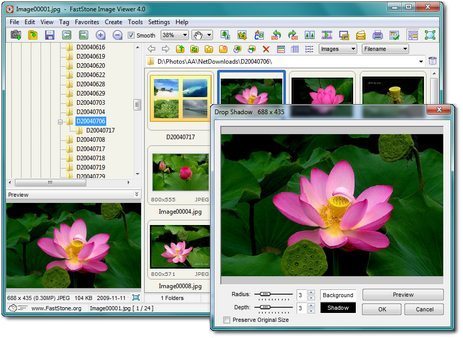
Next up we have the best freeware image viewer that i"ve tested so far, and it's NOT Irfanview.

It's called FastStone Image Viewer.

FSViewerScreenShot1.jpg


Let's face it. I have a lot of photos, given that it's my main art medium. Sometimes the default Windows Picture viewer doesn't cut it. It takes too long to load some images, it doesn't rotate without data loss, and it often shrinks the image down to a window.

FastStone allows you to browse photos just like in Explorer, but with much more customization.

You can increase or decrease thumbnail size. Clicking on a thumbnail dispalys a small preview of the image on the side before you open it. It supports all of my camera's RAW file formats. It makes the process of viewing, sorting, deleting, and editing photos much easier on my nerves. I can't recommend this one enough if you work with a large number of photos or saved internet images.

Official description:


FastStone Image Viewer is a fast, stable, user-friendly image browser, converter and editor. It has a nice array of features that include image viewing, management, comparison, red-eye removal, emailing, resizing, cropping and color adjustments. Its innovative but intuitive full-screen mode provides quick access to EXIF information, thumbnail browser and major functionalities via hidden toolbars that pop up when your mouse touches the four edges of the screen. Other features include a high quality magnifier and a musical slideshow with 150+ transitional effects, as well as lossless JPEG transitions, drop shadow effects, image annotation, scanner support, histogram and much more. It supports all major graphic formats (BMP, JPEG, JPEG 2000, animated GIF, PNG, PCX, TIFF, WMF, ICO and TGA) and popular digital camera RAW formats (CRW, CR2, NEF, PEF, RAF, MRW, ORF, SRF and DNG).

Get it for free at http://www.faststone.org/FSViewerDetail.htm

Next up, we will be looking at browsers, and I don't mean Firefox, Opera, IE, or Safari!
 
Three browsers, and I'm saving the best for last.


Let's get this out of the way first. I have not used Chrome, nor do I intend to. I simply don't trust Google with any form of information. I use Scroogle for most of my searching needs.

The very idea of using a browser by them seems ripe for data mining. However, there is a better way. If you use Chrome, considering switching over to ChromePlus!

ChromePlus is basically Chrome with a bunch of great features added, and a LOT of data tracking removed.

Examples: Chrome installs a updater, which installs Google product in backgound. This does not exist in ChromePlus. Chrome tracks some events such as search engine change, dev tool open, browser update, bookmark creation, browser exit, options change, ClientID and timestamps, theme installation and more. These have been removed from ChromePlus. Depending on the configuration, if you have typed a false address in the address bar, this is sent to Google and you get an error message from Google's servers. This is disabled by default. You can enable it if you like. RLZ-encoded-Tracking: This Chrome-function transmits information in encoded form to Google, for example, when and where Chrome has been downloaded. Does not exist in ChromePlus.

You get extra features too, like Mouse Gestures, Adblock, SuperDrag (Drag a link in the page with your left button and drop it somewhere else in the page), and more!

You can get ChromePlus at http://www.chromeplus.org/index.php

Next up is K-Meleon. I use this little guy a lot. I've gone mine set up in offline mode, and associated it with saved html files. When I'm looking at saved web pages, this is what I use because it's quick, simple, and easy. It's fast-loading and uses very little memory. The only reason I don't switch to it full-time is because I'm addicted to Firefox add-ons. You can get K-Meleon at http://kmeleon.sourceforge.net/

Whoops. Did I say Firefox? Ph?bus hit the nail on the head. It's time to look at my current browser and overall favorite, Pale Moon!

Pale Moon is based off the Firefox project, but it's been optimized to take advantage of Windows and most modern systems. It's faster, takes less memory, and basically is what Firefox SHOULD be. The best part? As soon as you install it and run the migration tool (separate download), you retain all your information from Firefox! All bookmarks, active sessions, plug-ins, add-ons, EVERYTHING! There's literally no reason not to install this browser now, as you have nothing to lose and EVERYTHING to gain!

From the web site:

"Why settle for a basic build of your Firefox browser on Windows Operating Systems when you can have one that performs 25% faster? Mozilla does not provide optimized browser packages for Windows, while many Linux ("from scratch") users get the advantage of a browser built specifically for their system. That needs to change! So, here is the Pale Moon project: Custom-built and optimized Firefox browsers for Windows Operating Systems. Make sure to get the most speed out of your browser!

Of course, getting a faster browser is not just about optimizing the compilation process (building a program from its source code), but also about carefully choosing features and how to choose the best setup. This means that this browser, however extremely close to Firefox, does not have all the functions that Firefox has. A few, carefully selected, features have been disabled that are not in high demand, and that do not interfere with the way web pages are displayed or function; all to maximize speed and efficiency of the browser. Please see the page with technical details to learn exactly what the browser supports, and what it doesn't support. In short, if you need accessibility features or parental controls, then please visit the firefox homepage and get the official, non-optimized build.

Main features:

* Highly optimized for current processors
* 100% Firefox sourced: As safe as the browser that has seen years of development.
* Uses slightly less memory because of disabled redundant and optional code
* Significant speed increases for page drawing and script processing
* Support for SVG and Canvas
* Support for Firefox extensions, themes and personas
* Able to use existing Firefox profiles"

Download Pale Moon at http://www.palemoon.org/download.html

Get the migration tool at http://www.dediplanet.com/palemoon/support/pmmig.exe

 
Sorry I'm a tad late here but I wanted to say I like MediaCoder muuuuuch more than Super. Super has an annoying UI and an annoying update nag that basically says the world will end if you don't update. Also, unless something has changed recently, updating Super was annoying b/c of how the web site is structured. I haven't tried the other video program you mentioned, but MediaCoder > Super easily and for sure.
 
Back
Top