- Joined
- Jul 7, 2009
- Messages
- 1,335
More specifically setting up my xbox360 wireless network adapter, This -> http://www.gadtech.com/wp-content/u...802-11n-xbox-360-wireless-network-adapter.jpg to be more exact.
Anyways let me give you guys a little explanation before I start firing out questions. As a present for my last birthday (all the way back in May) I received a wireless network adapter for my 360 so I could finally get the platform out of the family room (about 10 feet away from the computer). However as time went on I was unable to solve the questions I had about actually getting the device working and in the process brought about multiple other questions. The reason I have finally decided to bring my questions here is because no one else seems to have the answers. Also my father is good at making situations more difficult than they should be haha.
I stumbled upon this website -> http://www.ehow.com/how_4579006_configure-xbox-wireless-network-adapter.html earlier today which stated that "The Xbox 360 connects to the Internet through your home network via a wireless network adapter that is sold separately".
Here comes the questions.
~ Seeing as I already have the 360 adapter. Is the only other device I need a wireless adapter that connects to my computer,router,etc?
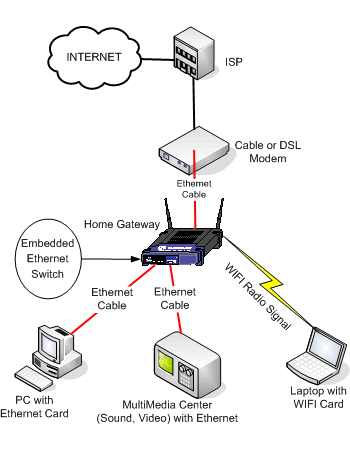
~ The current modem/router my family owns are NOT wireless. Would I need a wireless modem(if there is a such a thing) and a wireless router for this to work? Or just the wireless adapter as long as everything else is connected through cables.
~ My computer uses a broadband/DSL connection from a local area internet provider (http://www.ironton.com/). Does this 'connection' have wireless capability? I know it is a foolish question but my father seems to believe that certain internet connections/providers have the ability to be wireless while others do not (I however don't think this is true lol).
~ Seeing as my computer connects to the internet via cables, would I have to change any internet settings or create a new connection to use my wireless items?
These are the only questions I can think of currently and I'll be very happy if I see any of them answered
P.S. I am still not computer/tech savvy. lol
Anyways let me give you guys a little explanation before I start firing out questions. As a present for my last birthday (all the way back in May) I received a wireless network adapter for my 360 so I could finally get the platform out of the family room (about 10 feet away from the computer). However as time went on I was unable to solve the questions I had about actually getting the device working and in the process brought about multiple other questions. The reason I have finally decided to bring my questions here is because no one else seems to have the answers. Also my father is good at making situations more difficult than they should be haha.
I stumbled upon this website -> http://www.ehow.com/how_4579006_configure-xbox-wireless-network-adapter.html earlier today which stated that "The Xbox 360 connects to the Internet through your home network via a wireless network adapter that is sold separately".
Here comes the questions.
~ Seeing as I already have the 360 adapter. Is the only other device I need a wireless adapter that connects to my computer,router,etc?
~ The current modem/router my family owns are NOT wireless. Would I need a wireless modem(if there is a such a thing) and a wireless router for this to work? Or just the wireless adapter as long as everything else is connected through cables.
~ My computer uses a broadband/DSL connection from a local area internet provider (http://www.ironton.com/). Does this 'connection' have wireless capability? I know it is a foolish question but my father seems to believe that certain internet connections/providers have the ability to be wireless while others do not (I however don't think this is true lol).
~ Seeing as my computer connects to the internet via cables, would I have to change any internet settings or create a new connection to use my wireless items?
These are the only questions I can think of currently and I'll be very happy if I see any of them answered
P.S. I am still not computer/tech savvy. lol