


ok so my pc has broken down and i have no idea whats wrong with it. before it broke my screen was like frozen. i cant explain how it looked but its like bluring green pixles im sure most has seen what that looks like. sorry i cant really explain in that good. but if you might know please help me

You are using an out of date browser. It may not display this or other websites correctly.
You should upgrade or use an alternative browser.
You should upgrade or use an alternative browser.
help computer problems
- Thread starter klepto
- Start date




- Joined
- Sep 18, 2009
- Messages
- 415
You need to be a little more specific as to what is broke. Will it boot up or even power on? Does the CPU come on but not the monitor? When you turn it on, do you hear beeps coming from the CPU?
If you can provide a little more information about what is going on, I am sure someone will have a good idea on how to fix it.
If you can provide a little more information about what is going on, I am sure someone will have a good idea on how to fix it.


If you are seeing artifacts in the beginning while the computer is POSTing, to me it sounds like a video card issue. I remember one time while I was building my first PC I forgot to plug in the fan cable for my video card (which is an 8800GTS) and it made a very loud beep, which signals the fan was not receiving power and thus the GPU was overheating. There's some things you can do for me to help clarify what you mean about "beeping".
1. Where exactly are you hearing this beeping sound. Is it immediately after you power up your PC, is it while your computer is POSTING (which stands for Power On Self Test, which is a diagnostic your computer does to make sure critical components are functioning normally.) Normally a successful POST you'll hear just one single, short beep. Here's an example of a bad POST with errors.
[ame]http://www.youtube.com/watch?v=tTnKm3YSBbc[/ame]
2. What kind of BIOS does your PC have? The way you can find this is when your computer loads up you'll usually see a black screen with a bunch of stuff. Here's an example of Phoenix BIOS.
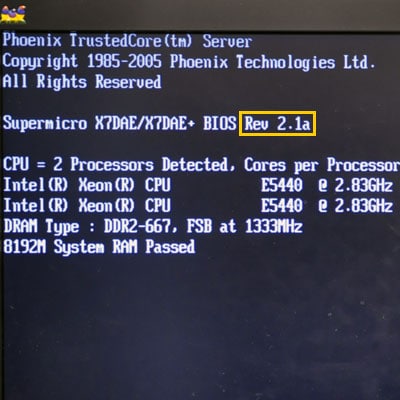
As you can see from the picture on the top its says the vendor (which is Phoenix) and the BIOS version is highlighted in the yellow box. The reason I ask this is if it's a BIOS POST error, the beeps actually stand for a code, and they aren't always exactly from vendor to vendor.
3. If you can, open up your case and see if any fans are running in your video card, processor and power supply unit (PSU). Do be careful and not touch any part of the motherboard if you need to move around any cabling. I'd take the case off first and then power it on, and see if any of those fans are running, or making a weird noise, or not moving at all.
Let me know what you discover and if you want, feel free to bug me on Steam.
1. Where exactly are you hearing this beeping sound. Is it immediately after you power up your PC, is it while your computer is POSTING (which stands for Power On Self Test, which is a diagnostic your computer does to make sure critical components are functioning normally.) Normally a successful POST you'll hear just one single, short beep. Here's an example of a bad POST with errors.
[ame]http://www.youtube.com/watch?v=tTnKm3YSBbc[/ame]
2. What kind of BIOS does your PC have? The way you can find this is when your computer loads up you'll usually see a black screen with a bunch of stuff. Here's an example of Phoenix BIOS.
As you can see from the picture on the top its says the vendor (which is Phoenix) and the BIOS version is highlighted in the yellow box. The reason I ask this is if it's a BIOS POST error, the beeps actually stand for a code, and they aren't always exactly from vendor to vendor.
3. If you can, open up your case and see if any fans are running in your video card, processor and power supply unit (PSU). Do be careful and not touch any part of the motherboard if you need to move around any cabling. I'd take the case off first and then power it on, and see if any of those fans are running, or making a weird noise, or not moving at all.
Let me know what you discover and if you want, feel free to bug me on Steam.
Last edited:
ty duce and the video that was there is not like mine. when i first hit the power button its just 1 beep thats like a half a second or somting like that. and i cant get to the BIOS thing because my screen is all blurred out with lines running threw it all
Yeah it sounds like to me your video card might be on the fritz. Just for troubleshooting sakes, can you test to rule out your monitor by plugging in another monitor and see if it has the same effects (Odds are it isn't your monitor, but just to see)?
Yeah man, it definitely sounds like your video card is acting up. I'm guessing it looks something kind of like this, except the artifacts are green, I imagine?
http://www.drfsrich.com/img/artifacts.jpg
http://www.drfsrich.com/img/artifacts.jpg


well since your fan is attached to your video card, i would highly suggest you upgrade the video card. please tell us what kind of video card that you have & we will be more than happy to give suggestions for you, based on your price range. please look in my sig for a site called srtest.com. srtest checks your computer to make sure how have the required features to play a specific game. however, it does not go into very specific details as to the architecture of your video card. you need to find out if your video card is agp, pci-e, etc. best way to find to figure out which u have is to read this article: http://www.differencebetween.net/technology/difference-between-pci-express-and-agp/
^the long yellow thing is the pci-e slot
^the long yellow thing is the pci-e slot
well i highly doubt that u will have yellow slots in your motherboard, the article is rather old & there just to make an example. besides, u have the same video card as i do. whos the manufacturer of the video card? i got mine from evga. depending upon who made ur video card will depend on how much of a warranty there is on the video card. if the warranty is indeed expired, then look into upgrading your video card, based on an acceptable price range.
Depends on what slot your video card is on, if it's either AGP or PCI-E. I'm pretty sure if it's PCI-E. Here's what I mean about PCI Express and AGP:
PCI Express

The slot that's blue is an example of PCI-Express
AGP
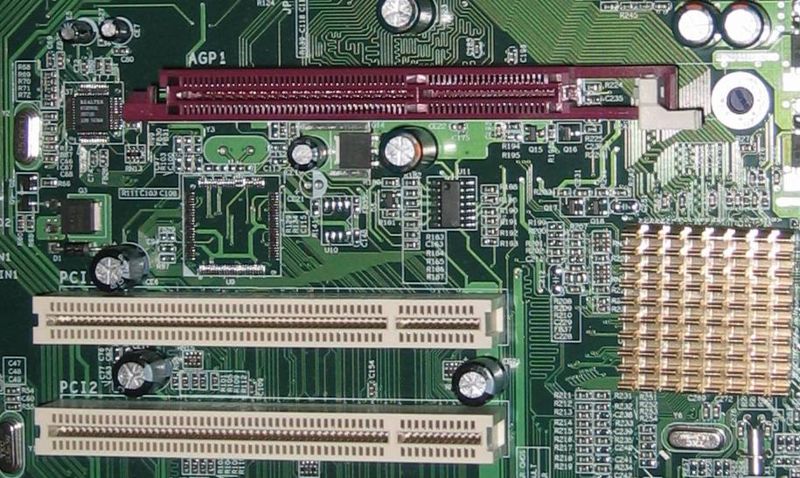
The slot that is colored purple-ish is an AGP slot.
As long as you get the proper slot fitting, then it shouldn't really matter, unless you got something like a PCI-Express 16x but I doubt that a 4 year old computer would have that, so I wouldn't worry, nor would it really matter, it'd still work. The only thing you'd need to worry about is if the power supply on your computer can handle a high powered video card. That, and price, of course.
PCI Express
The slot that's blue is an example of PCI-Express
AGP
The slot that is colored purple-ish is an AGP slot.
As long as you get the proper slot fitting, then it shouldn't really matter, unless you got something like a PCI-Express 16x but I doubt that a 4 year old computer would have that, so I wouldn't worry, nor would it really matter, it'd still work. The only thing you'd need to worry about is if the power supply on your computer can handle a high powered video card. That, and price, of course.
If you look carefully on the pictures, you'll see the pin configurations. Notice the PCI-Express (blue slot, first picture) has a smaller notch separated by a big notch, while the AGP (purple slot, second picture) has almost evenly sized notches.
Similar threads


- Replies
- 5
- Views
- 522


- Replies
- 4
- Views
- 135


