


I would love to build my own first computer since I've had the same one for more than 5 years. I need to have something that can run BF3 on pretty much all high. I already have a monitor but I do need an OS to go with it unless vista sounds alright to you guys. Anyways, I'm not looking at a budget since I'll be building it over time as I save up so any help and parts to get is appreciated.

You are using an out of date browser. It may not display this or other websites correctly.
You should upgrade or use an alternative browser.
You should upgrade or use an alternative browser.
Help me build my first gaming rig.
- Thread starter iEddy
- Start date


- Joined
- Aug 8, 2009
- Messages
- 530
Don't build it over time, save all up the money until you think you want to buy it.
As it stands right now, you can spend about ~1000-1300 for most games that are out right now you'd play on high to medium high. It really depends on if you go with AMD or Intel. Intel is much better, and will last longer as it's technology stays relievent much longer. AMD is more budget side and aimed towards the small man. The man with shorter pockets. Hopefully with Bulldozer, they'll actually start to become a better brand and be less "Budget." AMD also owns ATI now and has rebranded as such if you didn't know and unless you can afford a single GTX 580 stick with the 6950/6970. 6970 is just behind the GTX 580 but ahead of the GTX 570 about 95% of the time.
Yes you can build it for cheaper than I'll show you on the bottom. But honestly I'd wait till 1)Bulldozer comes out 2)BF3 comes out. Or at least the beta comes out. 3)AMD and Nvidia(I believe) are releasing the next family of GPUS by the end of the year?
Do you need mouse and keyboard?
You could save some money by dropping down to a 6950 and an i5 2500k, maybe a cheaper motherboard. You could drop down to 8GB (2x4GB) instead of the 16 I gave you I like having more than I need. Makes me feel better and eases my mind (No matter what Phobus says about 4GB being the max you need ). APB will make you almost max out the 4GB not giving you a lot of room. Haven't ran into a game that get's past 85% under extreme cases but APB pushed mine to 98-99% most of the time.. :/
Keep Win7 Pro 64-Bit. Home Premium 64-Bit can only recognize 16GB worth of memory. That's RAM and graphical memory. Pro/Enterprise/Ultimate 64-Bit reads up to 192GB. Why does that matter? With that setup I have you with 16GB of RAM and 2GB on the graphics. 8GB of RAM is all you really need right now. I haven't ran past 50% usually unless I play GTAIV then I can actually hit in the high 60's.. Or when I have photoshop, skype, BFBC2(Or any other game really), Pandora radio, steam, xfire a few others running at once. Hahaha.
Quote from the build guide Phobus has written in the forums.
This is the setup. More or less what I want.

As it stands right now, you can spend about ~1000-1300 for most games that are out right now you'd play on high to medium high. It really depends on if you go with AMD or Intel. Intel is much better, and will last longer as it's technology stays relievent much longer. AMD is more budget side and aimed towards the small man. The man with shorter pockets. Hopefully with Bulldozer, they'll actually start to become a better brand and be less "Budget." AMD also owns ATI now and has rebranded as such if you didn't know and unless you can afford a single GTX 580 stick with the 6950/6970. 6970 is just behind the GTX 580 but ahead of the GTX 570 about 95% of the time.
Yes you can build it for cheaper than I'll show you on the bottom. But honestly I'd wait till 1)Bulldozer comes out 2)BF3 comes out. Or at least the beta comes out. 3)AMD and Nvidia(I believe) are releasing the next family of GPUS by the end of the year?
Do you need mouse and keyboard?
You could save some money by dropping down to a 6950 and an i5 2500k, maybe a cheaper motherboard. You could drop down to 8GB (2x4GB) instead of the 16 I gave you
I like having more than I need. Makes me feel better and eases my mind (No matter what Phobus says about 4GB being the max you need ). APB will make you almost max out the 4GB not giving you a lot of room. Haven't ran into a game that get's past 85% under extreme cases but APB pushed mine to 98-99% most of the time.. :/Keep Win7 Pro 64-Bit. Home Premium 64-Bit can only recognize 16GB worth of memory. That's RAM and graphical memory. Pro/Enterprise/Ultimate 64-Bit reads up to 192GB. Why does that matter? With that setup I have you with 16GB of RAM and 2GB on the graphics. 8GB of RAM is all you really need right now. I haven't ran past 50% usually unless I play GTAIV then I can actually hit in the high 60's.. Or when I have photoshop, skype, BFBC2(Or any other game really), Pandora radio, steam, xfire a few others running at once. Hahaha.
Quote from the build guide Phobus has written in the forums.
Although he says "So you can use up all of your memory that you ahve available, Microsoft does limit each version of Windows of how much it can read.Phobus: So why do I only recommend 4GB of memory? First I think I should explain 32-bit and 64-bit programs and operating systems. A 32-bit piece of software can address up to 2^32 bits, which is 4GB(GiB, if you want to get technical) of memory. So let's say that you have 4GB of memory, with a 1GB video card. The operating system can only handle 4GB of the 5GB+ (some things on the motherboard may need to address memory) you have available. Now 64-bit software can address up to 2^64 bits, which is something like 16YB(Yhottabytes, which is roughly 16,000TB) of memory. So you can use up all of your memory that you have available.
This is the setup. More or less what I want.

Last edited:

eh no point getting i7 sandy bridge... they r just like the i5 but with more threading really.. iEddy would be good with an oc i5, 8gb ddr3 1666, dual 6950, 1 or 2 tb hdd, and 125gb ssd, with probably a psu around 750w ish. the psu watts idk. and os should be win 7. plus idk know your budget so if mind telling use what is the limit point. also if u r waiting, the bulldozer that amd is putting out is suppose to come out this fall. i would wait for that or if u feel like waiting a year then get ivy bridge. all up to u. o for the cpu cooler hyper 212.....


- Joined
- May 20, 2010
- Messages
- 779
^
This guy knows his stuff!
This guy knows his stuff!


Keep Win7 Pro 64-Bit. Home Premium 64-Bit can only recognize 16GB worth of memory. That's RAM and graphical memory. Pro/Enterprise/Ultimate 64-Bit reads up to 192GB. Why does that matter? With that setup I have you with 16GB of RAM and 2GB on the graphics. 8GB of RAM is all you really need right now. I haven't ran past 50% usually unless I play GTAIV then I can actually hit in the high 60's.. Or when I have photoshop, skype, BFBC2(Or any other game really), Pandora radio, steam, xfire a few others running at once. Hahaha.
So really, if he has a budget amount, he should go to 8 GB at max, as anything else is just being excessive, unless its for work purposes (and necessary for any projects you are doing).
Intel ---> boooo!! Just my opinion. I have had 2 different computers as a Intel build... hated both. Running AMD now and have not had one problem at all!
In what context is this statement? AMD's Athlon64 CPUs were great in the day, and making some people hate their Intel Builds. Now, the Core2Duo series from Intel made people hate AMD builds. Gotta provide us with some sort of context so we can judge whether or not the Intel CPU is to blame, the build itself by you, or just the bad timing.
iEddy, as Celtic said, you should buy your parts all at once, so you get the maximum benefit of the purchase. Otherwise, you'll be paying more up front for parts that, once you buy the last, may have dropped in price $10, 20. Doesn't sound like much, but say the GPU was down in price by $15, CPU by $20, RAM by $10, Hard drive by $5, keyboard and mouse by $10, and already you would have saved $60 total, which could have be used in buying a better GPU, or more RAM. So you should have the money available to purchase first, then give us the budget to purchase. Otherwise, any recommendations would be useless as the prices would need to be continually adjusted and new parts may be suggested instead of the previous ones.
Personally, a $1200-$1500 (with OS included) will guarantee you a great gaming system that will last for years, and its longevity increased if you find a way to buy the best for certain components, so all you have to do is upgrade/replace the older, less powerful ones over time. For a truly behemoth gaming machine, $2000-2500 will definitely guarantee a machine that can running nearly everything at max. Anything over that is just more eye candy and excessive. Your choice.


- Joined
- Dec 18, 2008
- Messages
- 4,044
Intel ---> boooo!! Just my opinion. I have had 2 different computers as a Intel build... hated both. Running AMD now and have not had one problem at all!
are you in any way related to Heavy MG? I noticed your avatar is very similar.
http://www.overclock.net/member.php?u=181086
probably the biggest AMD troll I have every dealt with, just read some of his posts:
http://www.overclock.net/search.php?searchid=4977248
every single one....trying to rationalize his purchase, and make it seem like thuban is faster/somehow a worthwhile purchase....
Step 1: Figure out how much you want or willing to spend, and have that money available/ready when you want us to price/build the PC.
Step 2: Inform us the amount you're willing to spend.
Step 3: Sit back and watch us price a great system for you.
Step 4: Debate the parts and prices with us.
Step 5: Purchase
Step 6: Build
Step 7: Bask in the glow of a brand new gaming PC.
Step 8: Game time!
Step 2: Inform us the amount you're willing to spend.
Step 3: Sit back and watch us price a great system for you.
Step 4: Debate the parts and prices with us.
Step 5: Purchase
Step 6: Build
Step 7: Bask in the glow of a brand new gaming PC.
Step 8: Game time!
- Joined
- Aug 8, 2009
- Messages
- 530
Here you go. To satisfy the "No point in getting i7 SB" Even though it'll stay relevant in the long run. And the "excess RAM" etc etc etc.
This is a more "realistic" build most likely. I seriously would wait until AMD puts out the Bulldozer processors and around then Nvidia and AMD should be putting out the next family of graphic cards as well.

This is a more "realistic" build most likely. I seriously would wait until AMD puts out the Bulldozer processors and around then Nvidia and AMD should be putting out the next family of graphic cards as well.

this is a build that is more "realistic" u get an 120gb ssd, 6950 that u can unlock to a 6970. (cross ur finggers thoe) hyper 212 thats is now only $25 and more.
http://imgur.com/8dbFY
http://imgur.com/8dbFY
Last edited:


- Joined
- Oct 29, 2008
- Messages
- 2,417
Step 1: Figure out how much you want or willing to spend, and have that money available/ready when you want us to price/build the PC.
Step 2: Inform us the amount you're willing to spend.
Step 3: Sit back and watch us price a great system for you.
Step 4: Debate the parts and prices with us.
Step 5: Purchase
Step 6: Build
Step 7: Bask in the glow of a brand new gaming PC.
Step 8: Game time!
You forgot
???????
Profit!
- Joined
- Aug 8, 2009
- Messages
- 530
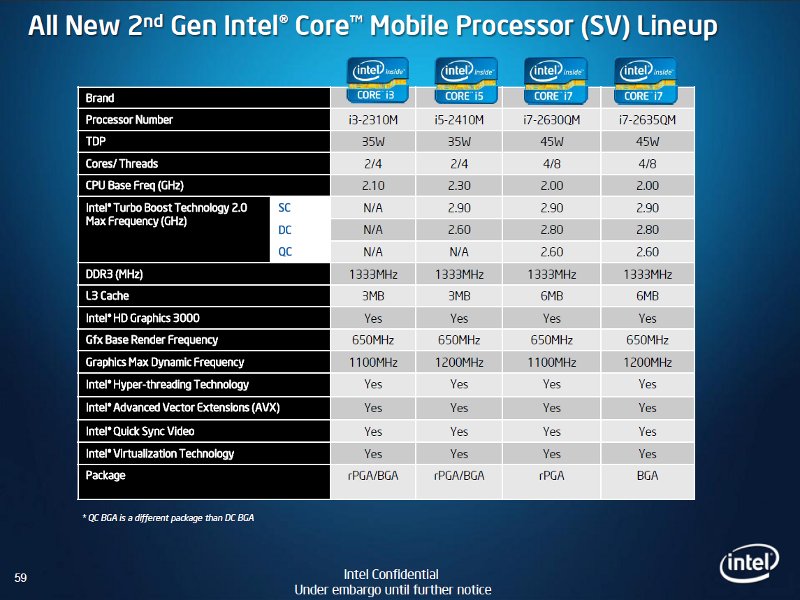
So what's up with the i7 then? Just more worth it to get an i5?
The biggest difference between the i5 2500k and the i7 2600k is how many threads the processor has, or Hyper-Threading. i5 2500k has 4 cores and 1 thread per core, with a total of 4 threads (Without Hyper-threading). i7 2600k has 4 cores and 2 threads per core, with a total of 8 threads (With Hyper-Threading).
As of today, their isn't much of a huge difference between the two as far as performance because they're of the Sandy Bridge technology. They perform relatively close to each other. The i7 2600k shines when a program/game/etc utilizes Multi-Threading. Now that multiple threads are becoming more common in processors, programs will soon follow and utilize the technology. So this means that the i7 2600k should stay relevant in the long run.
Threading helps process more information more quickly.
The difference of $100 vs performance as it stands right now i5 wins.
But i look for longevity of products. So to me the i7 wins. But that's my personal opinion.
Anyone can correct me if I'm wrong.

Similar threads

- Replies
- 4
- Views
- 496


