Anyone know anything about phone wiring?

mdgrim

EGO Addict
Joined
Jul 7, 2009
Messages
1,335
So basically here is the situation. I want to place my gaming rig in my room, but the only ACTIVE (a.k.a has a jack installed) place I could hook my modem up to in out in the living room. However my parents nor I want to run a wire 30+ feet down the hallway into my room. In my room I DO have an exposed (I blame the horrible previous house owners) phone wire, I just bought a jack and understand how to properly install my wire variants into the back of it.

The phone wires that are in my room are as follow (believe they are CAT5 wires):
Blue, White with Blue stripe, Orange, White with Orange stripe, Green, White with Green stripe. [[Underline indicates the wires I must use]]

Now this is the part that is somewhat confusing... My phone line has six wires inside mentioned above, The white/green, orange, and white/orange wires are separated from each other whereas the green, blue, and blue/white are being held together by some sort of plastic device. I assume the wires are attached inside of here. All that aside, main main question is: If I cut the Blue and White/Blue wires to use as connection point in my new phone jack, will I possibly cut the other phone connections around the house? Also, should I attach the unused wires together with something like electrical tape?

Here are a couple diagrams (one horrid looking one i made lol) for those of you who gather information better this way.

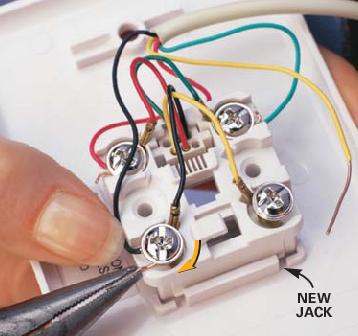
This is what the back of the phone jack looks like (the wiring in that house is using the old USA standard)
jack.jpg


This is what the exposed wiring in my room looks like
whatisthisidonteven.jpg


**SIDE NOTE** I checked the wiring that the phone in the living room uses. It uses a different wire that follows the older USA standard (Red,Green, Yellow, Black)

 
u know i would just drill some holes in the wall run the wire threw the actic from the modem to your room...
 
u know i would just drill some holes in the wall run the wire threw the actic from the modem to your room...

I know nothing about doing that, and what I've stated in the original post is all I know about phone jacks :P
 
i would not mess with it. just get 100ft cable. wait till ur fokes are out of the house. start drilling a hole near the modem. and a hole where ur comp is. plug in the cable to the modem. fish it up the hole to the attic. then find the wire. and bring it to the hole in your room.
 
I wouldn't go cutting those unless I knew where they went. And yes the wires in your wall are cat 5. From the looks of it, your phone is running +,-,Ground. What I suggest is get a small stretch of Cat 5 from a local store and add that on to the existing patch connection. Then run that to your jack.
 
I wouldn't go cutting those unless I knew where they went. And yes the wires in your wall are cat 5. From the looks of it, your phone is running +,-,Ground. What I suggest is get a small stretch of Cat 5 from a local store and add that on to the existing patch connection. Then run that to your jack.

well see the way I'm currently looking at it is, if I cut those and nothing works I can attempt to splice them back together. The only two active phone jacks in my house are using the old standard (checked fathers office last night had Red,Yellow,Green,Black like the living room). I personally don't even know if these CAT5 cables are attached anywhere... I mean the original owners cut so many corners that they didn't tell us about its unbelievable.

Just a few of the things they failed to mention include: A busted attic door that needed fixing, Insulation covering the entire attic (not supposed to be like that EVER in this state), a mold problem downstairs that made it musky every time in rained, a hot tub that was supposed to be left that disappeared, and a LIVE wire sticking out of the ground in the backyard that was originally attached to the hot tub.

I don't think messing up the cat5 wires will affect the older cat3 wires... because they should be in separate cables (like I said the last group neglected to tell us... ALOT)

TL;DR If worse comes to worse, I cut phone capabilities for locations around the house that aren't using jacks lol.

*edit* It's either this or spend more money in an attempt to make my gaming rig pick up wireless connections, which I would rather avoid if possible. I'm not going to drill holes in the wall and feed a phone line up to my room... I'm 110% sure my parents would not be pleased, it's not my house after all.


*second edit* I think I see what your getting at. kind of... I would attach (for example) both blue wires to the new blue wire from the 3rd cable, thus making a single connection point for the jack. But wouldn't I just be able to place both blue wires from the current cables into the corresponding part of the jack?
 
Last edited:
yeah I have been using that site :p. Now I'm just worried that they wont have power in them... This 6 wire CAT5 cable is attached to a jack in the kitchen as well (wasn't wired properly but I fixed it up). However after the wires were properly attached, there was no dial tone coiming from the phone I am using to test...
 
its possible you wired it for a different line. its also possible that the line installer did a crap job and hooked the wires up incorrectly.


***edit: correct, landlines are powered seperate from the line connection.

my choice would be a wifi modem, with a powerline receiver(Ethernet to PC)

powerline receiver: http://www.newegg.com/Product/Product.aspx?Item=N82E16833181126

another possible thing is to get a 2 plug outlet... wire the top for phone and the bottom Internet, this you could place in the room with the Active jack. wifi from that to the receiver at pc.... the reason I said to use a powerline receiver is due to the high transfer rates.

its not the most cost effective setup, but it is a viable option.
 
Last edited:
So wait... with this *powerline receiver* I can completely bypass the need of a phone jack? Because if so that will solve all of my issue ^^

From what I've read about this it seems that you plug one of the receivers into a outlet that is nearby the modem/router currently used for internet capabilities. Then you plug another into an outlet nearby the new computer and plug the Ethernet cable into the PC itself... is this correct?
 
Last edited:
there is still a need for a phone jack.. just not in your room.

get 1 of these:

L40244-W-EA-2.jpg


place it in the room with the active jack.. wire the top jack to the phone, wire the bottom jack for internet.

place a wireless modem/router at the Active jack.... plug the powerline receiver in your room and connect to the pc via Etherenet.

the plus side to this setup is the ability to add more pc's with just the need to purchase a powerline adapter for each at any time. Another plus is that most of the powerline receivers run at 200mbp/s +
 
there is still a need for a phone jack.. just not in your room.

get 1 of these:

L40244-W-EA-2.jpg


place it in the room with the active jack.. wire the top jack to the phone, wire the bottom jack for internet.

place a wireless modem/router at the Active jack.... plug the powerline receiver in your room and connect to the pc via Etherenet.

the plus side to this setup is the ability to add more pc's with just the need to purchase a powerline adapter for each at any time. Another plus is that most of the powerline receivers run at 200mbp/s +

Well the current setup on this computer downstairs is as follows: single phone jack with a phone/dsl splitter attached. Phone line attached the dsl port of the splitter that goes into the wired modem, USB port from the modem running into the PC. Then there is an Ethernet cable going from the modem to the wireless router a couple feet away as well as a 2nd Ethernet cable going from the wireless router into the PC. Basically all I have to do i purchase one powerline networking adapter and plug the Ethernet cable from it into my PC upstairs and I will have an active connection to the internet... right?

And before you ask, I have a wireless router for my 360 =p
 
with the described setup.. yes, all you'd need is the powerline adapter... make sure the adapter you purchase is on the same frequency as your modem. ie, 801.1 b/g/n ---- 802.2 b/g/n --- most but not all of these adapter run on the 802.xx b/g/n
 
Last edited:
with the described setup.. yes, all you'd need is the powerline adapter... make sure the adapter you purchase is on the same frequency as your modem. ie, 801.1g --- most but not all of these adapter run on the 802.xx b/g/n

k thanks for the info ^^ now I just need to find out what frequency my modem runs on (its some brand I've never heard of supplied by our phone/tv/internet provider called 'Paradyne'). Anyways here is another horrible diagram I made in my 5 minutes lol

currentdownstairssetup.jpg
 
well the modem is wired.. all i know is that it is Paradyne. The wireless router is a D-Link DIR-601. All the video I have seen so far have mentioned that for 2 computers you will need 2 network adapters (this computer + mine upstairs)
 

Latest posts

Back
Top