- Joined
- Jul 30, 2011
- Messages
- 116
Hey guys, i've been really unhappy about how Battlefield 3 performs compared to BC2. When pretty much do anything i get micro stutters/chugging. This doesn't happen in any other game.
It seems to be mostly with ATI users, but what I changed to fix this had nothing to do with my ATI/AMD gpu = disabled CPU HyperThreading. Anyone with a hyperthreading cpu should disable it on their motherboard to see if it resolves it. Any Intel I7 processor has hyperthreading. I happen to have an I7 930
1. Download current driver for your Video Card
A. ATI users only Download the latest 11.10 Version 3 Preview drivers: http://support.amd.com/us/kbarticles/Pages/GPU124AMDCat1110PreDriverV3.aspx
B. NVidia Users only Download the latest driver for your card at nvidia.com - Current driver for newer generation NVidia cards is version 285.62 - Mobile users (laptops) do have this version available, but it is a different package, so make sure when you are on the nvidia website to select the card with the M after it. example nvidia 285m instead of 285 which would be for a desktop card!
2. ATI users only Do not download or install the CAP3 <--- if you don't know what this is, you probably don't have it.
3. ATI users only If you have the CAP3 installed currently, remove it by going to Control Panel, Programs, and Remove or Uninstall the one that says "Application Process", (I think that's what its called, something like that)
4. Uninstall current video driver and any other item from your video cards driver installation from control panel -> add/remove area
5. Reboot
6. Install driver you downloaded in step 1
7. Reboot if it asks
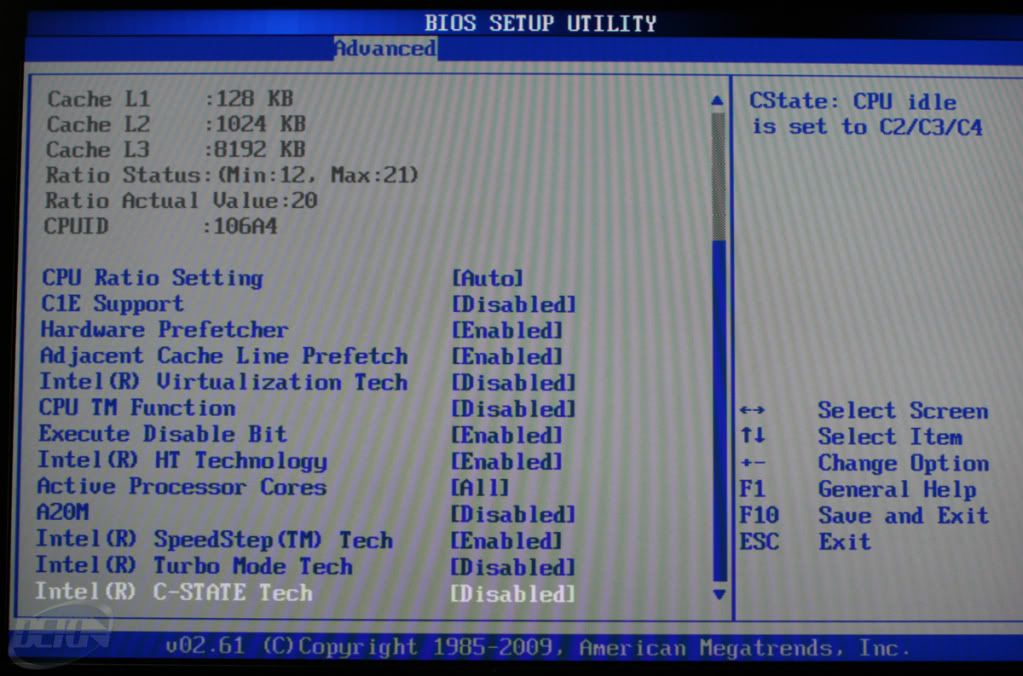
8. If you use a processor that has HyperThreading, go into the BIOS and Disable HyperThreading - see pic below the bios probably won't say HyperThreading - might say "Intel HT Technology" or something similar
9. Enjoy your new stutterless game.
It seems to be mostly with ATI users, but what I changed to fix this had nothing to do with my ATI/AMD gpu = disabled CPU HyperThreading. Anyone with a hyperthreading cpu should disable it on their motherboard to see if it resolves it. Any Intel I7 processor has hyperthreading. I happen to have an I7 930
1. Download current driver for your Video Card
A. ATI users only Download the latest 11.10 Version 3 Preview drivers: http://support.amd.com/us/kbarticles/Pages/GPU124AMDCat1110PreDriverV3.aspx
B. NVidia Users only Download the latest driver for your card at nvidia.com - Current driver for newer generation NVidia cards is version 285.62 - Mobile users (laptops) do have this version available, but it is a different package, so make sure when you are on the nvidia website to select the card with the M after it. example nvidia 285m instead of 285 which would be for a desktop card!
2. ATI users only Do not download or install the CAP3 <--- if you don't know what this is, you probably don't have it.
3. ATI users only If you have the CAP3 installed currently, remove it by going to Control Panel, Programs, and Remove or Uninstall the one that says "Application Process", (I think that's what its called, something like that)
4. Uninstall current video driver and any other item from your video cards driver installation from control panel -> add/remove area
5. Reboot
6. Install driver you downloaded in step 1
7. Reboot if it asks
8. If you use a processor that has HyperThreading, go into the BIOS and Disable HyperThreading - see pic below the bios probably won't say HyperThreading - might say "Intel HT Technology" or something similar
9. Enjoy your new stutterless game.
Last edited: