Good rig for under 1100$?

you have great points, and its more than likely overnight renders and such and the occasional stream, i havent seen 1 Fry's Electronics in Tucson. Only one I've seen was in Vegas. There is a computer hardware store here tho, but what they have is really limited, i'd have to bounce all over the place to get everything, and waitin is always good. I throw a basic list together on Newegg, I'll check TigerDirect and other places for cheaper prices as well.

There is a frys electronics near pheonix if you have the time to go look.
 
There is a frys electronics near pheonix if you have the time to go look.

if I dont blow my cash I may be able to afford the case, plus my family is gojng to vegas in late may-early june, stopping by Pheonix for Comicon, so I'll try to look.
 
I'm with pillar on the 16GB. Photoshop, editing, and rendering will REQUIRE you to get the 16GB. Streaming is the Internet, but the other stuff relies more on having the memory space to actually do the computations.
 
I'm with pillar on the 16GB. Photoshop, editing, and rendering will REQUIRE you to get the 16GB. Streaming is the Internet, but the other stuff relies more on having the memory space to actually do the computations.

if you take a look at my list, the RAM I chose is 2 sticks of 4gb, so I can go and buy two more to double it to 16. All about dat flexibility
 
I'm with pillar on the 16GB. Photoshop, editing, and rendering will REQUIRE you to get the 16GB. Streaming is the Internet, but the other stuff relies more on having the memory space to actually do the computations.

Im not sure what you mean by saying photoshop and editing would take up more RAM... I was doing just fine on 4 gigs for months rendering stuff from Maya 2012. Didnt take any longer then 10 minutes for a good amount of rendering too. 16 gigs would be straight overkill unless you feel like rendering 30 things at once and playing 2-3 games at the same time. :P
 
Im not sure what you mean by saying photoshop and editing would take up more RAM... I was doing just fine on 4 gigs for months rendering stuff from Maya 2012. Didnt take any longer then 10 minutes for a good amount of rendering too. 16 gigs would be straight overkill unless you feel like rendering 30 things at once and playing 2-3 games at the same time. :P

i multi-task a lot, some of the stuff I'll stream will be Source Sdk or UDK when ue4 comes out. plus counter strike or bf on the side
 
i do realize that and the list might change, ive never heard of thermalright. By the time I do save enough, haswell will be large and in charge and still expensive. Btw this is a machine that will have to render stuff and more than likely stream stuff as well. The octo cores will probs help offload some of the stuff, but it is actually lower in power than an intel hex or quad. And the system will probs run full blast a lot of the time if I get into metro or battlefield when it comes out. Intel is always kinda pricey which puts me off a lot. sure they have PCIe 3 an all,(Asus is holding out on us amd folk) which can put it up. I'll have to look through and try matching price with intel stuff later.

Even in rendering, if the 8 core wins, it isn't by much. And which cpu comes out on top will depend on the program used.

http://www.xbitlabs.com/articles/cpu/display/fx-8350-8320-6300-4300_7.html#sect0

As you can see, the 8320 doesn't necessarily win. Both in PS and 3dsmax, it actually loses.

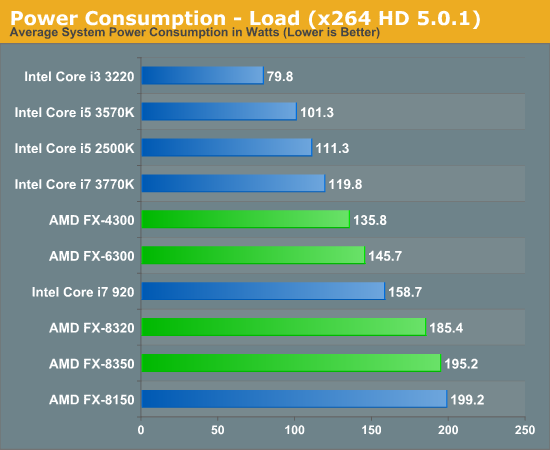
And for power consumption, you think the 8320 is better?

51142.png


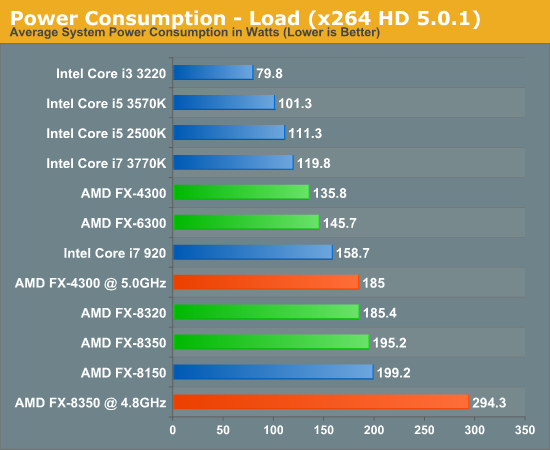
and if you want to overclock:

51144.png


And beyond just rendering, in actual gaming and applications, the 3570k will win easily. So if you care just about when you are not on the pc, then it doesn't really matter what you get since you won't be on there to enjoy it (however, your wallet will thank you if you get the 3570k). But if you care about when you are actually using the computer, then the winner is obvious.

Good luck.
 
Even in rendering, if the 8 core wins, it isn't by much. And which cpu comes out on top will depend on the program used.

http://www.xbitlabs.com/articles/cpu/display/fx-8350-8320-6300-4300_7.html#sect0

As you can see, the 8320 doesn't necessarily win. Both in PS and 3dsmax, it actually loses.

And for power consumption, you think the 8320 is better?

51142.png


and if you want to overclock:

51144.png


And beyond just rendering, in actual gaming and applications, the 3570k will win easily. So if you care just about when you are not on the pc, then it doesn't really matter what you get since you won't be on there to enjoy it (however, your wallet will thank you if you get the 3570k). But if you care about when you are actually using the computer, then the winner is obvious.

Good luck.

a 3570k, hyper 212 evo, and a gigabyte board pulls the newegg price up to just under 1500$ That'll be like an "if I can" type deal. But i see where you're getting at on there. AMD makes power hungry proccessors that seemingly like to run hot during burns, which is what I'll probs put it through during recording sessions. Intel does have better performance, yes, but they make you pay for that performance. If I had 10k I'd probs either go with a Sandy Bridge-E processor or Haswell with some titans. Although thats really overkill, meh.
 
a 3570k, hyper 212 evo, and a gigabyte board pulls the newegg price up to just under 1500$ That'll be like an "if I can" type deal. But i see where you're getting at on there. AMD makes power hungry proccessors that seemingly like to run hot during burns, which is what I'll probs put it through during recording sessions. Intel does have better performance, yes, but they make you pay for that performance. If I had 10k I'd probs either go with a Sandy Bridge-E processor or Haswell with some titans. Although thats really overkill, meh.

I'd stay away from Haswell, the new motherboards are gonna have little to no features integrated, and the processor's dont have as fast of speeds as Sandy Bridge-E. Already peaked at the performances on them. Only benefit is the on board graphics is increased. Other than that, they run hotter than ivy bridge and have the same performance level, plus less features on the motherboards. Not worth it. Sandy bridge or sandy bridge E is the way to go imo. And the GTX 690 beats the titan, at the same price.
 
I'd stay away from Haswell, the new motherboards are gonna have little to no features integrated, and the processor's dont have as fast of speeds as Sandy Bridge-E. Already peaked at the performances on them. Only benefit is the on board graphics is increased. Other than that, they run hotter than ivy bridge and have the same performance level, plus less features on the motherboards. Not worth it. Sandy bridge or sandy bridge E is the way to go imo. And the GTX 690 beats the titan, at the same price.

yes the 690 beats a titan, but for the reason its dual gpu. Twin titans would probs run a little cooler with just as near quad-sli 690s. And the sandy bridge e is just like if my parents win a ton of money and just give me as much as i need for the build
 
yes the 690 beats a titan, but for the reason its dual gpu. Twin titans would probs run a little cooler with just as near quad-sli 690s. And the sandy bridge e is just like if my parents win a ton of money and just give me as much as i need for the build

A 660Ti out performs a titan and in some cases a 690. Save your money and get a 660Ti.
 
A 660Ti out performs a titan and in some cases a 690. Save your money and get a 660Ti.

^ Touche. 660 ti SLI is a hard setup to beat for price to performance ratio. 660 ti SLI is probably the best way to go, especially since MOST games dont even require more than a gtx 560...... And still run on DirectX11 unless your playing like Skyrim with the HD mod or Crysis 3.The Titan was a huge letdown, its overpriced... The 690 is the best IF you can afford it. Dual titans performs worse than a single 690. And consumes more power and runs hotter.
 
were getting off track now. back to the normal 660, 3570k, 212 evo, and gigbyte board

I run the 3570k with the 212 evo with the tuniq x4 paste and got the Cougar 120mm fans in push/pull, the high quality cougar ones with the high static pressure :P. I see about 26 degrees celsius idle and 58 degrees celsius max temp at stock clock. 4.3 GHz at stock voltage (is stable for me in prime95) is 28 degrees idle and 62 degrees max. Just wanted to say its an excellent cooler, and if you get the higher end ones, diminishing returns, as in they are pointless as anything at or below 60 degrees is a very stable temp.
 
were getting off track now. back to the normal 660, 3570k, 212 evo, and gigbyte board

We werent getting off topic. I was saying that you should save some extra money and get the 660Ti version then the 660 or the titan. The 660Ti does perform better then the titan and I have seen performance pair ups with the 690 and the titan and the 660Ti outperformed both of the cards. A single, 660Ti will be less money and give you better results.
 
We werent getting off topic. I was saying that you should save some extra money and get the 660Ti version then the 660 or the titan. The 660Ti does perform better then the titan and I have seen performance pair ups with the 690 and the titan and the 660Ti outperformed both of the cards. A single, 660Ti will be less money and give you better results.
that was a actually a side thing, the planned one has a non ti 660, 3570k, hyper212 evo, and a gigabyte board. I didnt know the random thing i mention would spark quite the argument
 
that was a actually a side thing, the planned one has a non ti 660, 3570k, hyper212 evo, and a gigabyte board. I didnt know the random thing i mention would spark quite the argument

That didnt spark an argument. I am just saying if you have the extra money to spend I suggest you spend it on the Ti version of your GPU. It will perform better then your 660.
 
Back
Top