New Vid Card

That's not a bad choice Simon. I'm going to order SOMETHING tomorrow. And I'm leaning towards the 9700.

Sounds good! Yes, make sure you do the research and compare and see what gets you :)
 
I have emerged from my study dungeon to see that Simon answered all your questions, and I just went on a "Like" free-for-all as he said pretty much what I would say. And the builds he came up with are GOOD.

One other thing to tell ya: You're at a great point to look into a new build as both RAM and SSD prices have comparatively collapsed to what they were a year ago or so. I remember paying over $150 for my 16GB of RAM then, and look where it's at now. Thank you crash of cryptocurrency. Let's not discuss how stupid GPU prices were at the time either.
 
Oh D DragonD , totally forgot to mention this earlier in any build lists - but M.2 SSD's exist now. Your regular 2.5" SSD usually gets around 500MB/s. The m.2 SSD's get up to 3.5GB/s read speeds. They slot into newer motherboards. You will want one! Whether you get it now or later on down the road. I'll be using one for my main OS, then my older SSD's can have games dumped to them for some speedy load times :)

Speeds differ drive to drive, but the Samsung 970 EVO Plus does 3.5GB/s read, 3.3GB/s write. Obviously this is a ton of data moving quickly and you don't have to go all out on the highest end model like that, but, just letting you know it does exist and is a must have at some point!
 
Last edited:
I have a 250GB M2 for my Primary OS. I would argue that should be your bare minimum (500GB better) as that space does fill up fast if you install games onto it. And when you see how cheap 1TB SSDs are now comparatively. It'll blow your mind in a great way.
 
I have a 250GB M2 for my Primary OS. I would argue that should be your bare minimum (500GB better) as that space does fill up fast if you install games onto it. And when you see how cheap 1TB SSDs are now comparatively. It'll blow your mind in a great way.

250GB is definitely the minimum I'd go with these days... I lived with a 120GB for a long time for my OS drive, but it didn't take much to fill it up.

Luckily whenever I do a new build (likely in the new year), I do have a 1TB SSD (Believe it was a Samsung 860 EVO) kicking around ready to accept games.
 
Simon Simon , S Snipeye

WTH?? I know i've been out of things for a few years.. but... M2??

Never heard of it.. and when I look it up.. 1T "slot" drives for a hundred bucks????? I spent that much on Margaritas last night!! (not joking btw)

O.. it's on now! Gonna get me one of them thingies.
 
See if you can see it now...

Looks great to me my friend. You're in for one hell of an upgrade. Remember a little thermal paste for that cooler install and you'll be set! I like that the motherboard has USB-C as well.
 
Looks great to me my friend. You're in for one hell of an upgrade. Remember a little thermal paste for that cooler install and you'll be set! I like that the motherboard has USB-C as well.

Done and done!

Everything will be here the next few days... *rubs hands together while making evil laughter*
 
Done and done!

Everything will be here the next few days... *rubs hands together while making evil laughter*

I hate you for getting it so fast. I literally built my PC just a couple of months before the 9700 series was announced (got a I7-8700).

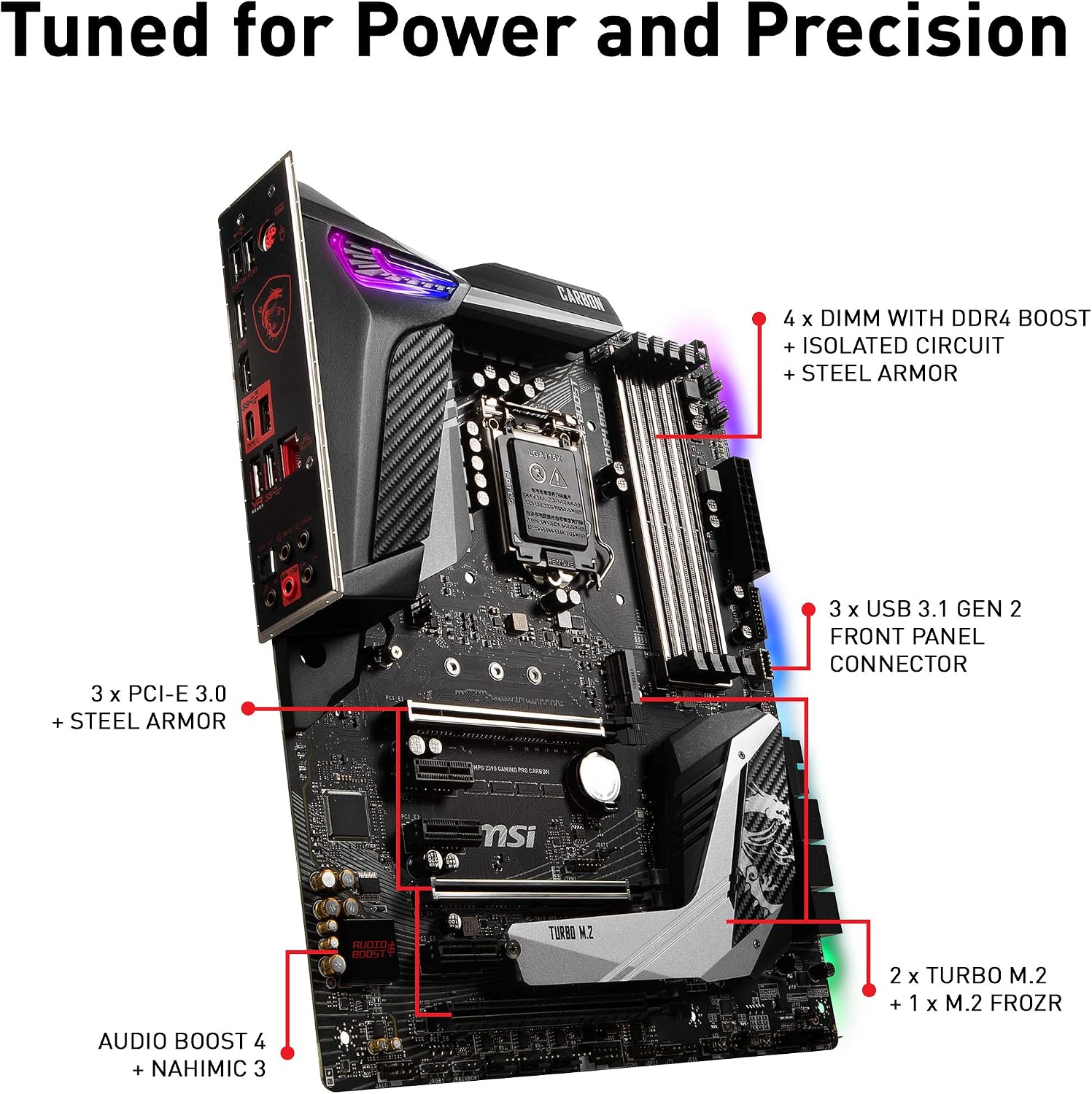
Good choice on the RAM (I prefer G.Skill) and CPU fan is good and reliable (have it as well). Just a word because I can't tell exactly; the M2 connector may be behind the motherboard sink (the giant silver object that says Turbo M.2.) Not a huge problem, just a little extra work (unscrew the heatsink, insert M2 drive, rescrew heatsink).
 
I hate you for getting it so fast. I literally built my PC just a couple of months before the 9700 series was announced (got a I7-8700).

Good choice on the RAM (I prefer G.Skill) and CPU fan is good and reliable (have it as well). Just a word because I can't tell exactly; the M2 connector may be behind the motherboard sink (the giant silver object that says Turbo M.2.) Not a huge problem, just a little extra work (unscrew the heatsink, insert M2 drive, rescrew heatsink).


Your probably right about the M2 connections. Here is different pic of the mb

81VnasJTkwL._AC_SL1500_.jpg


I like how it has two m2 slots.

That's just crazy.. 5 years ago when I built my current rig, it cost an arm and leg for a 250g SSD.. now a Terabyte card that pops right into the mb???
 
That's just crazy.. 5 years ago when I built my current rig, it cost an arm and leg for a 250g SSD.. now a Terabyte card that pops right into the mb???

I got my 120GB SSD when it was ALMOST $1/1GB (think I paid about $140 or so). Then paid about $140 a few years later for my 250GB. This year got a 1TB for i think $170 or so. Crazy how much the prices have changed but I love it! There's no real reason to store games on a spinning drive anymore when it's so cheap to get these now, and enjoy fast load times for everything
 
My gaming rig is also a photography editing PC. So I got M2 for OS, SSD for immediate, fast photo editing, and large Terabyte HDDs for mass storage. At some point, I will likely add some more TB SSDs with their prices having crashed since my initial build a few years ago. God, I wish I had the 2080 instead of my 1080 now....
 
I have very little idea about nvidia gpu as I have been a long time AMD user but I must say go for RTX 2060
 
So, another question.

I'm running dual monitors.

The primary monitor is an Asus ve278

It's older now. While it's 27 inches, it has a max of 60mzh refresh rate.

Best Buy near me has a sale on an acer 27 inch with a refresh rate of 144 for only $230.

How much of a difference would that make?
 
D DragonD Based on those two monitors, you should see some difference. MHz is the refresh rate the monitor experiences, which you can compare to as frames per second. So a 60Hz is 60 frames per second; 144 MHz is 144 frames per second. So if you're getting 180 frames per second while gaming; your monitor will only be able to show 60/144 respectively (generally speaking). Now, here's the fun part: Going from 60Hz to 144Hz, users may not recognize or see a major difference. However, more often those going from 144 Hz back down to 60 Hz on their monitors, they can sense a difference and everything feels sluggish in comparison.

In a general overall sense, it really depends on the quality of the monitor and your uses for it. Higher Hz refresh rates makes sense for gamers, but it can come at the cost of viewing angles and color quality. For me, I would go with a 144 Hz monitor with a 60 Hz, 100% Adobe sRGB monitor for gaming/photography purposes. It just depends on your needs and the monitors you're looking. You will NOT have any issues with moving to the newer monitor with that new build. And I still hate you for it. :D

 
S Snipeye I went and picked up the monitor this morning.

I was not able to unpack it and hook it up till this afternoon. (I'm on vacation from thanksgiving week until after the new year.. but darn if the wife doesn't give me things she "sure wishes I could help her with".. basically a "honey-do-list". )

Anyways, yea, I really could tell a difference in the image quality.

You will NOT have any issues with moving to the newer monitor with that new build. And I still hate you for it. :D


O, and the 9700 came in today.. I thought about taking a video of me rubbing it across my chest.. but naa.
 

Latest posts

Back
Top