Please help me find a new video card.

The Shape

Thread Junky
Joined
Jan 22, 2008
Messages
778
Hello. I have a good knowledge of computers but when it comes to video cards, I get overwhelmed because there's so many different brands and all these numbers haha. I currently have the Nvidia Geforce 7800 GTX 256MB which I love but I would love to get some form of the 8800. Now this is where I get overwhelmed because I know there's the GT and GTS, already overclocked etc etc !bang

I would like to keep the purchase under $200 if I can help it. Here's some of my system specs.

Prcoessor: AMD Athlon 64 X2 6000+ Windsor 3.0GHz

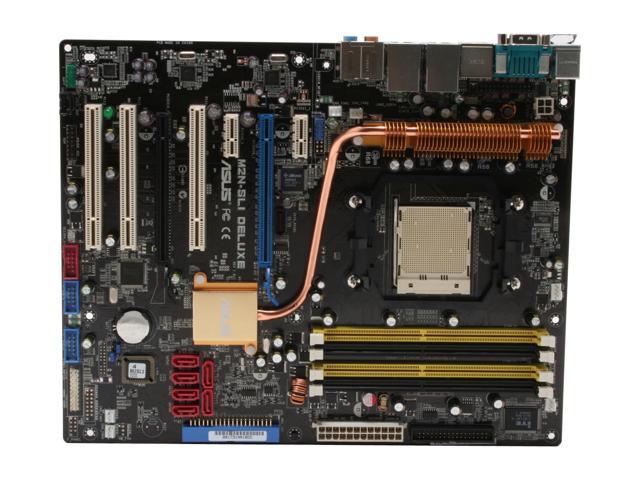
Motherboard: ASUS M2N-SLI Deluxe AM2 NVIDIA nForce 570

4GB DDR2 SDRAM DDR2 800
550W Power Supply
500GB SATA Harddrive
Windows XP Professional
CD ROM Drive
DVD Drive

 
The EVGA 8800gt 512mb is a solid card, I use it and I love it. Look for the dual slot cooler version like the Akimbo cooler, it does get quite hot.
 
The EVGA 8800gt 512mb is a solid card, I use it and I love it. Look for the dual slot cooler version like the Akimbo cooler, it does get quite hot.

Thanks for the reply. What exactly is a dual slot cooler? Got a link? :D
 
ya after various research, i found that evga dominates the board now (even tho i def would suggest xfx due 2 their lifetime warranty, but then again, lets be real here. a typical vid card only last what 2-3 years b4 its way outta class by future vid cards so forget the lifetime warranty. most vid card companies usually know how to make outstanding vid cards)

Thanks! I did some comparing between that card and my motherboard. The card's interface says PCI Express 2.0 x16, my motherboard has these for PCI slots

PCI Express x16: 2 x PCI Express x16 slot at x16, x8 speed Support NVIDIA?SLI™ technology (both at x8 mode)

PCI Express x1: 2
PCI Slots: 3

Will that work on my motherboard?
when it comes to an 8800 card, you need a pci-e x16 slot. companies dont make the cards for pci slots cause those slots are used for general things like sound cards, additional usb slots, ieee1394 slots, etc. pci-e x1 slots r generally used for the same (mostly sound cards) but those pci-e x1 slots have more speed & more pipelines than the pci slots do (which allows for more traffic & quicker read time).
 
Last edited:
PCI-Express 2.0 is backwards compatible with PCI-Express 1.0/1.1 A 8800GT/HD4850 should work on your motherboard, no problems. :D
 
I think I'm going to get that one, fox. So, the Akimbo cooler needs another PCI slot, right?

My board should be able to handle it...I think

13-131-013-04.jpg
 
Hi there Shape -

First off, the card should work just fine with your system.

Second, I would suggest checking into the 9800 GT or GTX instead of the 8800. The 8800 is a great card, but it's already starting to show its age...the 9800 will last at least a year, maybe 2 years longer (in terms of being technologically viable) than the 8800 will. Here are a couple of models under $200:

9800 GT

9800 GTX+ (GREAT DEAL)

The one thing to remember with any of these cards is their size...make sure you're using a full tower. If not, MEASURE FIRST!!
 
Your board should be fine. You'll lost another slot, but it shouldnt matter unless your PC is jam-packed with PCI devices. :p

Edit: The 9800GT is literally just a 8800GT with a different name, and i think a die-shrink. Specs are pretty much identical, except for a slightly higher Core/Memory clock.

If you want a card that will last longer than the 8800GT, look at the HIS Hightech HD4850 ($175) - http://www.newegg.com/Product/Product.aspx?Item=N82E16814161235
 
Last edited:
I didn't suggest an AMD/ATI card or anything else because SOMETIMES the nForce chipsets don't play nice with other vendors.

And the 9800GT is a different card...yeah there's a die-shrink, and several other changes as well. The numbers are relatively different. The 8800 is a great card, I'm just suggesting looking at newer technology since the prices are so close - that's all :-)
 
Well my current 7800GTX card is 9 inches long and that card fox posted is 9 inches long so that 9800GT should be the same size if they're pretty much the same, right?
 
Last edited:
The 9800GT is 9 inches. If you're looking at the 9800GTX, that's 10.5 inches.
 
Last edited:
Here's the inside of my computer. Should I stick with the 8800 just to play it safe?

inside.jpg
 
Haha. Wasnt expecting you to take an actual picture, but, you've got enough clearance really. A 8800GT/9800GT/9800GTX+ would fit in there, no problems. :)

If you do decide to go with a 9800GTX+, make sure your PSU has both a 6pin and a 6+2pin PCI-E connector. The 9800GTX+ requires both to be plugged in. If you dont have the required plugs, dont bother buying an adapter. Not recommended. Just go for the 9800GT. :D
 
Last edited:
Haha. Wasnt expecting you to take an actual picture, but, you've got enough clearance really. A 8800GT/9800GT/9800GTX+ would fit in there, no problems. :)

:D

This is why I've put off getting a new card for so long. I get paranoid about not having enough space. I hate returning stuff! Maybe I'll get the 9800GT.
 
Hi there Shape -

First off, the card should work just fine with your system.

Second, I would suggest checking into the 9800 GT or GTX instead of the 8800. The 8800 is a great card, but it's already starting to show its age...the 9800 will last at least a year, maybe 2 years longer (in terms of being technologically viable) than the 8800 will. Here are a couple of models under $200:

9800 GT

9800 GTX+ (GREAT DEAL)

The one thing to remember with any of these cards is their size...make sure you're using a full tower. If not, MEASURE FIRST!!

The 8800GT and the 9800GT are the EXACT same card. Don't waste your money. Same chip, same PCB, different BIOS. Nvidia is also allowing vendors to flash their 8800GTs to the 9800GT BIOS. They are the EXACT same.

http://www.newegg.com/Product/Produ...mpareItemList=N82E16814130377,N82E16814130319

The die shrink has only been done on the 9800GTX+

~Gooda~
 
Last edited:
Well the 8800 I was going to get was 512MB, the 9800GT I ordered is 1GB so that's a little bit of a difference isn't it? Either way, I'm just glad to be getting a new card.
 

Latest posts

Back
Top