New mapper need some help

Joined
Oct 19, 2008
Messages
34
Hey guys, I've recently joined eGO so I'd appreciate any help you guys could give me.

So I've mapped in Counter Strike 1.6 before, so I'd thought I would give mapping some DOD:Source maps a try. Back in CS 1.6 I used the program, I think the name was Hammer, to map. So my questions for DOD:S are:
1) what is the best program for mapping?
2) is there any other programs I might need to install besides the mapping software?
3) About how many man hours did it take you guys to finish a small to medium sized map?
4) Is the learning curve for mapping in DOD:S small or big?
5) Any other tips you could give me (:

Thanks to everyone in advance.

Cheers.

 
Hey guys, I've recently joined eGO so I'd appreciate any help you guys could give me.

So I've mapped in Counter Strike 1.6 before, so I'd thought I would give mapping some DOD:Source maps a try. Back in CS 1.6 I used the program, I think the name was Hammer, to map. So my questions for DOD:S are:
1) what is the best program for mapping?
2) is there any other programs I might need to install besides the mapping software?
3) About how many man hours did it take you guys to finish a small to medium sized map?
4) Is the learning curve for mapping in DOD:S small or big?
5) Any other tips you could give me (:

Thanks to everyone in advance.

Cheers.

1.Source SDK Valve Hammer Editor
2.Not that I know of
3.Medium size not so detailed 2 hours
4.Kinda, kinda not depends how big and detailed it is
5.Learn 1 thing by 1 thing and the grid and other stuff is a bit weirder in Source Engine mapping.
 
In your steam menu click on Tools and install Source SDK. Once installed you double click on Valve Hammer Editor. Though you need atleast one steam game that uses the Source engine, ex dod:s, css:s, tf2, hl2
 
Hey guys, I've recently joined eGO so I'd appreciate any help you guys could give me.

So I've mapped in Counter Strike 1.6 before, so I'd thought I would give mapping some DOD:Source maps a try. Back in CS 1.6 I used the program, I think the name was Hammer, to map. So my questions for DOD:S are:
1) what is the best program for mapping?
2) is there any other programs I might need to install besides the mapping software?
3) About how many man hours did it take you guys to finish a small to medium sized map?
4) Is the learning curve for mapping in DOD:S small or big?
5) Any other tips you could give me (:

Thanks to everyone in advance.

Cheers.

could of sworn this was un replied :(


1.) Valve hammer editor (In source SDK, which you should have in your tools tab in steam)

2.) Just the source sdk

3.) Depends on how good you are

4.) I havent mapped DOD:S yet

5.) If you start just read tutorials, then read tutorials. After that, probably read some more tutorials.
 
Last edited:
2) is there any other programs I might need to install besides the mapping software?
This depends on the level of customization you want.
Custom textures, paint.net/gimp/photoshop
Custom models xsi soft/3dsmax etc.

3) About how many man hours did it take you guys to finish a small to medium sized map?
Learning hammer rather well about 1 month, then again i didnt spend every day on it nor that many hours.

4) Is the learning curve for mapping in DOD:S small or big?
Not sure bout day of defeat but it shouldnt be too hard. Youll make it easier on yourself if you decided on a layout first or even ask for comments on the layout. So overall the learning curve shouldnt be that.
5) Any other tips you could give me (:
Leave on snap to grid the [] shrink or expand the size of the grid. (I didnt realize you could shrink snap to grid so i turned it off. After a month i saw you can shrink snap to grid. Lets just say i spent a couple of weeks cleaning up things)

Learn hot keys they will i find make things easier.

shift+z, max one pane
ctrl+a autosize all panes
shift+a texture
ctrl+t tie to an entity
ctrl+e center 2d view on selected 3d item.

These are what i use the most, that and my scroll wheel, which has taken a beating :).

Lastly design with optimization in mind. When you get to area portals, i can help i have a good deal debugging them. And am writing a guide.

To go with optimization, learn func_detail, if you look at some of valve maps, a good portion are func_details, look at the developer wiki, they have a rather good article on them.

I also recommend learning how the brushes actually work.

Get used to the advanced compile. When your going performance hunting just running one of the compile procedures can be a major time saver.

Valve developer wiki is a good resource.

This is a good site for tuts, granted its for tf2, there are some good guides in there bout hammer in general that dont apply just to tf2
http://forums.tf2maps.net/forumdisplay.php?f=12

Lastly dont be afraid to ask for help, there are plenty of members that are willing to help.
 
Thanks a lot soulnothing that really helped me, I've been playing for it for about 2 hours now, I've made two rooms, and learned lighting, water, skybox, and columns (not just square ones but rounder ones) So far I've googled my tutorials and they've really helped, but I have no idea how to add in objects like cars or tanks etc. Also there is a advanced technique that I can't remember right now, because it's 3:30 in the morning, but it lets me have broken walls, place garbage and debris, I have no idea what they are talking about when they say this. Thanks for advice.
Cheers
 
As to the cars tanks etc. Not sure bout dod props. Anywho you want to add an entity again this is a whole subsection entity handles a ton of stuff. Granted you learned this by handling lighting

under entity got prop_static
double click world model, select the model.

As to garbage, again you can do this by prop_static, but then it is immovable however looking at another valve map, they use prop_physics_override or something similar this allows it to be moveable i.e. bottle that can be kicked around.

Broken walls i would say are done through displacements. Whilst i know how to do them im by no means an expert on em.

Create a brush go into texture shift+a
Displacement>(3 should be fine)>paint geometry> this allows you to edit.

You will have to get used to it your self. Right click = push back Left = forward, axis allows you to change direction you are working. Radius allows you to increase or decrease the size of the displacement tool.

Now the type of wall will also alter things. Say you want a wall where the end of a house is broken off. At the eng it is really ragged. That would be easy enough to do. Just displace the end of the wall. Now lets say you want a wall with a hole in the center that looks like a shell or something flew through there. I would say you want four seperate brushes.

http://razorskyline.org/screen.png

The one on the left is 4 seperate brushes built vertically ones on the right are cut horizontally. Bit tired to explain in length. But essentially if your trying to do a hole in the center of the wall the one on the left is better. Note the one on the right was done with the carve tool which isnt that adviseable.

Whilst you still have four brushes this isnt as good in optimization terms. Bit tired to explain, but essentially too many unnecesary brushes, you want to try and minimize the amount of brush usage you have for various reason. So the first one was good because the second one is okay, but the first is a bit better.

So as to a center shell displacement. You would simply take the same method, just displace the center brushes.

As to the advanced im not following, displacements are quite common, and so are prop entities. Hell when i was looking at a valve map, i deleted all the func_details, and prop+* and that got rid of a majority of the level.

You know there was something else i wanted to mention just cant remember.
Ill post later when i can remember.
 
Last edited:
With broken wall I kinda create a small block and use the vertex tool alot. I make multiple blocks then vertex it till I like the broken wall.
 
I've heard func_details a lot now, what exactly are they? Are they immovable props placed on the map, or are they movable? I'm kinda confused as to what they really are.

Cheers
 
they are brushes that the engine aka vvis skips over which reduces compiling times and increase frames.

Best used for a lot of small brushes.

They are moveable
 
Sorry guys about that hammer screenie, didnt realize it was so big.

Yeah as rogue said there moveable brushes. VVIS skips over them. At first i stayed away from them due to a tjunc error a while back. (but yeah there good to use.)

http://developer.valvesoftware.com/wiki/Func_detail

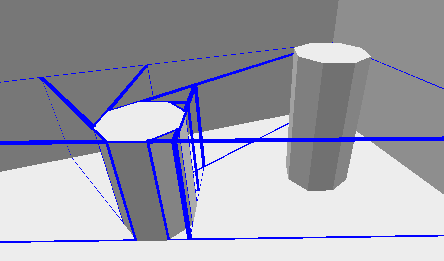
This is from the wiki.
World-vs-detail.png


The one on the right is a func_detail. The left is the same item but not as a func_detail. Essentially those blue(?) lines indicate what the game engine draws that you see.

The best way to think of them. Lets say you have a four sided room. Simple, all the walls that are seen by the outside, should be normal brushes. Lets say you add a couple of walls inside the room. These can be turned to func_details, because they do not need to be rendered everywhere.Im having a hard time explaining it maybe some can do a better job.

A lot of valve maps a lot of the inside of rooms are func_details. They are good for optimization and compilation time. Now going back to that room example, lets say you make a window sill. Nice fancy thing. beveled clean cut etc. This could/should be a func_detail. Because it is just that a detail added. I will work on some screenies from hammer soon. To try and explain better.

Really the key thing is they do not close off a world environment properly(at all). You will understand this better if you choose to do areaportals(these are optimization techniques, again later on).

Grr im probaly confusing, have that tendency if im not making sense just ignore.

Essentialy no need to worry about them at this stage.
 

Latest posts

Back
Top