
Keyboard help.

BraveLittleToaster

Active Member
Joined
Mar 16, 2009
Messages
358
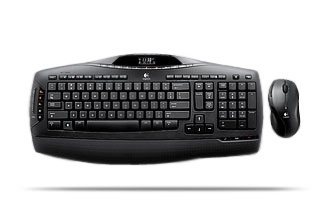
My husband who plays on here has a Logitech wireless keyboard and mouse combo that I have seen people's computer pictures and it seems a lot of you have the same set. Or at least the same keyboard. It's the Wireless MX 3200 Keyboard by Logitech. The mouse is fine, but sometimes when he is playing the keyboard sticks. Like he'll be running forward and let go, and he keeps running forward, and he has to reconnect the keyboard to make it stop. We've made sure the software and utilities for it are up to date, made sure to keep anything that might interfere with the mini connection adapter away, and tried it at varying distances, no luck. Any advice guys?
1422.1.0.jpg
 
Go wired :) also do you notice a certain pattern that makes the forward stick? on an older KB i used ctrl + shift + <key> made that key "stick" until repressed. Could you maybe be accidentally triggering something similar to this?
 
Yes go wired u get the fastest reaction time with it . Also it could be a contact problem between the keys and the actual receptor which could mean that u might wanna disassemble it and clean it with a non wet cloth of some sort if you know how. Also if you spilled any liquid on the keyboard it could mean that some of the keys are starting to go.
 
well I wish it being dirty was the problem but It's brand new. We bought it last week.. so unfortch I think it's a connection problem but I'm not sure how to fix it. Logitech says to move all electronic components at least 5 feet away....the computer would not reach that far from his monitor LOL.
 
there's no problem with the keyboard, wireless things usually aren't meant to be used for gaming and even if you return/replace the keyboard it'll continue doing the same thing. as everyone else has suggested go for a wired solution.
 
hell guys, i got a wireless DELL multimedia keyboard for what 4-5 years now? it's very good. i game on it all the time and it can still be lifted off the table when i want a snack while watching a DVD on my PC. also the multimedia buttons help a lot. (most by playing music while in a game.)

wireless mice though are a whole other story. i had a wireless DELL mouse - it sucked for gaming. now i have a "free" dell wired mouse. fits my hand pretty well, but only 2 buttons and a wheel make it a bit behind the times. (at times it seems a bit inadequatte in COD4/5)
 
not all wireless transmitters are equal. just as not all environments are equal. there may be an external factor such as a EM field or RF [assuming the keyboard is RF & not IR] signal that is interfering and causing the issue, which is why logitech tells you to be 5 feet away from everything, lol.
 
Also when you run wireless keyboard or mouse, make sure your your gear is not beside a cordless phone especially a 2.4 Gz the phone will interfere with some mice and keyboards
 

Latest posts

Back
Top