
Prisoner416 reviews freeware for you! (A series)

I have been busy tweaking up my Windows 7, and also fixing it to triple boot with XP and Ubuntu.

Updates will come within the week.
 
If you're like me, and I know I am, you've got a lot of files on your computer.

Windows search options are okay for basic use, but they take time and resources, and it could be a lot better.

Enter Agent Ransack.

main.png


Agent Ransack is great for searching text files. As you can see in the photo, when you're searching for files, it will display a preview of each file you highlight, along with showing where the terms you searched for appeared.

You can also combine search terms using the familiar Boolean operators AND, OR, NOT. So, you can search for "politics AND President NOT Bush".

The feature list states "Super fast multi-threaded searching with highly efficient search algorithms". All I know is it searches pretty darn quickly.

Plus, it's got a 64-bit version if your OS supports it!

Like most of my reviews, this program comes with the Prisoner416 SEAL OF APPROVAL.

It's almost a required download.

tf2soldier01.jpg


Download it at http://mythicsoft.com/page.aspx?type=agentransack&page=home NOW, MAGGOTS!
 
Last edited:
I am sad.. I started school. :P Don't worry, I got the joke.. Or however it was not related to me at all, but I don't really search for files, I'm organized, but I downloaded it!
 
Windows 7 is great except for the fact that I can't turn off auto-arrange or auto-refresh. I don't like crating a new folder and having it decide it needs to be with its other folder buddies, I want it to stay where I put it so I can place files into it!

It's hell for sorting pictures, manga, artwork, and files in general. WHY MICROSOFT WHY.

Really pisses me off. I'm not the only one, check out this thread of artists and general users: http://social.answers.microsoft.com/Forums/en-US/w7files/thread/960fadd4-c348-4aed-9ee0-c565884787eb

However, I'm getting off topic. This is a freeware thread.

Text editors.

Everyone uses them, normally it's Notepad or Wordpad.

Most people on eGO use Notepad++. I used to, but then I decided I didn't like it. It's too bloated, takes a bit to load, has features I'll never really use... I wanted something light but powerful.

I found it.

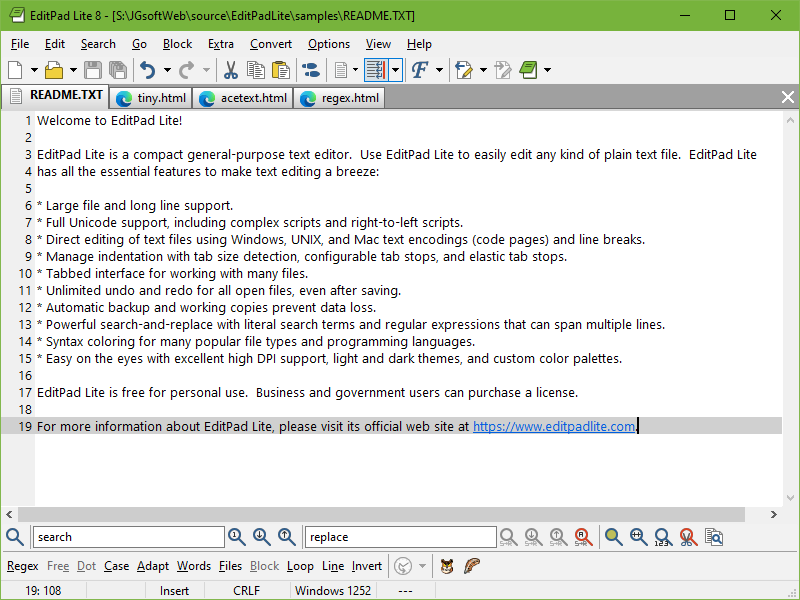
EditPad Lite is quick, simple, and great for me, since I can easily switch the font rendering from Unicode to system defaults. I run with Japanese Unicode enabled, so my condumps normally don't display symbols well. Being able to switch to Unicode displays them properly.

editpadlite.png


It basically does everything Notepad++ does, but in a smaller, faster package.

Get it now at http://www.editpadlite.com/
 
New poll:

What should I review next?

A: Hosts file manager! (Block ads and bad websites)
B: Tools to make XP look and behave more like Windows 7.
C: Tools to add extra functions to Windows 7.
D: Junk file cleaner.
E: Forget the Windows junk, review me some Linux. Get my open-source on!
 
New poll:

What should I review next?

A: Hosts file manager! (Block ads and bad websites)
B: Tools to make XP look and behave more like Windows 7.
C: Tools to add extra functions to Windows 7.
D: Junk file cleaner.
E: Forget the Windows junk, review me some Linux. Get my open-source on!

C
 
Only two votes? Really?

Fine then.

http://www.cp.eng.chula.ac.th/~u50pkt/preme/

Preme is a Windows 7 shortcut utility that adds new and unique keyboard and mouse shortcuts, including a handful of useful ways to interact with windows using your mouse's scroll wheel.

For example, hold your mouse over any window's title bar and scroll down on your mouse wheel to minimize that window; middle-clicking the same title bar area (or just tapping the Escape key twice) will close the active window. Hold down the mouse on a title bar to make windows always on top or not. The utility aims to be particularly user-friendly, with screenshots and interactive demos designed to explain how each shortcut works.

It adds other effects too, some good, some bad. I had some glitches using the "Windows switcher corner" feature where it didn't work, and the "hover start menu" got annoying since I'm used to clicking it to open it. The touch slide window feature is WONDERFUL however, and I can't begin to describe how it works. You have to see it yourself. However, you can disable any feature you don't want.
 
Poll:

Should I do review more tools for power users, like I've been doing, or focus for a bit on "normal" freeware like audio players, video, and such?
 
Back
Top

