Freezing On Startup

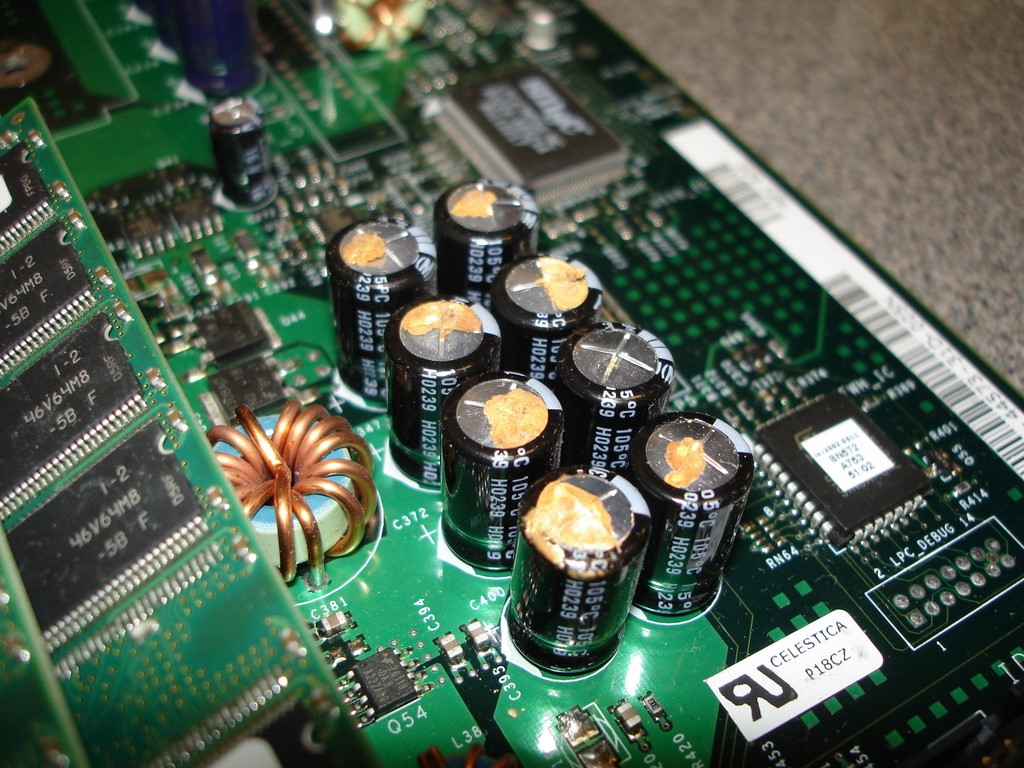
I believe your MotherBoard is on its last leg.. and may be due to burned/leaking capacitors... please open your case and with a flashlight, look for obvious signs of failure... here is a pic to help you know what to look for. If this is what you end up seeing on your motherboard, replaceing the board is the only fix.

DSC07131.JPG
 
Last edited:
Does the computer ever run a check disc when you start it up after it freezes?

I dont want to say its a failing hardrive because everyone likes to say that, but im really going towards the fact that after a while its drawing more power than the power supply can handle, as things become hotter, electrical resistance grows requiring more power in lamens terms
 
Last edited:
well, now that I see it is an eVGA board.. I would lean a bit and say that your PC may be overclocked... start the PC, hit delete after BIOS boots... look for "set to default" or "set all to default" something like that click it, F10 save and quit.. as I to have an eVGA board, 780i in my case, the MCP tends to run hot.. and if not properly cooled or OC'd too far will result in freezes.
 
when the BIOS loads it will come up with CPU blah blah balh 2.4 blah blah
Ram 900mhz blah blah...

F1 to start, Delete to enter setup

hit delete.. this takes you into BIOS setup.. on the far right is the button for set to default... hit it, F10 save and quit = yes

beleive me , its there, eVGA runs all its BIOS on Pheonix.
 
Already took your run for it i presume lol, Silent is correct however, hit the power and hold delete immediately after you start it, that is the only way to access a phoenix bios

thats my fault - Im used to my PC which boots to BIOS automatically until I tell it to load OS
 
So you can't get a picture of Speccy like this one?
bleh.jpg


You can try resetting the CMOS battery.
To do this, take out the CMOS battery (pictured below), unplug the cable running from powersupply to wall, and hold the power button for about 1 minute. Place the battery back in, plug in the powersupply, then boot up.
remove-battery.jpg
 
Back
Top