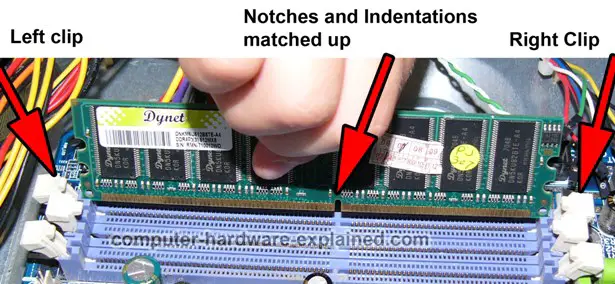
Tools needed to install RAM.

StillV2

Active Member
Joined
May 14, 2009
Messages
364
Planning to go from 4GB to 16 GB and got my shipment in today. Which tools do I need? Will a Philips screwdriver do the trick?

I have watched RAM being installed twice so I got this. I was originally planning on having a xpert do it but they want around $100.
 
As far as I know the only tools you should need are your fingers. :p
 
What mdgrim said -- just your hands are fine, since RAM goes in between pre-built latches on the motherboard that lock your memory into place

Make sure you're clear of any static before you start rummaging around inside your case and/or your case is grounded and you're golden!
 
Yep just make sure the side clips are pushed downwards, and when you put the ram into the slot it will make a snap sound and the clips will be clipped to the side of the RAM sticks.
 
I have watched RAM being installed twice so I got this. I was originally planning on having a xpert do it but they want around $100.

Glad you talked to us before going with that "expert." Expert at ripping customers off. If I were you, I would throw in a review of how ridiculous he's overcharging customers. I know, a business is a business, but unless that $100 included the cost of the RAM itself, then we're all in the wrong business. Charging $100 for 2 minutes of your time. Hell, most I ever seen a person get charged was $10 for a similar, easy service by a local builder, and that was to give builder lunch money for helping the person out (didn't want to charge).
 
Ok I installed it but now I think I'm haing a problem. I'm on Windows 10 and I can't get past the Lenovo boot screen. I've tried using one-key recovery and restoring but it still won't get past the boot screen. So I may have to send it back if I can't get this fixed.

My laptop was working fine until this morning.
 
Last edited:
Ok I installed it but now I think I'm haing a problem. I'm on Windows 10 and I can't get past the Lenovo boot screen. I've tried using one-key recovery and restoring but it still won't get past the boot screen. So I may have to send it back if I can't get this fixed.

My laptop was working fine until this morning.

I'm no expert but a few things that could cause this:

- bad RAM (sucks but is a possibility)
- RAM is put in the wrong way
- RAM is not put in all the way (no clicking sound or visual representation of fitting completely in)
- RAM not supported by Motherboard

Again, I'm no expert but those are some things I've gained knowledge of through experience and just basic computer knowledge. I know more guys around here have better knowledge than me.
 
how-to-install-ram.jpg
 
Um he said laptop above...but agreed.

Try going into the BIOS first and looking for an "optimized" preset. It could be unsupported but that's hard to confirm without details.

Crucial has a great what ram works in my pc tool you can try if you have the model.
 
only using 8 GB, can't figure out how to install the second because the edge doesn't line up and I had to put it upside down that's why my screen was messed up
 

Latest posts

Back
Top