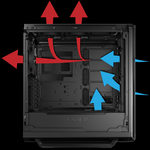
Removing the panel won't guarantee getting lower temps. Without the panel on you don't allow for the air to properly flow through your case/components, especially if your intake fans are on the side then they are just blowing it out of the panel with no side on it.Playing vr on itself is already hardware demanding, so also streaming at the same time just makes it worse. I suggest taking off your side panel so that you can at least have cooler temps for a bit longer.
Playing vr on itself is already hardware demanding, so also streaming at the same time just makes it worse. I suggest taking off your side panel so that you can at least have cooler temps for a bit longer.
What are your pc specs?
dunno if this will helpRemoving the panel won't guarantee getting lower temps. Without the panel on you don't allow for the air to properly flow through your case/components, especially if your intake fans are on the side then they are just blowing it out of the panel with no side on it.
Listing your specs would be helpful to know and also what VR games roughly you are referring to as stated VR is pretty heaving consumption on your hardware so each game matters. Also ensure when you're streaming you're not using your GPU for encoding, you will definitely have issues while attempting to play and stream. It may also help to have as little as possible open on the computer while doing all this. So close out of everything that isn't required for stream ie browser etc. Having only your stream software open and your game will help as well.
Yes that does, and at your specs you should be able to stream and play some VR without problems, I do it with an i7-6700 and a 1070, but I only ever have my streaming program open and my game. Now that also will depend on things you have running and if you don't have proper air flow for your case could result in some throttling.dunno if this will help
![]()