Windows 7 Information

ScrappyDoo

EGO Is My Life!
Joined
Nov 7, 2008
Messages
4,560
I've gotten into a few discussions with people talking about Windows 7. Here's some quick links which might answer questions:


1. Can I upgrade do an "in-place" upgrade from what I have to Win 7?

windows-upgrade-chart.png


"In-Place" means you don't need (but still should...) back-up anything or reinstall anything. You just put the Win 7 disk in and click install.

"Custom" means you will need to back-up your data and need to reinstall everything - programs and drivers, after the Win 7 install.


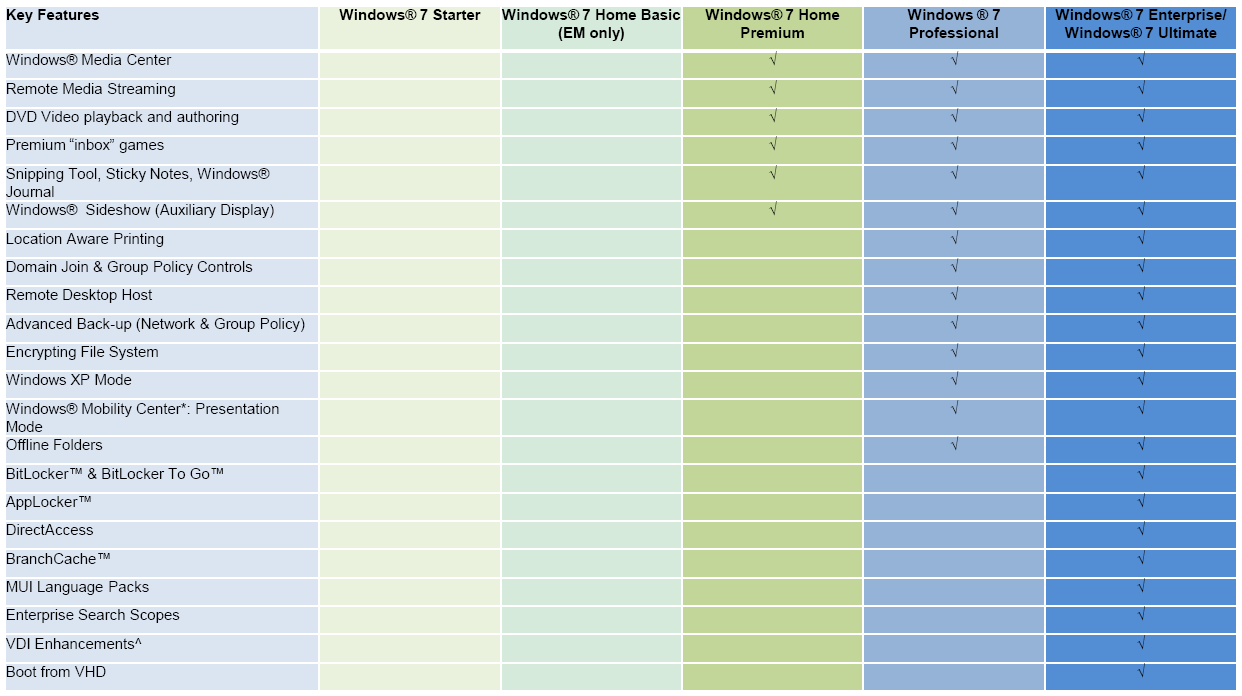
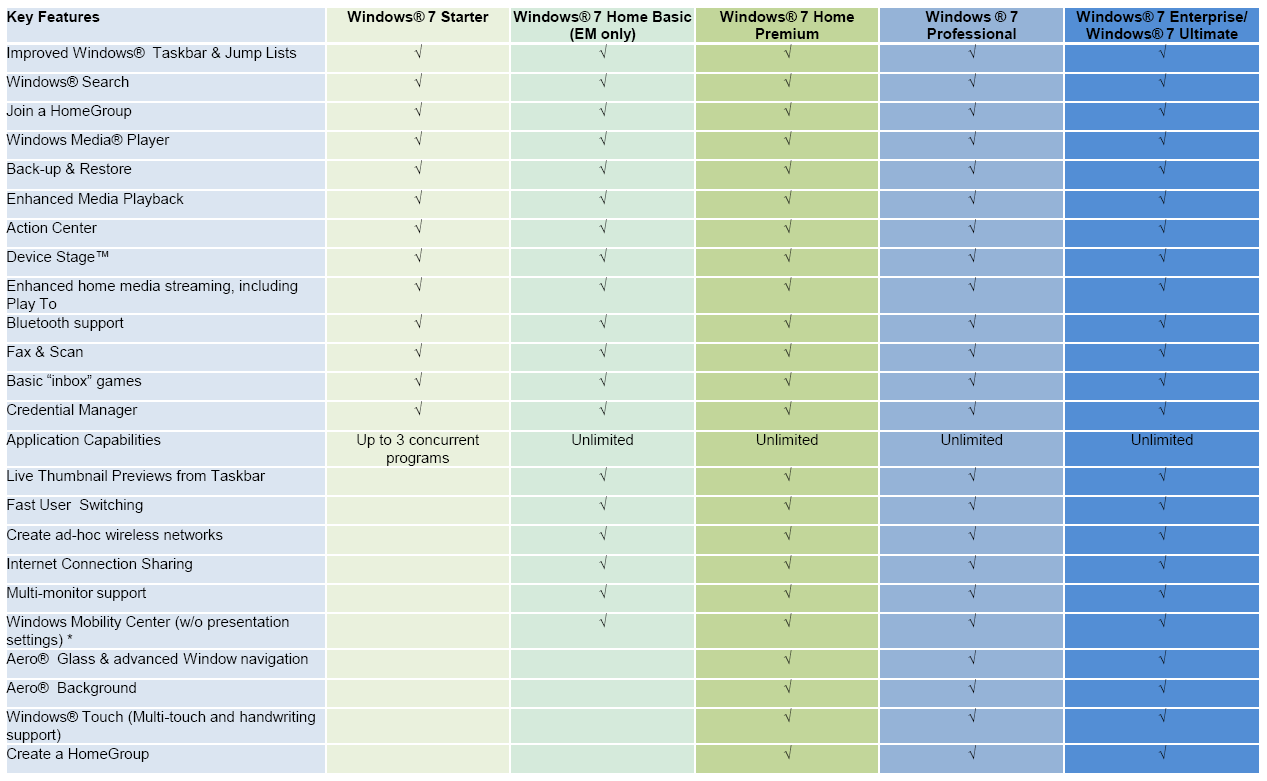
2. What's the big difference between Win 7 Premium, Professional, and Ultimate?


win71.PNG


win72.PNG


Unlike the whole crap around Vista "ultimate", there really is a difference here between Win 7 Ultimate and everything else. Most likely, you will be more than happy with Home Premium. If you expect your home PC to be handling Remote Desktop sessions or need to login to a domain, then you want the Professional version.


3. Try the Windows 7 Upgrade Advisor on your PC.


You can get it from Microsoft, here, and it will scan your PC checking for issues. It's not foolproof, but it will give you a good idea on how many issues you might expect. I ran it on my PC, and it gave me found some minor compatibility issues I hadn't expected.


4. If you're a student, you can get Win 7 at a significant discount.

College students can get Win 7 for about 30 to 50 bucks, depending on version and what site/offer you use. High school students are also eligible depending on state and program.

Right now, you can call the Microsoft store at 1.877.696.7786 and get a FULL (not upgrade) version of Win 7 for 35 bucks - DVD shipped to you.

You might also want to check your student bookstore, student professional memberships such as ACM or IEEE, and software alliance programs.

Of course, if you're a MSDN member, this is all moot.

 
Wonderful information! Just one minor thing, Windows 7 Starter Edition had the 3 program limit removed. So now all you netbook people who want to run Starter Edition don't have to worry about the 3 program limit.
 
I personally think Windows 7 Pro will be good enough... the extras from the ultimate do not enthuse me enough to even think about spending the extra money. Considering I already have 3 copies of win 7 comming my way lol, I think I have spent enough on it :D
 
I've been using it at work for quite some time, and the XP Mode that comes with Professional or Ultimate is definitely nifty.
 
I've had professional for a while. Ultimate doesn't seem like a huge deal to get.
 
ya pro looks tempting with that xp mode - but whats up with the 32-64 bit thing, is it like you get a choice between installing one or the other no matter which you buy? because i cannot see a specific 64 bit windows 7 for sale anywhere...
probably still stick with 32 bit. i don't need to utilize more than 3.4 gb of ram (or whatever it caps it at) and i don't think i use any programs that are 64 bit, so it would probably hinder me more than help me
 
ya pro looks tempting with that xp mode - but whats up with the 32-64 bit thing, is it like you get a choice between installing one or the other no matter which you buy? because i cannot see a specific 64 bit windows 7 for sale anywhere...
probably still stick with 32 bit. i don't need to utilize more than 3.4 gb of ram (or whatever it caps it at) and i don't think i use any programs that are 64 bit, so it would probably hinder me more than help me

when you buy windows 7 it comes with both a copy of 32 and 64 bit versions. I highly recommend installing the 64 bit version. You may not need it now, but in a year or two when you want to upgrade your ram, you won't have to reinstall windows. Just do it.

I've been using windows 7 pro for a while now. Its great, I recommend it for anyone who is considering any upgrades or new os.
 
I have been running windows 7 Pro for about a month now and it is alsome. I don't see the need for Ultimate
 
ya im looking to get that done, my girlfriend went to school at georgia tech and her brothers are currently attending, so i'll be able to grab up a cheap copy
 
just got my copy today, new egg shipped my upgrade copy like a day earlier and came right on the 22, thank you egg :3

it runs greatttttttttt. i cant believe how fast it is. i tried the trail version when they had it, but to me, the finish product (hopefully it is XD) is much faster. files for some reason transfer faster, apps open faster, and even my computer is running more smoothly. its making less noise, and i reinstalled vista like a few weeks ago cause my computer was slowing down.

7 is just awesome, to me that is. some stuff is still being worked on to install, but ill get there. i did a clean install on my harddrive, i formatted and all, because i wanted my main hd to run smooth, in case of anything left over to affect the comp (im not a computer wiz, but i still like to take extra caution XD)

when the sites were having that $50 promo, i was able to grab mines, so bam, $50 for a good OS, awesome.

so far, nothing has gone wrong (cept for one problem which i want to post later :p)

i recommend this to people already, it has been fattyproved :p
 
64bit is fine.

ya pro looks tempting with that xp mode - but whats up with the 32-64 bit thing, is it like you get a choice between installing one or the other no matter which you buy? because i cannot see a specific 64 bit windows 7 for sale anywhere...
probably still stick with 32 bit. i don't need to utilize more than 3.4 gb of ram (or whatever it caps it at) and i don't think i use any programs that are 64 bit, so it would probably hinder me more than help me

I've been running the RC of 64bit 7 exclusively for a while now, ever since Windows search tried to index my XP drive and toasted it. 64bit isn't an issue, it runs everything just fine.
And you may not want the full 4GB now, but you will in the future, might as well invest now.
 
...i can get it for $10 from the U where I got my Grad degree from.
icon_dance.gif
 
interesting little article here that everybody with more than 4 GB of ram should read

http://www.tomshardware.com/reviews/memory-module-upgrade,2264.html

conclusion, unless you use professional applications like auto cad or something, you're never going to benefit from having so much ram

I definitely use up to my 4 gbs very often. I think i actually may need more. I am constantly running multiple programs, most of which require a lot of ram to work. I guess i would be classified as a power user though.
 
I love windows 7! I used it since the first public beta to the RC and I got the MSDN copy for free through my tech program at school! I see no reason why anyone would ever want anything else! With so many different programs to get it through you can find it for cheap fairly easily!

IF YOU ARE A COLLEGE STUDENT OR TEACHER! You can get many things INSANELY CHEAP
Check these out!
http://www.win741.com/
http://www.microsoft.com/student/discounts/theultimatesteal-us/default.aspx
https://www.dreamspark.com/default.aspx
 
Back
Top