



- Joined
- Nov 7, 2008
- Messages
- 4,560
I've gotten into a few discussions with people talking about Windows 7. Here's some quick links which might answer questions:
1. Can I upgrade do an "in-place" upgrade from what I have to Win 7?

"In-Place" means you don't need (but still should...) back-up anything or reinstall anything. You just put the Win 7 disk in and click install.
"Custom" means you will need to back-up your data and need to reinstall everything - programs and drivers, after the Win 7 install.
2. What's the big difference between Win 7 Premium, Professional, and Ultimate?
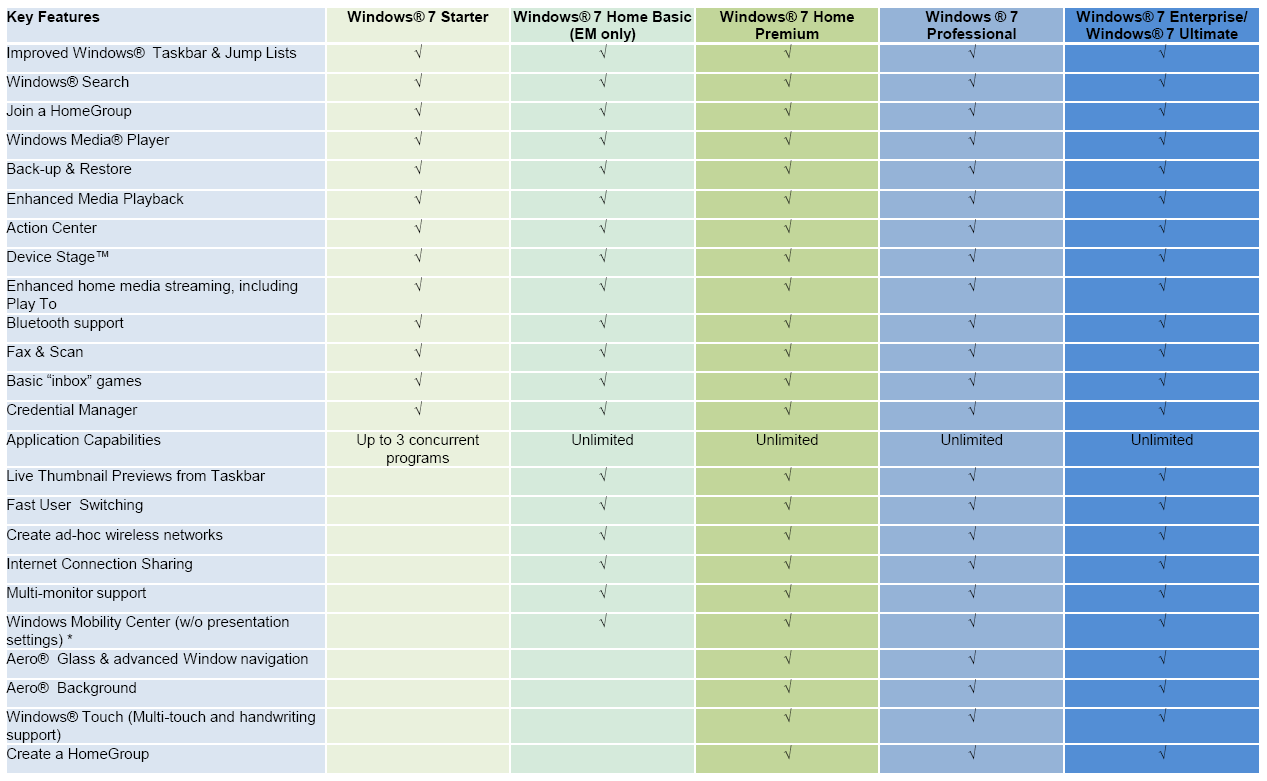
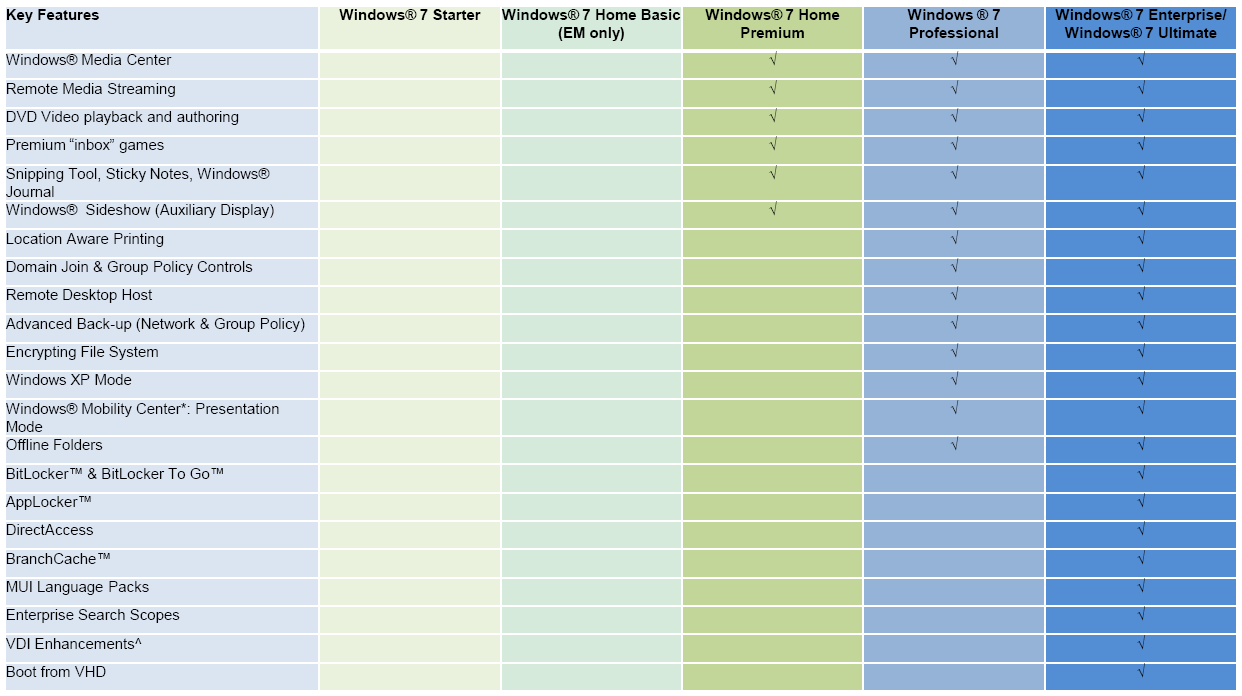
Unlike the whole crap around Vista "ultimate", there really is a difference here between Win 7 Ultimate and everything else. Most likely, you will be more than happy with Home Premium. If you expect your home PC to be handling Remote Desktop sessions or need to login to a domain, then you want the Professional version.
3. Try the Windows 7 Upgrade Advisor on your PC.
You can get it from Microsoft, here, and it will scan your PC checking for issues. It's not foolproof, but it will give you a good idea on how many issues you might expect. I ran it on my PC, and it gave me found some minor compatibility issues I hadn't expected.
4. If you're a student, you can get Win 7 at a significant discount.
College students can get Win 7 for about 30 to 50 bucks, depending on version and what site/offer you use. High school students are also eligible depending on state and program.
Right now, you can call the Microsoft store at 1.877.696.7786 and get a FULL (not upgrade) version of Win 7 for 35 bucks - DVD shipped to you.
You might also want to check your student bookstore, student professional memberships such as ACM or IEEE, and software alliance programs.
Of course, if you're a MSDN member, this is all moot.
1. Can I upgrade do an "in-place" upgrade from what I have to Win 7?
"In-Place" means you don't need (but still should...) back-up anything or reinstall anything. You just put the Win 7 disk in and click install.
"Custom" means you will need to back-up your data and need to reinstall everything - programs and drivers, after the Win 7 install.
2. What's the big difference between Win 7 Premium, Professional, and Ultimate?
Unlike the whole crap around Vista "ultimate", there really is a difference here between Win 7 Ultimate and everything else. Most likely, you will be more than happy with Home Premium. If you expect your home PC to be handling Remote Desktop sessions or need to login to a domain, then you want the Professional version.
3. Try the Windows 7 Upgrade Advisor on your PC.
You can get it from Microsoft, here, and it will scan your PC checking for issues. It's not foolproof, but it will give you a good idea on how many issues you might expect. I ran it on my PC, and it gave me found some minor compatibility issues I hadn't expected.
4. If you're a student, you can get Win 7 at a significant discount.
College students can get Win 7 for about 30 to 50 bucks, depending on version and what site/offer you use. High school students are also eligible depending on state and program.
Right now, you can call the Microsoft store at 1.877.696.7786 and get a FULL (not upgrade) version of Win 7 for 35 bucks - DVD shipped to you.
You might also want to check your student bookstore, student professional memberships such as ACM or IEEE, and software alliance programs.
Of course, if you're a MSDN member, this is all moot.










 )




