Prisoner416 reviews freeware for you! (A series)

I lied. We'll save the defrag tools for another time.

Right now, let's focus on a tool almost everyone on here can use. Steam Cleaner.

http://www.fpsbanana.com/tools/3595

What this handy little tool does is clean out all the crap saved each time you play on Steam.

BE CAREFUL WITH THIS TOOL. If you don't know what something does, don't touch it.

It supports Counter Strike Source, Team Fortress 2, Garry's Mod, Day of defeat: Source, and more.

Why should you use it?

I'll tell you why. Every time you play on any server, temporary files are stored on your computer. Steam doesn't really need them, it just likes to keep them. Steam is an obsessive hoarder that refuses to attend an intervention. Left on its own, it will keep saving enough junk until it buries itself in its own clutter.

Enter the cleaner.

What I normally do is choose the game I want cleaned, tell it to clean the Game Overlay and normal crash logs (who needs those, really?), the temporary spray files (I don't need backup files of every spray I've ever seen), and sometimes I'll remove temporary downloads.

All the files go straight to the recycle bin.

If you are an admin, I advise NOT cleaning demos and screenshots.

Don't even think of touching the "Remove sounds, models, textures, maps, derp" settings. They bring pain and destruction.

Use this tool, and Steam will be a bit quicker, and your hard drive will thank you.


I think Im officially in love with you Prisoner lol
 
Quickie review: Deskpins.

This is a program I found recently because of a problem I had. You see, I listen to music a lot, and like to watch the pretty visuals. However, the windowed visual program would always end up being buried under the folders and windows I was working with. NOT GOOD, as Heavy would say.

So I hunted around for a simple fix, and this program is the best one I found.

It's called DeskPins. What it does is sit in your system tray. Click on it, and a little thumbtack icon will follow your cursor. Click on whatever window you want to stay on the top, and bingo! It gets "pinned". You can even see the little pin in the window title.

dp.png


You can get it at http://users.forthnet.gr/pat/efotinis/programs/deskpins.html

Next review, add AeroSnap, AeroShake, transparent windows, and more to Windows XP, and enhance the same services in Vista/7!
 
Do More Do more !

Settle down there, I'm planning on doing more. I have to pace myself though, don't want to get them all done at once.

Also, someone really needs to show me how to fork the first post into a table of contents for the reviews, or something.
 
Next up is a tool I use everyday, intended mainly for Windows XP users, but still offers some helpful functions to Vista/7.

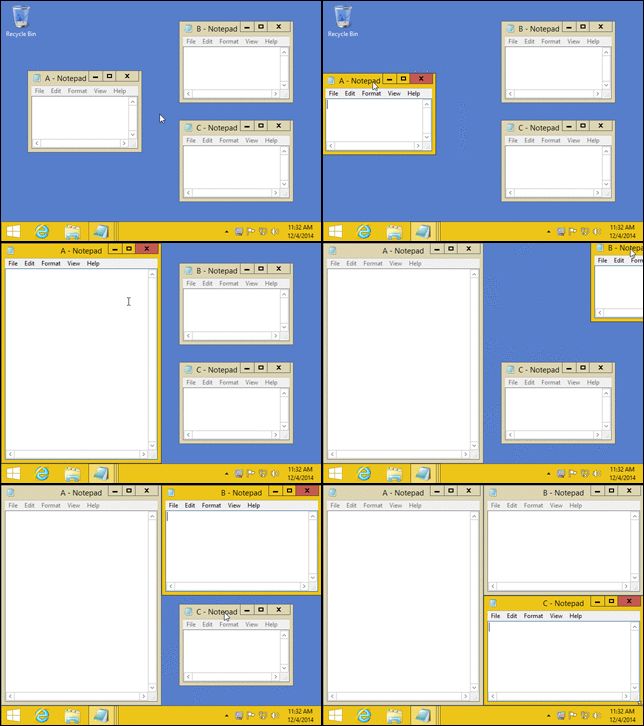
It's called Aquasnap. It's a simple program that replicates the new features of Windows 7. Being able to "snap" windows to half a screen, having windows you move become transparent so you can view what's underneath them, shaking windows to minimize other processes, double-click a window bar to maximize it... it's a very handy tool.

If you already have Windows 7, Aquasnap enhances the snapping function to allow corner access as well. It even works with multiple monitors!

It's also very small, and takes up very little memory, which is always nice.

4_SettingsPage2.png


Get it for free at http://www.nurgo-software.com/products/aquasnap
 
Last edited:
I lied. We'll save the defrag tools for another time.

Right now, let's focus on a tool almost everyone on here can use. Steam Cleaner.

http://www.fpsbanana.com/tools/3595

What this handy little tool does is clean out all the crap saved each time you play on Steam.

BE CAREFUL WITH THIS TOOL. If you don't know what something does, don't touch it.

It supports Counter Strike Source, Team Fortress 2, Garry's Mod, Day of defeat: Source, and more.

Why should you use it?

I'll tell you why. Every time you play on any server, temporary files are stored on your computer. Steam doesn't really need them, it just likes to keep them. Steam is an obsessive hoarder that refuses to attend an intervention. Left on its own, it will keep saving enough junk until it buries itself in its own clutter.

Enter the cleaner.

What I normally do is choose the game I want cleaned, tell it to clean the Game Overlay and normal crash logs (who needs those, really?), the temporary spray files (I don't need backup files of every spray I've ever seen), and sometimes I'll remove temporary downloads.

All the files go straight to the recycle bin.

If you are an admin, I advise NOT cleaning demos and screenshots.

Don't even think of touching the "Remove sounds, models, textures, maps, derp" settings. They bring pain and destruction.

Use this tool, and Steam will be a bit quicker, and your hard drive will thank you.

beautiful - over 200mb of space back from uneeded Steam files.
 
If you're anything like I used to be, your desktop is filthy. No, not the actual desk or the monitor, I'm talking about the massive amount of icons you've saved up over the months.

"I'll sort it later", you say. "I need it on my desktop, it's important, it reminds me to do something, blah blah blah!" you say! Pretty soon you're babbling about collections and visual feedback.

That's when I smack you upside the head and direct your attention to this fine piece of freeware called Fences.

Fences basically sorts your desktop crap for you. You can create custom "Fences", label them by type, and stick all your crap into them. Plus, they are scrollable! You could have 50 icons that you can scroll through in one fences taking up the space of 5 or 10 normal icons!

It even has a backup tool that allows you to save the state of all your desktop icons and restore them at will!

As an added-bonus, you can double-click the desktop, and all your icons will disappear until you double-click again! Makes it nice to look at your wallpaper again, or hide stuff really quickly. It's okay, I won't judge you.

Here's a photo of how I use it. The red team of Team Fortress 2 is not exactly happy to be censoring my private files. In fact, I think some of it scares them. They knew the risks when they signed up.

fences.png


Get Fences at http://www.stardock.com/products/fences/index.asp today!
 
If you're anything like I used to be, your desktop is filthy. No, not the actual desk or the monitor, I'm talking about the massive amount of icons you've saved up over the months.

"I'll sort it later", you say. "I need it on my desktop, it's important, it reminds me to do something, blah blah blah!" you say! Pretty soon you're babbling about collections and visual feedback.

That's when I smack you upside the head and direct your attention to this fine piece of freeware called Fences.

Fences basically sorts your desktop crap for you. You can create custom "Fences", label them by type, and stick all your crap into them. Plus, they are scrollable! You could have 50 icons that you can scroll through in one fences taking up the space of 5 or 10 normal icons!

It even has a backup tool that allows you to save the state of all your desktop icons and restore them at will!

As an added-bonus, you can double-click the desktop, and all your icons will disappear until you double-click again! Makes it nice to look at your wallpaper again, or hide stuff really quickly. It's okay, I won't judge you.

Here's a photo of how I use it. The red team of Team Fortress 2 is not exactly happy to be censoring my private files. In fact, I think some of it scares them. They knew the risks when they signed up.

fences.png


Get Fences at http://www.stardock.com/products/fences/index.asp today!


though i wish fences was actually as good as the folder view for KDE that it coppied
 
Public poll:

What should I cover next?

A: Text editor!
B: Hosts file manager!
C: File searching utility!
D: Secret utility for Windows 7 users!
 
If you're anything like I used to be, your desktop is filthy. No, not the actual desk or the monitor, I'm talking about the massive amount of icons you've saved up over the months.

"I'll sort it later", you say. "I need it on my desktop, it's important, it reminds me to do something, blah blah blah!" you say! Pretty soon you're babbling about collections and visual feedback.

That's when I smack you upside the head and direct your attention to this fine piece of freeware called Fences.

Fences basically sorts your desktop crap for you. You can create custom "Fences", label them by type, and stick all your crap into them. Plus, they are scrollable! You could have 50 icons that you can scroll through in one fences taking up the space of 5 or 10 normal icons!

It even has a backup tool that allows you to save the state of all your desktop icons and restore them at will!

As an added-bonus, you can double-click the desktop, and all your icons will disappear until you double-click again! Makes it nice to look at your wallpaper again, or hide stuff really quickly. It's okay, I won't judge you.

Here's a photo of how I use it. The red team of Team Fortress 2 is not exactly happy to be censoring my private files. In fact, I think some of it scares them. They knew the risks when they signed up.

fences.png


Get Fences at http://www.stardock.com/products/fences/index.asp today!

Im just wondering.. But what's your background in that pic?
 
Public poll:

What should I cover next?

A: Text editor!
B: Hosts file manager!
C: File searching utility!
D: Secret utility for Windows 7 users!

I would like to see which text editor you recommend.
 
Okay, fine! Seems D is the winner for some strange reason.

Who am I to disappoint?

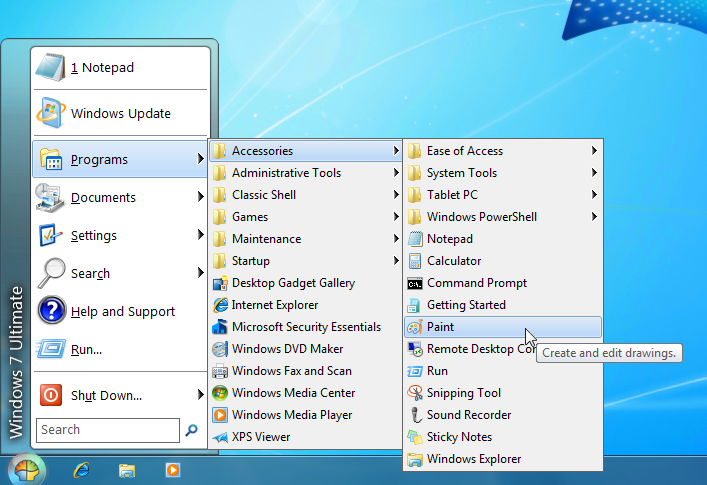
Classic Shell is a collection of features that were available in older versions of Windows but are removed from Vista and Windows 7. It has a classic start menu for Windows 7, it adds a toolbar for Windows Explorer and supports a variety of smaller features.

Here are just some of the features. I cannot go in-depth as I am still running XP.


Classic Start Menu is a clone of the original start menu, which you can find in all versions of Windows from 95 to Vista. Pick from 8 default skins, download more from the Internet, or make your own! It has a variety of advanced features:

* Drag and drop to let you organize your applications
* Options to show Favorites, expand Control Panel, etc
* Shows recently used documents. The number of documents to display is customizable
* Translated in 35 languages, including Right-to-left support for Arabic and Hebrew
* Does not disable the original start menu in Windows. You can access it by Shift+Click on the start button
* Right-click on an item in the menu to delete, rename, sort, or perform other tasks
* Available for 32 and 64-bit operating systems
* Has support for skins, including additional 3rd party skins
* Fully customizable in both looks and functionality
* Support for Microsoft’s Active Accessibility
* Converts the “All Programs” button in the Windows menu into a cascading menu

screenshot.png


Classic Explorer:

Classic Explorer is a plugin for Windows Explorer that:

* Adds a toolbar to Explorer for some common operations (Go to parent folder, Cut, Copy, Paste, Delete, Properties, Email). More buttons can be added manually.
* Replaces the copy UI in Vista and Windows 7 with the more user-friendly “classic” version similar to Windows XP.
* Handles Alt+Enter in the folder panel of Windows Explorer and shows the properties of the selected folder.
* Has options for customizing the folder panel to look more like the Windows XP version or to not fade the expand buttons.
* Can show the free disk space and the total file size in the status bar.
* Can disable the breadcrumbs in the address bar.
* Can display an icon overlay for the shared folders in Windows 7.


For a full list and explanation of what Classic Shell offers, see http://classicshell.sourceforge.net/features.html

Download it at http://classicshell.sourceforge.net/index.html
 
Just updated to Windows 7 Ultimate 64.

Expect delays while I reconfig all my files.

Also, WTF MICROSOFT dropping animated gif support.
 
Back
Top