Question

Fearless888

Active Member
Joined
Dec 19, 2008
Messages
408
I recently heard about something called "keylogging." After looking it up on the internet I have become extremely paranoid.

I noticed that I was lagging when trying to type for the last few weeks or so (it comes and goes) and someone suggested that it might be keylogging. Then I heard someone talking about it again today and people started freaking out and telling him to change his passwords and all this crazy stuff.

I have an antivirus program and my firewall is enabled, but how can I be sure that I am safe? One solution posed on the internet was to monitor the programs that are running on my computer via the task manager (because some keylogging "stuff" runs in the background). How do I know what to look for and how to get rid of it if there is something fishy going on there? Also, what should I do if this has been going on for a long time and I have no idea what I have typed in that time span?

P.S. I have noticed for a long time that the same message pops up when I exit tf2. It shows up next to the "Team Fortress 2" on my games list. Normally it'll say the speed at which I am downloading an update or w/e, but when I exit tf2 after having played it, it says "Syncing." Is this a potential keylogging threat? I am so crazy paranoid right now I just don't know what to do. Please help.
 
Also, I can add a list of the procceses running in my task manager if I wouldn't be relaying vital information that needs to be kept secret. On a separate thread I was reading (in this forum) someone had a potential problem with trojans and one possible source for the problem was a .exe that was just a bunch of jumbled letters (e.g. Axlg3Io.exe). How do I know if it is a vital process or a bad one (because a lot of em seem to be jumbled letters IMO). Thanks again.
 
for your viewing pleasure:
http://en.wikipedia.org/wiki/Keystroke_logging

since you have an active firewall and antivirus its unlikely a keylogger was installed via virus.

If you in fact do have a keylogger on your machine its probably more likely that someone physically had access to your computer and installed it themselves.

What firewall and antivirus do you use? do you have any anti spyware/malware programs installed?

-Blue
 
Last edited:
slayers 5 steps - guide against keyloggers

1. Get 2 computers
2. Get one pc as your main computer
3. Get a good antivirus and firewall. (like mcfee, not AVG because that sucks)
4. on the other pc, install linux. (no antivirus program needed)
5. change ALL your passwords once a month on the linux pc.

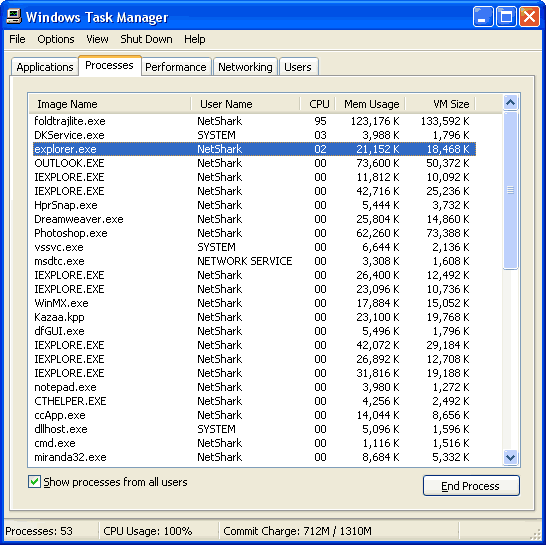
How can u know if a proccess can be terminated or not

Basicly by knowing what the process does.
task_manager.gif


All tasks that has your username behind it, are less likely going to crash. DON'T touch the system tasks. They will get your pc messy. By knowing what each process does, u can figure it out what they do. for example: ventrilo.exe: we are absolutely certain that this is "safe" to terminate. But, do know that u can lose work, data, are what ever when u do this. For example in office word. Googleing the process u want to terminate can help u to. Scan your pc once a week with a GOOD virus scanner.

Hope this helps.
 
I have mcafee. Thanks for the tips (although I doubt I can afford 2 comps lol).

P.S. Any ideas on the "syncing" issue I described in my first post? That is what initially caused my concern. Also, would allowing steam, hl2, and the gameoverlayGUI to pass through my firewall be a cause for concern? A message kept popping up from my mcafee and I couldnt use friends or anything in game unless I allowed that stuff. Thanks.
 
I have mcafee. Thanks for the tips (although I doubt I can afford 2 comps lol).

P.S. Any ideas on the "syncing" issue I described in my first post? That is what initially caused my concern. Also, would allowing steam, hl2, and the gameoverlayGUI to pass through my firewall be a cause for concern? A message kept popping up from my mcafee and I couldnt use friends or anything in game unless I allowed that stuff. Thanks.

the "syncing" problem you are describing was recently rectified in a steam client update I believe yesterday or the day before. So problems with syncing are caused by steam glitching out and are not a result of keyloggers.

As for allowing ports to be open for steam through your firewall, here is a list of ports that are safe and are required for steam:

Steam Client
UDP 27000 to 27015 inclusive (Game client traffic)
UDP 27015 to 27030 inclusive (Typically Matchmaking and HLTV)
TCP 27014 to 27050 inclusive (Steam downloads)
UDP 4380

Dedicated or Listen Servers
TCP 27015 (SRCDS Rcon port)

Steamworks P2P Networking and Steam Voice Chat
UDP 3478 (Outbound)
UDP 4379 (Outbound)
UDP 4380 (Outbound)

Those ports HAVE to be open for steam to function fully and properly. In fact, if some of those ports are closed or not fully open, it could and is probably causing your sync problems.

As for your antivirus, Mcaffee is not the best but is sufficient in blocking keyloggers in viruses I would suppose.

You should also think about getting some anti-spyware programs installed. Good ones are

Windows Defender (probably already installed)
Spybot S&D
Superantispyware

-Blue
 
I have mcafee. Thanks for the tips (although I doubt I can afford 2 comps lol).

P.S. Any ideas on the "syncing" issue I described in my first post? That is what initially caused my concern. Also, would allowing steam, hl2, and the gameoverlayGUI to pass through my firewall be a cause for concern? A message kept popping up from my mcafee and I couldnt use friends or anything in game unless I allowed that stuff. Thanks.

It doesn't really need to be a "good" comp with a i7 or something. My laptop (wich is crap :P) runs linux fine. Doesn't run windows, because it's to heavy. Put linux on it, now it's fast like a bird. My laptop is around 4-5 years old. And what do u mean by syncing? I bet that u cannot for example use your steambrowser in game? I have the same problem. My mcfee blocks it. Don't really care the rest works fine =)

 
McCaffee is honestly good software, but it uses ALLOT of resources. Most likely its doing what you want it to do. Spybot Search and destroy is good anti spyware, you may want to try MalwareBytes if you get the chance. Its some good stuff. To have control over your computer, you should check processes from time to time and always know what they are running for. Knowledge is power...and knowing is half the battle....the other half is hoping windows doesn't turn rogue on you.
 
mcfee best. Only when they released malacious update once. That made my pc go insane man. Good thing it was broke at the time so i did not lose any data (phew)
 

Latest posts

Back
Top