




- Joined
- Sep 8, 2024
- Messages
- 710
SMP BETA TEST 11/29/25
Hey Minecrafters! This guide will act as sort of an introduction and help page for tips/tricks regarding everything to do with the brand new SMP server. SMP stands for Survival Multiplayer and its exactly what it sounds like. The server provides many different avenues for whatever you would like to do in Minecraft! It provides an experience for players no matter if their interest is building, pvp, pure survival. If you want to show off your builds to others in the eGO community you have the freedom to do that or if you want to thrive and become the richest player on the server you may do that as well. The opportunities are endless! Despite trying to keep the pure survival mechanics. Minecraft Leadership did add many new features and updated existing Minecraft features to keep things fresh and interesting. All of these things will be explained down below with helpful commands to guide you on your journey!
Land Claiming
The Minecraft Server does introduce Land Claiming as a way to protect your builds and bases. Ensuring you do not need to be online 24/7 to protect your builds. The Land Claiming system also introduces many new features to keep things unique, like settings to fine tune your plots to be perfect for you or creating Nations and having relations with other Nations. Listed below are useful commands for Claiming:
• /land claim (radius) - Allows you to claim a specific area, typing the command without radius will claim one chunk.
• /land trust (User) - Allows you to trust another user adding them to your claim making your claim CO-OP.
• /land claimlist - Shows all of your claims in the world and their position.
• /land menu - Pulls up a helpful GUI menu that helps you fine tune your land to you.
• /land setspawn - Allows you to set the spawn for your land.
• /land chat - Allows you to talk in your own chat for you and your land members.
• /land top - Shows the top lands.
• /land deposit - Allows you to deposit money into your land bank (/land bal).
• /land storage - Allows you to place things in a secure land vault.
• /nation create (name) - Allows you to create a nation.
Players will start off with 25 chunks of land and gain 1 chunk for every 30 minutes of playtime (this time can be spent afk). This has a maximum of 100 chunks.
Jobs
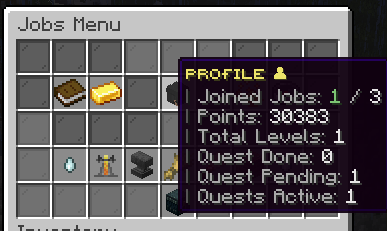
Jobs are very helpful to earn passive income for doing things you would normally in survival. There are 21 different jobs to do covering a vast majority of progression phases in the game. As you do these jobs more you will level up gaining more XP and earning more money from doing simple tasks. Every job features a unique questline that will reward you with XP and Jobs points. Job points may be used in the jobs shop to unlock rare items you may have not found in the world! They can also be used to buy boosters that earn you and the entire community more money and XP from the jobs.
Use /jobs to get started!
Skills
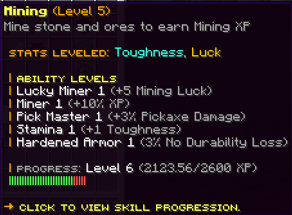
Skills are a unique way to level up your progression and slowly make you more powerful throughout your playthrough. Every aspect of the game has a unique skill with an expansive skill tree to level up unlocking powerful boosts to use on your journey.
Unlike jobs you will not need to select a skill to level up. All skills will level up passively as you gain XP in that specific skill. You can use these upgrades to increase your health, better your combat skills, or help you make more money.
Use /skills to get started!
Economy
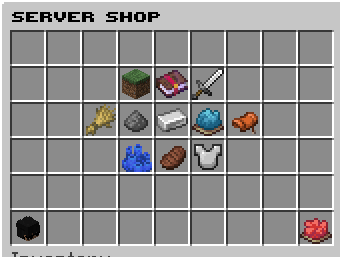
SMP does have its own Economy with a built in server shop as a way for players to gain money to trade with other players. Prices of items will change every week as more items are sold and bought. If an item is being sold a lot the price will go down or if a specific item is in high demand the price of that item will go up. Price changes will be announced in discord weekly as part of balance changes.
Use /shop to get started!
Spawners are obtainable in SMP however they are extremely rare, you will only be able to obtain spawners by finding them in the world and breaking them with a silk touch pickaxe. Spawners are designed to be used for XP farms only, and will produce very low amounts of money as the selling prices for the mob drops that come from spawners will remain very low.
Custom Beacons
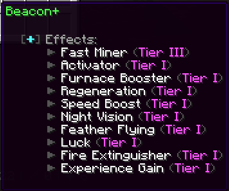
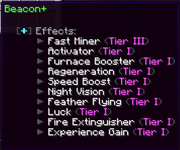
Custom Beacons are available in all tiers of crates as an endgame item that allow you to get a wide variety of effects in your base. They are also very easy to carry around only requiring ore blocks under them if you have multiple effects that use a lot of beacon power. There are a wide variety of effects available. They include but are definitely not limited to:
• Chunk Loading
• Night Vision
• Fly (Yes allowing you to fly in that chunk)
• Luck
• Gaining Experience (Gains experience passively, you can be afk for this to work)
• Multiplying Gained Experience (Great for XP Farms)
• Furnace Boosting
• & much more!
You can upgrade and unlock these effects by buying them in the Beacon menu. Regular Beacons are still available via the crafting recipe. There will be a community poll to allow these to be craftable in game. However, for now, they are only available in the Vote Crate and Legendary Crate.
Cosmetics
Cosmetics are available in three different forms: Trails, Chat Tags and Pets. Trails and Chat tags are limited to Dedicated Supporters only, a list of Tags/Trails will be available in the DS Section. Non-DS will gain access to one special Christmas Tag.
Use /trails and /tags to apply these if you are a Dedicated Supporter!
Pets are buyable in game and available no matter your rank. Pets have special properties even allowing you to ride and fly with them. Every mob in the game is available as a pet ranging from a wide variety of prices. However, the pets that allow you to fly are very expensive only meant to be obtainable in the end game.
Use /pet buy to get started.
Chest Shops
Chest Shops allow you to be constantly selling items and buying items at your base/land. You are able to make them for any item and you can choose to make them sell/buy only (or both).
Creating a Shop Exclusively for Selling
• Write [Sell] on the first line
• Write the amount of items you are buying on the second line
• Write the name of the item you are buying on the third line (Ex: Diamond)
• Write the price you are buying the item for on the fourth line
Creating a Shop Exclusively for Buying
• Write [Buy] on the first line
• Write the number of items you are selling on the second line
• Write the name of the item you are selling on the third line (Ex: Diamond)
• Write the price you are selling the item for on the fourth line
Other Useful Information/Commands
This section will mainly just run through some other useful commands and mechanics that could help you along your journey as well as some quality of life commands.
• /ah - Brings up the Auction House allowing players to buy/sell items from others
• /cf - Allows you to coinflip other players in a 50/50 chance
• /pv - Brings up Private Vaults available to all players (Even if you are not Dedicated Supporter!)
• /quests - Brings up a menu of quests to complete which includes over 2,000 quests!
• /rtp - Allows you to randomly teleport anywhere in the world (Careful this has a cooldown!)
Dedicated Supporter Perks
These will be listed here to give a clear idea of all the perks which includes all the Tags/Trails available at every level of Dedicated Supporter. DS Perks are mainly designed to be Quality of Life perks and Cosmetic items. However, they will provide some useful items in their kits as a thank you to those who support us to keep our servers open. The perks go as follows.
Silver
• /feed - Feed yourself allowing you not to have to carry food on you
• /craft - Opens up a personal workbench
• /disposal - A trashbin for discarding unwanted items
• /hat - Wear any block as a hat!
• /kit silver - Includes useful items like tools/armor
• /nick - Allows you to set your own nickname
• Access to 2 Private Vaults
• Allows you to sell 5 items at once on the Auction House
• Tags: Cupcake, Detective, Gambler, Gentlemen, Gooner, Hustler, Jailbreak, Lover, Legend, Maniac, Masked, Mechanic, Mossy, MrNiceGuy, Obsessed, Original, Quake, Rocky, Shark, Shroom, Toxic, TTT, Undefeated, Undetected
• Trails: Cloud, Crit, Enchant, Endrod, Flaming, Note, Redstone, Slime, Water
• Access to 5 Sethomes!
Gold
• /anvil - Opens up a personal anvil
• /kit gold - Provides useful tools/armor
• /near - See players that are close to you
• Access to 3 Private Vaults
• Allows you to sell 7 items at once on the Auction House
• Tags: Alien, Ashes, Beatbox, Champ, Citadel, Combine, Comeback, Crazed, Diamond, Evil, Firstblood, Frosty, Goated, Handsome, Paranormal, Unreal, Vin Diesal
• Trails: Dragons Breath, Hearts, Nautilus, Portal, Smoke, Soul, Totem, Witch
• Access to 7 Sethomes!
Platinum
• Keeps XP on Death
• /kit platinum - Provides useful tools/armor
• Access to 5 Private Vaults
• Allows you to sell 10 items at once on the Auction House
• Tags: Bang, Celestial, Destined, Detained, Factor, Fracture, Fresh, Greatest, International, Jimmy, Kaboom, Loyal, Master, Parrot, Pork, Rival, Smoker, Unphased, Vamos, Venom, Yin-Yang
• Trails: Ash, Campfire, Electric, Honey, Nectar, Slime
• Allows you to set 10 Sethomes!
Royal
• /repair - Repairs your Tools.
• /ext - Puts out fire if you are currently burning
• /kit royal - Provides useful tools/armor
• Access to 10 Private Vaults
• Allows you to sell 20 items on the Auction House at once!
• Tags: Bread, Castle, Cherry, Cookie, Dangerous, Doom, Fortunate, Hardcore, Idol, King, Magnificent, Majestic, Nebula, Quantum
• Trails: Blossom, Crimson, Glow, Sculk, Sparkle, Warped
• Access to 15 Sethomes!
Attachments
Last edited:


