Am i just cursed?!?!

Joined
Dec 20, 2008
Messages
120
Ok guys, i decided that this year with my income tax return i was gonna build myself a new machine.
My old HP had a problem stuttering in games that i had just learned to live with, but now my newly built (about 5 hrs old!) pc does the same thing!

The only carryover from the old to the new is a Core 2 Duo e6400 that im using until i buy a new cpu.

Can it be just a bad cpu, or am i cursed?!

New System:
(old) e6400 @ 2.13ghz
Gigabyte ep45-ud3r
XFX ATI Radeon 4850 512mb
4gb OCZ pc-8500 ram
Windows 7 64-bit (just trying it out for now)
Antec Earthwatts 430w PSU
 
Hmmm... I think its definitely your processor. If your computer has lots of background processes then it can really bog your CPU down
 
Thanks for the response.

Im fairly certain (read "really hope") it has to be my cpu, and as for background processes, the only programs i have installed are steam, team fortress 2, and portal.
 
well it's got to be your processor since all your other components are brand new.

as for a new processor to get, the core 2 duo e7500 is a good choice. it should work with your motherboard fine.
 
I know a good witch doctor who might be able to uncurse you for a small fee?
 
maybe try tweaking your computer for better performance, turning off services that are not windows essential

you can find lists of services at the link below and if they are safe to disable.

http://www.blackviper.com/Windows_7/servicecfg.htm


also i see a problem already just looking at your system specs.

your running a 430watt psu with 2x 12v17A rails (thats pretty low amps) and 1x 6pin PCI-e power, your video card calls for minimum 450watt psu with 2x 6pin PCI-e powers connectors (not sure how many amps your card calls for but im sure its way more than 17amps). but i can give and educated guess that this could be some of your problem with stuttering.
 
Last edited:
Just curious, did you do clean install?

not sure how many amps your card calls for but im sure its way more than 17amps

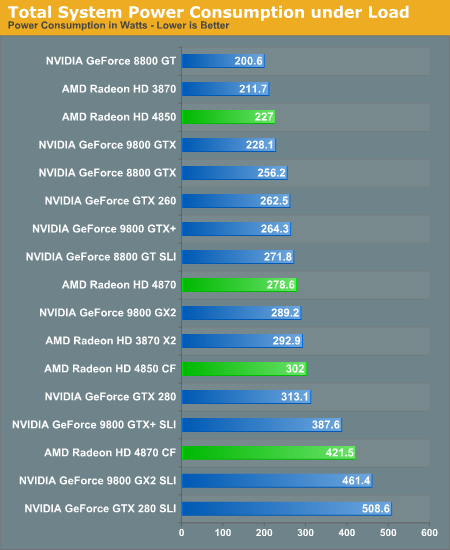
You and I both know that there is now way a 4850 can suck down 200 watts all on it's own.

17144.png


Intel QX9770, 4 GB Corsair DDR 3, Intel DX48BT2, and an old Seagate 120 GB HDD.^^^

There is no way Paperbags' system is pushing anything close to 400 watts.
 
Thanks for all the input guys!
I thought it may be the power supply as well, however the stutter was there with my old system that had an 8600gt that doesnt require a pci-e power connector.

As for the HDD, i forgot to list it, but i have a WD 500gb Caviar Black Hard drive.

Also, i've got an older pc that has a socket 775 Pentium D 820 that im gonna try installing today, I'll come back and post the results.

EDIT:
Im also gonna try installing my 8600gt just to try and rule out the power supply! thanks again!
 
Last edited:
Sorry for double posting....

Update:
Installed Pentium D 820... Stutter still there
Changed Keyboard..... Still there
Changed Mouse.... Still there!

So, is it possible that it is an issue with the outlet or power in my apartment?
Im gonna try moving it to a different room, and then maybe to a friend or my parents house.

Any ideas guys? im desperate!
 
Here you go.... I have stuttering on my computer too... however it is relatively minor and does not bother me most of the time. None the less, I would like to get rid of it. This stuttering happened on both my last computer and my freshly built computer.

Could you clarify something for me though... When you say stuttering you need to be a little more clear... are you getting actual like framerate drops or spikes that are causing stuttering or is it just some smaller stuttering that isnt actually caused by your framerate.

My stuttering is the kind that is minor and not caused by any framerate fluctuations. Since I had it on both my old and new computer, I think it is actually the monitor that is causing the stuttering. Have you ever heard of monitor input lag, its actually a delay in when the picture is drawn on an LCD vs an old CRT, and since it fluctuates depending on the monitor, ity may be the cause of stuttering. I personally have not tried a different monitor since my stuttering doesnt really bother me all that much. If yours is the same sort, then I might try that, especially if you have an LCD monitor.

Just a few thoughts. Good luck.
 
I suppose it's possible that the PSU isn't receiving steady electrical flow from the outlet, at least trying it in a differnt room can't hurt...
 
My stutter, for lack of a better word i guess, doesnt seem to be related to my fps. It happens regardless of my fps and it happens when im not connected to the internet.

It is difficult to describe, but it is most noticeable in enclosed areas like the sewers in 2fort on TF2. I'll be moving forward and i can see the walls freeze for a split second and then return. Also when turning corners, the corner seems to almost flicker and skip.

As for the monitor, i've tried 2 lcd and the pc input on my HDTV, and all have the same problem.
I've pretty much looked at everything, but i havent checked out input lag for the monitor. Thanks for the input Mustachio.
 
with older systems you get bottle necks of all kinds.. not to mention with prebuilts (hp,dell etc) you get heat problems when running resource intencive programs such as games.

this stuttering prob could be due to hardware bottlenecks(likely), or heat issues (very likely..usually bad airflow in prebuilt cases) as well as dust and dirt buildup in fans/heatsinks etc...

@ hyperion, no the card wont suck down 200watts on its own. but it will suck more than 17amps from his powersupply causing fluxuations. there is a large difference in watts and amps.
2x 12volt rails at 17amps each is not alot when you start using newer hardware.

i usually blow out my case/fans/mobo/vga fans. and vac out my psu once every 3-4 weeks.

defrag once a month. and formatt harddrives once every 8-12 months
 
other than what ive posted.. you could have driver issues. i know with nvid cards the newest drivers really suck. stick with 178.24 drivers for nvid till the newer drivers are tweaked for better performance.

i dont mess with ati much so not sure about the drivers for it. but you can always try using older drivers/updating to newest. to see if the stutter goes away.
 
with older systems you get bottle necks of all kinds.. not to mention with prebuilts (hp,dell etc) you get heat problems when running resource intencive programs such as games.

this stuttering prob could be due to hardware bottlenecks(likely), or heat issues (very likely..usually bad airflow in prebuilt cases) as well as dust and dirt buildup in fans/heatsinks etc...

@ hyperion, no the card wont suck down 200watts on its own. but it will suck more than 17amps from his powersupply causing fluxuations. there is a large difference in watts and amps.
2x 12volt rails at 17amps each is not alot when you start using newer hardware.

i usually blow out my case/fans/mobo/vga fans. and vac out my psu once every 3-4 weeks.

defrag once a month. and formatt harddrives once every 8-12 months

Basic math homeslice, you just failed it! Volt x Amps= Watts. 12x17= 204x2=408. If the card draws less than 200 watts, it must also draw less than 17 amps because voltage is a constant. Next time, please make sure you know what you are talking about.

In all likelihood the card draws around 100 watts(8.3 amps) under load.

Guess, you are WAY over thinking this issue. Keep it simple; odds are, he just needs to re-install his OS.

@Paper

Dude, just go ahead and do a re-install. It is 95 percent likely that the source of your problems is some sort of driver/software conflict, and an OS re-install will clear it right up. It is a bit of a pain, but in the long run it is completely worth it. There is nothing quite like watching your comp boot up in 30 sec.
 
I can try doing a reinstall i guess. Just built the pc yesterday, so the OS has only been running for less than 24 hours. The problem existed on 2 completely different machines, so im not sure what else to do.
 
When you do the re-install, install only essential drivers first. See if you still have the problem. After that, install one program at a time until you find which one is doing it.
 
It is difficult to describe, but it is most noticeable in enclosed areas like the sewers in 2fort on TF2. I'll be moving forward and i can see the walls freeze for a split second and then return. Also when turning corners, the corner seems to almost flicker and skip.

Have you played with your in-game video settings? Turn down/play with the settings and see if it still happens. Also, be sure to check the new multicore rendering option in the advanced tab.
 

Latest posts

Back
Top