New Hardware New Desktop

Sata to 8 pin connectors are a yikes. Would not do that if you have another option. I only see them used on really low end builds and... really high end builds for some reason. Oh well
 
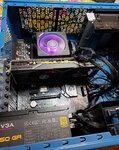
New psu installed and still no display. Gpu fans are running.
 
Last edited:
Like I said, the motherboard has no graphics so the port on there is completely useless for you. The port on the GPU is the only one that would be outputting. Just to confirm, all the fans are spinning, there's no noises or post codes being outputted by the mobo, and everything that can light up, is currently lit up? When you turn on the computer does the monitor change states? ie go no display detected. Can you post another photo too?
 
No post codes after the initial flash. No sounds being emitted. Only have the cpu, gpu, and ram currently plugged in. Fans on cpu and gpu are spinning and the only ones currently plugged in. Monitor just says no signal.
 

Attachments

  • 20200925_164027.jpg
    20200925_164027.jpg
    1.5 MB · Views: 177
Did you try clearing cmos again after you did that? Can you confirm the GPU is also fully seated so that the lock on the bottom at the pcie connector is locked? Additionally can you confirm that the hdmi connector is fully plugged in on both sides and the monitor is set to the right input?
 
There we go! Love to see it. You mentioned earlier the storage wasn't plugged in right? Plug in your windows install media and then it should recognize it and you'll be on your way
 
Yeah i've got to put it all back in and connect everything else but thank you guys so much. This has been a huge pain. Last computer I built was with my dad probably a decade ago and he did most of the building.
 
Haha yeah, it's changed a bit since then. Compatibility is the biggest issue, things like psus not being big enough happens a lot. Glad you got it working
 
Just curious because I didn't see it; what was the cause of the issue? Did you need to clear CMOS? Or was it a loose connection?
 
There were a few things but what it came down to at the end was the input was on vga and not hdmi.
 
and that's why we cover all the small things when troubleshooting
It's always something small and silly. I was also going to suggest a tribute to the gods was missing. Every time I build a PC without gloves on, I somehow always manage to give myself the equivalent of a papercut. Damn heatsink blades! :LOL:
 
Well the ram was in the wrong slots, the psu wasn't good enough, and finally the monitor wasn't on HDMI. Had I just used the TV as my monitor like I usually do, I would have been in better shape. But the TV isn't as portable to take to the dining room table. But it works in the end so that's all that matters.
 

Latest posts

Back
Top