
Counter-Strike Global Offensive Jail Server Sonitor: Account Age + Jailbreak Logs Analyzer

  • Thread starter Thread starter MS
  • Start date Start date

MS

EGO Zealot
Joined
Dec 10, 2019
Messages
1,966
Hi all, you may have recently seen my SteamAge account checker. If you play our Jailbreak Server at all, you may be familiar with the logs that are printed in console every round.
While these logs don't always give a complete description of what happens in the rounds, they often times can be extremely helpful when trying to figure out what happened, who did something, or why they may have done it.

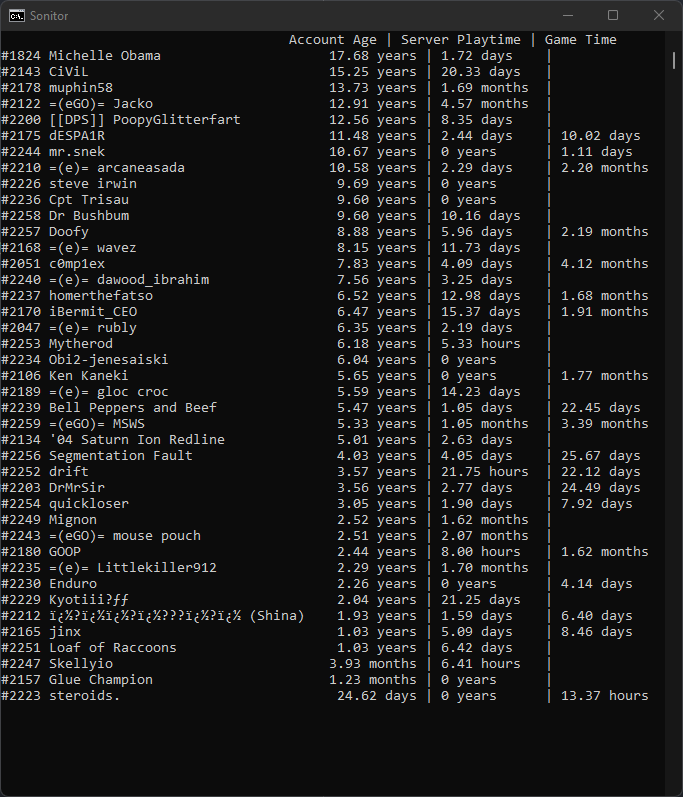
Introducing Sonitor: An application that combines the SteamAge program with a brand new Jailbreak Analyzer. Sonitor has all the features and configurability of SteamAge but with Jailbreak Logs integrated into itself. Additional support for TTT may be added in the future, depending on how well this is received.

Download Here!

Examples:
FbzInLQ.png
UKJijMa.png
Screenshot 2021-12-31 114123.png

Installation has been streamlined!
No longer will you have to worry about toggling settings or diving through your folders. Sonitor will automatically figure out or assign your CS output file. Alternatively, if you do not have an autoexec.cfg file, it will create one for you.

Note: for Counter-Strike: Source Players, you will have to manually specify the game's directory.
Note: the EXE file is recommended for novice users, the JAR version is supplied for compatability.
  1. Download Sonitor.exe
  2. (Optional) Move it to a preferred folder
  3. Run Sonitor - First time will generate a settings.txt file.
  4. The generated file should automatically open.
  5. Open the link that is after steamkey=.
  6. Register your Steam API Key.
  7. Paste it back into settings.txt
  8. (Optional) Mess around with the settings.txt file, Sonitor is very configurable
  9. Run CS.
Sonitor is packaged into a single executable program: no CMD Prompts, no dumb command typing, just double click (do a few extra steps) and you are good to go!

Sonitor's Features
  • Parse and analyze Jailbreak Logs
  • Summarizes the round in fewer words, with less spam
  • Supports button aliases. If you run into an Unknown (#00000) format, you can set an alias and logs will reflect alias
  • Prints out potentially suspect situations such as:
    • When a CT kills a prisoner after the warden has died
    • When a CT kills a prisoner less than three seconds after a warden has been selected
    • When a CT breaks vents before a prisoner has
    • When a CT drops a gun and a prisoner uses the same gun
    • When a player pushes a button and other players die by the world soon after
    • When a player throws a grenade and other players die by the world soon after
    • When a spectator deals damage to players
Usage
Sonitor will watch over the console output of Counter-Strike and print out events when they trigger. For account ages, this happens when you type status in the console. For Jailbreak Logs, these trigger when the round ends.

Download Here!

You can read more about SteamAge specifically here.
 

Attachments
  • Screenshot 2021-12-08 020241.png
    Screenshot 2021-12-08 020241.png
    63.9 KB · Views: 143
Last edited:
bro you're fucking insane.
when i get back to jailbreak this will be a really handy tool. THANK YOU!!!
 
Super cool! How did you come up with the name?
Me: Hmmm what should I call this?
Me: well- the base name is Monitor cause it monitors logs of course.
Me: yeah but monitor is too bland, way too generic; not searchable
Me: I want to add my name to it! But… MSMonitor doesn’t make much sense.
Me: Maybe SMonitor? No… not smooth enough
Me: I know! I’ll just remove the M, Sonitor! Perfect!
 
Me: Hmmm what should I call this?
Me: well- the base name is Monitor cause it monitors logs of course.
Me: yeah but monitor is too bland, way too generic; not searchable
Me: I want to add my name to it! But… MSMonitor doesn’t make much sense.
Me: Maybe SMonitor? No… not smooth enough
Me: I know! I’ll just remove the M, Sonitor! Perfect!
An artist at work haha
 
Rule breakers and evaders will be gone now. Thank you so much for all that you do. Manager soon!
 
Wow, that’s an insane work and will be so helpful !
You’re so good 👌
 
bro you're fucking insane.
Good programmers are. That is why I chose the hardware side and stayed sane.

Thank you so much on making it even easier for everyone to install and use this amazing piece software.
 
A couple things worth noting to those who may end up using this program (until the issues get patched):
  • This is an edge case bug (meaning it's a rare issue that can't be replicated on a majority of computers), but if the program can't find output.log for some reason, try this:
    When starting the program for the first time, you need to open settings.txt and make sure that there is a `output.log` at the end of the first path/variable (directory) and that console logging is enabled in autoexec (and outputting to `output.log`)
  • If you're an admin, gang logs will be outputted. Atm, this crashes the program with an IllegalArgumentException. Until this is fixed, you'll need to navigate to your CS directory, open output.log, and delete everything inside of it, then restart the program every single time there are gang logs. ISSUE HAS BEEN FIXED, thank you MSWS
  • There's the odd crash with an error in the Timer class, no idea what causes it currently ISSUE HAS BEEN FIXED, thank you MSWS

Bugs aside, great program. It's definitely going to save me a lot of time[/u][/u]
 
Last edited:
A couple things worth noting to those who may end up using this program (until the issues get patched):
- When starting the program for the first time, you need to open settings.txt and make sure that there is a `output.log` at the end of the first path/variable (directory) and that console logging is enabled in autoexec (and outputting to `output.log`)
- If you're an admin, gang logs will be outputted. Atm, this crashes the program with an IllegalArgumentException. Until this is fixed, you'll need to navigate to your CS directory, open output.log, and delete everything inside of it, then restart the program every single time there are gang logs.
- There's the odd crash with an error in the Timer class, no idea what causes it currently

Bugs aside, great program. It's definitely going to save me a lot of time
Thanks for the testing. I will definitely work on fixing this ASAP. The first one shouldn’t be needed, Sonitor automatically adapts to if the directory is a file or folder, it just needs to point to where CS‘ installation is. It should also be adding/modifying the autoexec automatically. If not, please let me know.
 
Last edited:
Thanks for the testing. I will definitely work on fixing this ASAP. The first one shouldn’t be needed, Sonitor automatically adapts to if the directory is a file or folder, it just needs to point to where CS‘ installation is. It should also be adding/modifying the autoexec automatically. If not, please let me know.
At least for me, output.log is needed at the end of the path else a NotFound and/or Permission error occurs. We can continue this on Discord, it'll likely be easier that way
 
Version 1.1.1 (Hotfix) is out. Apologies to those that experienced the issues brought up by blank_dvth blank_dvth , they have been patched with this update.

Changes:
  • Fixed gang logs crashing
  • Fixed CS:GO directory being used as file

Download Here
 
1.1.2 is out:
  • Sonitor will now display the playtime of the player if it is available (shoutout to blank_dvth blank_dvth for reminding me this is possible)
  • Prettified playtime output to align with lines
  • Fixed a bug that caused Sonitor to reset the buttons.txt file, reverting changes
  • Fixed a bug that prevented Sonitor from registering buttons
  • Added victim role in kill messages
  • Tweaked settings to be less demanding
Download Here
Screenshot 2021-12-08 020241.png
 
Back
Top