



- Joined
- Dec 10, 2019
- Messages
- 1,966
Hi all, you may have recently seen my SteamAge account checker. If you play our Jailbreak Server at all, you may be familiar with the logs that are printed in console every round.
While these logs don't always give a complete description of what happens in the rounds, they often times can be extremely helpful when trying to figure out what happened, who did something, or why they may have done it.
Introducing Sonitor: An application that combines the SteamAge program with a brand new Jailbreak Analyzer. Sonitor has all the features and configurability of SteamAge but with Jailbreak Logs integrated into itself. Additional support for TTT may be added in the future, depending on how well this is received.
Download Here!
Examples:


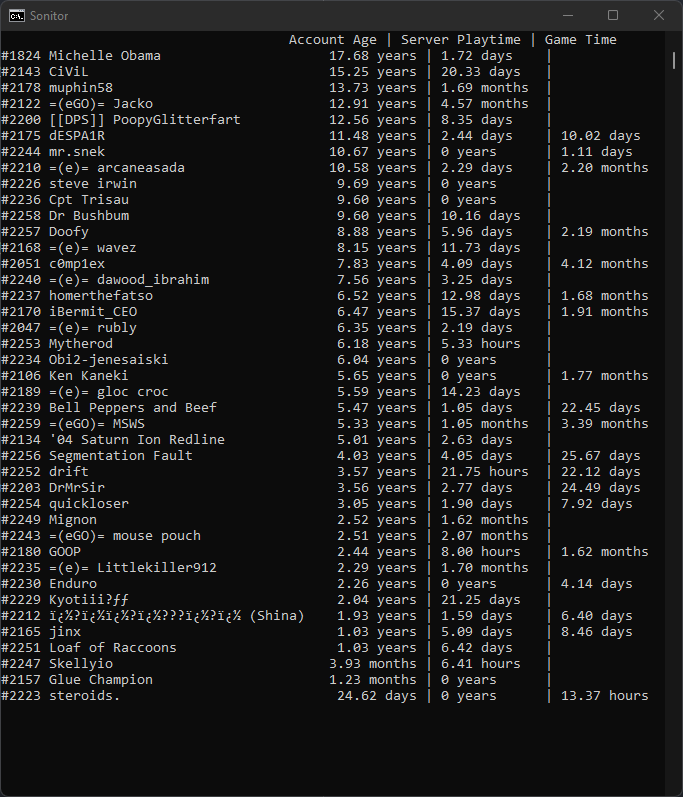
Installation has been streamlined!
No longer will you have to worry about toggling settings or diving through your folders. Sonitor will automatically figure out or assign your CS output file. Alternatively, if you do not have an
Note: for Counter-Strike: Source Players, you will have to manually specify the game's directory.
Note: the EXE file is recommended for novice users, the JAR version is supplied for compatability.
Sonitor's Features
Sonitor will watch over the console output of Counter-Strike and print out events when they trigger. For account ages, this happens when you type
Download Here!
You can read more about SteamAge specifically here.
While these logs don't always give a complete description of what happens in the rounds, they often times can be extremely helpful when trying to figure out what happened, who did something, or why they may have done it.
Introducing Sonitor: An application that combines the SteamAge program with a brand new Jailbreak Analyzer. Sonitor has all the features and configurability of SteamAge but with Jailbreak Logs integrated into itself. Additional support for TTT may be added in the future, depending on how well this is received.
Download Here!
Examples:
Installation has been streamlined!
No longer will you have to worry about toggling settings or diving through your folders. Sonitor will automatically figure out or assign your CS output file. Alternatively, if you do not have an
autoexec.cfg file, it will create one for you.Note: for Counter-Strike: Source Players, you will have to manually specify the game's directory.
Note: the EXE file is recommended for novice users, the JAR version is supplied for compatability.
- Download Sonitor.exe
- (Optional) Move it to a preferred folder
- Run Sonitor - First time will generate a
settings.txtfile. - The generated file should automatically open.
- Open the link that is after
steamkey=. - Register your Steam API Key.
- Paste it back into
settings.txt - (Optional) Mess around with the
settings.txtfile, Sonitor is very configurable - Run CS.
Sonitor's Features
- Parse and analyze Jailbreak Logs
- Summarizes the round in fewer words, with less spam
- Supports button aliases. If you run into an Unknown (#00000) format, you can set an alias and logs will reflect alias
- Prints out potentially suspect situations such as:
- When a CT kills a prisoner after the warden has died
- When a CT kills a prisoner less than three seconds after a warden has been selected
- When a CT breaks vents before a prisoner has
- When a CT drops a gun and a prisoner uses the same gun
- When a player pushes a button and other players die by the world soon after
- When a player throws a grenade and other players die by the world soon after
- When a spectator deals damage to players
Sonitor will watch over the console output of Counter-Strike and print out events when they trigger. For account ages, this happens when you type
status in the console. For Jailbreak Logs, these trigger when the round ends.Download Here!
You can read more about SteamAge specifically here.
Attachments
Last edited: